Back to Basics — How would you design Local Area Network from scratch?
How do you build your network. For any network you want to set up, you want to follow these steps:
Create a network plan —
On what resources should be in my network and key components of your network.
Being purposeful —
For every plan or action that you do there must a reason. Like my network should support 100 employees of my company.
Taking Stock —
List out the resources that are already existing like the number of computers you have, what is the memory and how many devices are connected, what is the OS version.
Considering Cable —
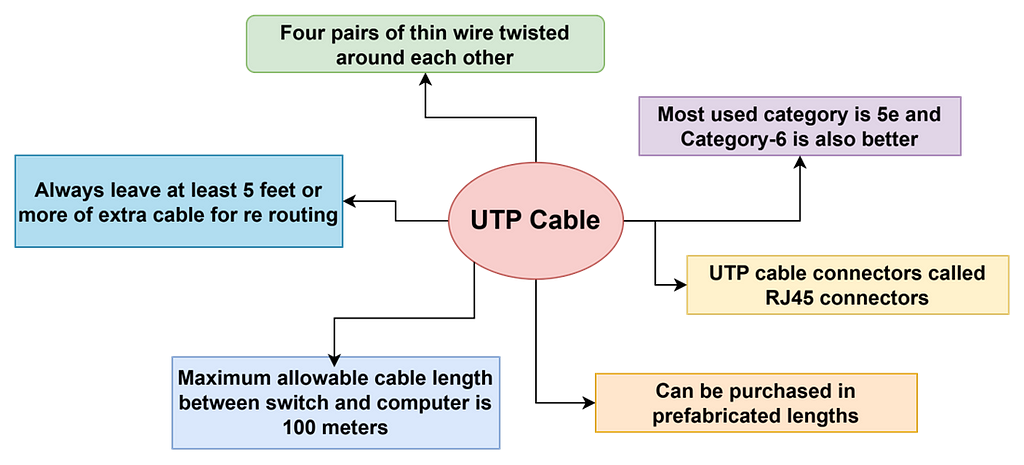
Now a days we use simple copper-based unshielded twisted pair (UTP) cable. the topology can be star and all the devices from 4 to 48 are connected to switch
Surmising Switches —
A switch contains number of ports, each of which is receptacle that can accommodate an RJ-45 jack connected to UTP cable
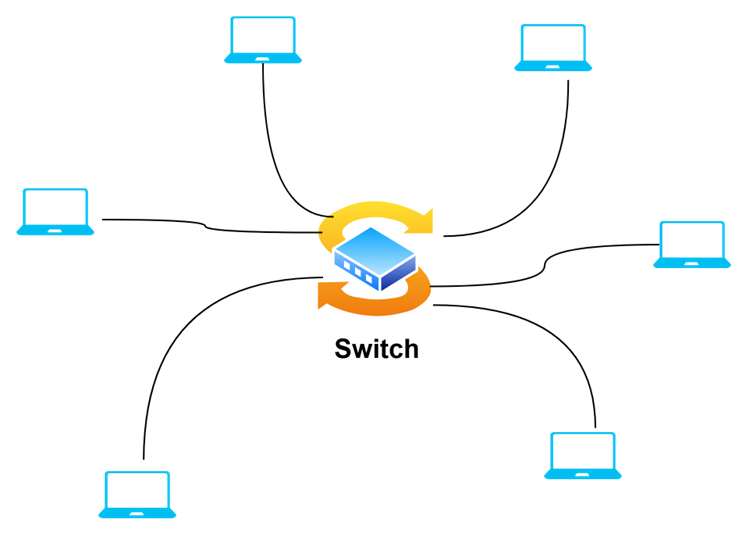
Switch can be anywhere to connect the devices using the cable 100 meters limit UTP cable.
- We should find the central location for the switch
- The switch requires electrical power
- Purchase as many switch ports as you currently need
- We can connect or daisy -chain switches to one another.
- Daisy-chaining can sometimes slow down the network because each switch has to wait until it gets the packet completely before forwarding the packet.
- If we need more switches than one switch can provide, we can use stackable switches where two or more switches behave as a single switch. this type of connection is sometimes called a back-plane connection.
- If we want high-speed interconnect between switches is to purchase switches that have a few high speed SFP ports. You can equip these ports with 10 Gb connections to route traffic between the switches
- Another way to create high-speed interconnects between switches is to use a feature called link aggregation. We can simply run two or more cables between the switches, using two or more ports on each switch. Then, you use the switch’s configuration software to bond the two ports together to create one link with double the port speed.
- We can also have manageable and unmanageable switches
Planning network topology
Topology refers the way devices in your network are connected to each other via network switches. You will need to determine what kind of switches to use, how many, where to run the cable, where to locate the switches.
For midsized networks ( say 50 to 200 users), common way is to use two layer switch architecture.
- Core Layer — Contains high-performance switches that connect to the servers, the internet gateway and to each other. These connections should be as fast as possible — ideally 10Gbps fiber or copper connections using SFP ports
- Access Layer — Consists of switches that are connected to the core layer and to the end-user computers
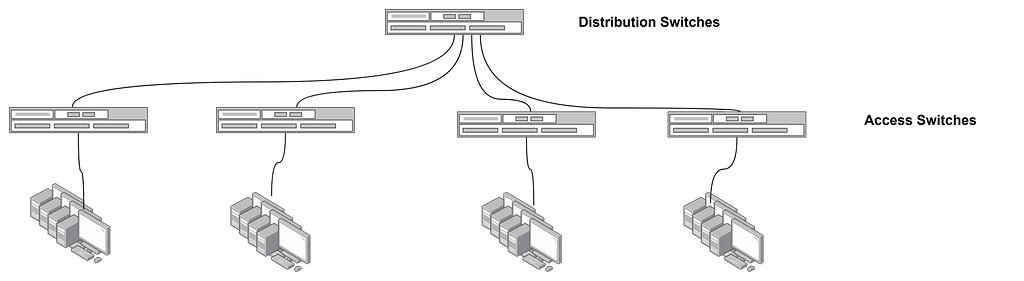
There is one switch at the core layer and four switches at the access layer, The two core switches are connected to each other, to the servers, and to the access layer switches using 10Gbps fiber SFP connections The access switches connect to the computers using standard 1Gbps Ethernet connections.
For larger networks, a three tier design can be used. In that case, distribution layer is added between the access and core layers. The servers are moved to the distribution layer and the core layer using specialized high-speed switches whose sole purpose is to move large amounts of data between the distribution switches as quickly as possible.
Planning the TCP/IP implementation
Along with planning the physical parts of the network infrastructure, you will need to plan the details of how you will implement TCP/IP for your network. TCP/IP is the basic networking protocol that your network uses to keep track of the individual computers and other devices on the network. Each computer or device will need an IP address. We need device plan on how these addresses are allocated
- The subnet and VLAN structure of your network — Will everything be on single subnet or will use two or more subnets
Wireless Networks — If we create two or more wireless networks, separate subnets for each of the wireless networks
- Remote locations connects via VPN tunnel
It is always good to use subnets when your organizations has few dozens of devices. You will probably need to set up VLANs to manage your subnets. There is one-to-one correspondence between subnets and VLANs; each subnet lives on its own VLAN. If the organization grows more than 254 devices one subnet is not sufficient
DHCP structure — Decide what server will be responsible for DHCP? What will be the DHCP scope? How will the size of your scope accommodate all the devices that will require DHCP on the subnet with plenty of room for growth
The Static IP addresses of devices whose IP should never change — These devices may include server, printer, firewalls and other managed devices. We need static IP addresses for each of the network interfaces on your servers, for your switches, printers, copiers, fax machines, firewalls, routers, tape backup devices and network storage devices. If you use virtualizations, the host processors also need an IP address for each network interface. Be sure to configure DHCP on top of static IP addresses.
Drawing Diagrams
One of the most helpful technique for creating a network plan is to draw a picture of it. The diagram can be a detailed floor plan, showing the actual location of each network component : a physical map.
Network plan should Address
- Does it allow growth? — If we take 24 port switch, it may now accommodate 20 devices, but with the growth anticipated, it is good to have 48 port switch which simplifies the expansion
- How will you secure it? — What kind of safety precautions will you take to keep unwanted visitors off your network? We need a well configured firewall to keep intruders from breaking in your network via your internet connection. If you are installing wireless access points, you will have to take precautions to secure the wireless networks. And you will need to use strong password policies
- How will you back it up? — You will need to include a solid plan to back up your servers and the data that resides in them. That plan will probably require additional hardware, such as a separate disk storage to hold the first level of backup data as well as means to get the backed up files off sire so they can survive a true disaster such as fire or flood.
- How will you recover from failures? — Make sure you have a plan in place that protects you from the commonplace maladies of daily life such as occasional power failures, as well as unforeseen theft or fire. Every device on the network should be protected by battery backup.
Happy Learning!!