In this article, let us dive into transforming structured and unstructured data into knowledge graph. These are very useful for high stakes applications where accuracy of the information we store and retrieve is important.
In RAG framework where the data is stored in the form of chunks in the vector databases. we will add some functionality where the chunks are linked to the entities extracted from the chunks. The chunks and entities in a graph are connected through edges. Each edge shows a relationship like a certain product has an issue. The entities are retrieved alongside the chunks to provide more relevant context to the LLM. This graph can be connected to other graph with more information extracted from structured data such as CSV files.
What if we use multi-agent system to construct this type of graph?
Before we construct the graph we might have to decide on the graph schema like what types of entities are needed and nodes that can be extracted from the data and what relationships exist between them. Once the schema is decided, we can construct a graph and store in the graph database. Instead of looking at the data to find the graph schema, we can design a multi-agent system that does this job for us.
First agent to converse with us to extract the goal and type of graph we want to build. Given that goal, a group of agents will specialize in extracting entities and relationships from your structured data and another group of agents will handle your unstructured data. Finally, 2 sets of agents will construct a graph accordingly.
To know more about the knowledge graphs, you can dive into the article
Architecture of Muti-agent System

The agent is like a new control flow operator:
- The outer loop executes and repeats until the condition or number of iterations are exhausted
- Inside it calls the LLM where the behavior is guided by a prompt and reads the conversational history and decides to respond or perform an action
- The switch performs the actions and the memory provides shared state across tools and LLM
The agent is powerful through reasoning and tool calls, adaptive with memory and easy for natural language prompting but it can be slow with calls to remote LLM and non-deterministic because of LLM and expensive with number of tokens.
In multi-agent system, they collaborate on a goal and it has hierarchy of agents and sub-agents where they are specialized in tasks and agents can delegate to each other. some agents act like tools and specific checkpoints with the user.
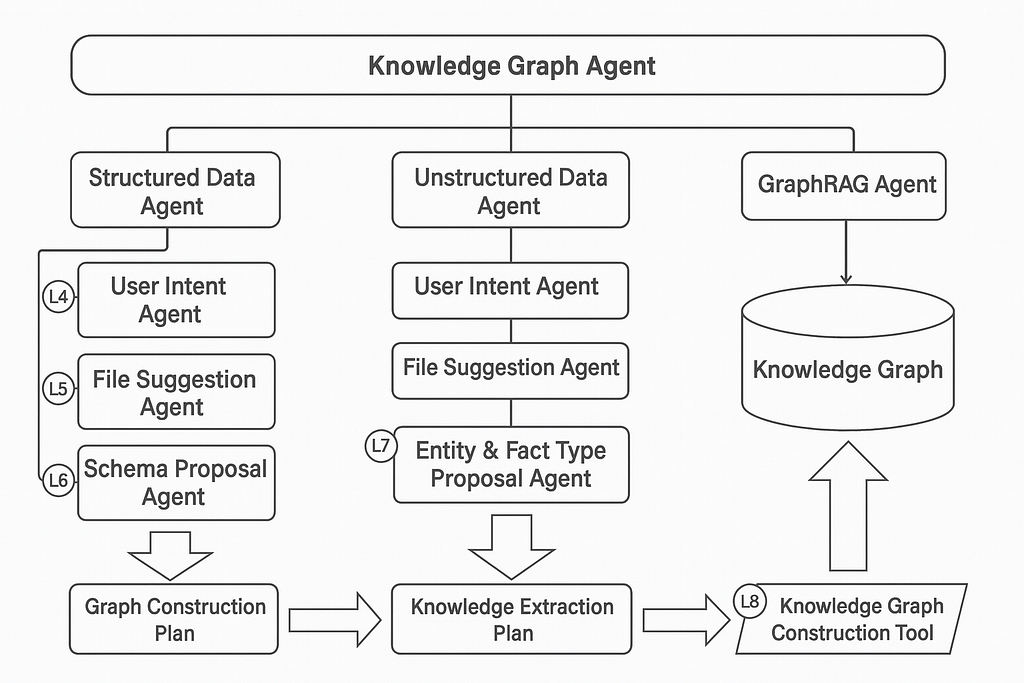
In this architecture, the knowledge graph agent is at the top level conversational agent and responsible for overall interaction with the user and guides user through major phases.
Structured Data Agent — is a workflow agent and data is imported from CSV files and delegates to sub-agents
Unstructured Data Agent — is a workflow agent where data is imported from markdown and delegates to sub-agent
GraphRAG Agent — is a tool-use agent and chooses retrieval strategy to answer questions
User Intent Agent — is a conversational agent that collaborates with user to determine the goal for data import
File suggestion Agent — is a tool-use agent and analyzes and suggests relevant CSV files
Schema Proposal Agent — is a pair of agents in the Critic Pattern that iteratively refines an appropriate graph schema
Graph Construction Plan — the output from structured data workflow and approved construction rules for turning CSVs into a graph.
Entity & Fact Type Proposal Agent — is tool-use agent that collaborates with user to determine the type of entities and relevant facts that could be extracted from Markdown
Knowledge Extraction Plan — output from unstructured data workflow and has approved entity types with facts about entities.
Knowledge Graph Construction Tool — It executes the graph construction and knowledge extraction which loop over construction rules to produce a domain graph and loop over the mark down files to chunk up and then extract entities and facts. Finally, connect extracted entities to defined domain entities.
Implementation
This code was developed using Google Agent Development Kit (ADK) for multi-agent system.
Building User Intent Agent
Define the role and goal for the user intent agent
agent_role_and_goal = """
    You are an expert at knowledge graph use cases.
    Your primary goal is to help the user come up with a knowledge graph use case.
"""
Give the agent some hints about what to say
agent_conversational_hints = """
    If the user is unsure what to do, make some suggestions based on classic use cases like:
    - social network involving friends, family, or professional relationships
    - logistics network with suppliers, customers, and partners
    - recommendation system with customers, products, and purchase patterns
    - fraud detection over multiple accounts with suspicious patterns of transactions
    - pop-culture graphs with movies, books, or music
"""
Describe what the output should look like
agent_output_definition = """
    A user goal has two components:
    - kind_of_graph: at most 3 words describing the graph, for example "social network" or "USA freight logistics"
    - description: a few sentences about the intention of the graph, for example "A dynamic routing and delivery system for cargo." or "Analysis of product dependencies and supplier alternatives."
"""
Specify the steps the agent should follow
agent_chain_of_thought_directions = """
    Think carefully and collaborate with the user:
    1. Understand the user's goal, which is a kind_of_graph with description
    2. Ask clarifying questions as needed
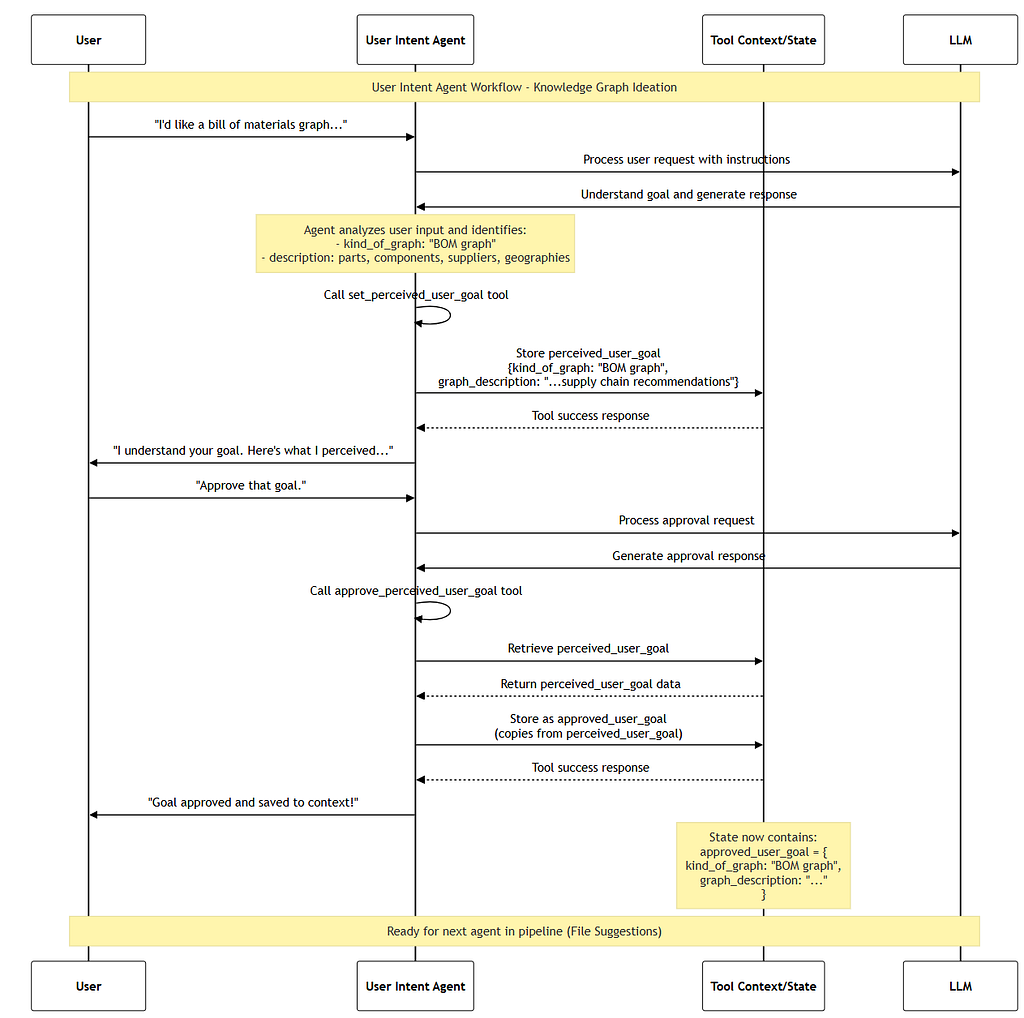
    3. When you think you understand their goal, use the 'set_perceived_user_goal' tool to record your perception
    4. Present the perceived user goal to the user for confirmation
    5. If the user agrees, use the 'approve_perceived_user_goal' tool to approve the user goal. This will save the goal in state under the 'approved_user_goal' key.
"""
Combine all the instruction components into one complete instructions
complete_agent_instruction = f"""
{agent_role_and_goal}
{agent_conversational_hints}
{agent_output_definition}
{agent_chain_of_thought_directions}
"""

print(complete_agent_instruction)
Using tools to define the user goal helps the agent focus on the requirements.
Rather than open-ended prose, the user goal is defined with specific arguments passed to a tool.
# Tool: Set Perceived User Goal
# to encourage collaboration with the user, the first tool only sets the perceived user goal

PERCEIVED_USER_GOAL = "perceived_user_goal"

def set_perceived_user_goal(kind_of_graph: str, graph_description:str, tool_context: ToolContext):
    """Sets the perceived user's goal, including the kind of graph and its description.

    Args:
        kind_of_graph: 2-3 word definition of the kind of graph, for example "recent US patents"
        graph_description: a single paragraph description of the graph, summarizing the user's intent
    """
    user_goal_data = {"kind_of_graph": kind_of_graph, "graph_description": graph_description}
    tool_context.state[PERCEIVED_USER_GOAL] = user_goal_data
    return tool_success(PERCEIVED_USER_GOAL, user_goal_data)
Once we have perceived user goal, let us have an approved user goal
APPROVED_USER_GOAL = "approved_user_goal"

def approve_perceived_user_goal(tool_context: ToolContext):
    """Upon approval from user, will record the perceived user goal as the approved user goal.

    Only call this tool if the user has explicitly approved the perceived user goal.
    """
    # Trust, but verify.
    # Require that the perceived goal was set before approving it.
    # Notice the tool error helps the agent take
    if PERCEIVED_USER_GOAL not in tool_context.state:
        return tool_error("perceived_user_goal not set. Set perceived user goal first, or ask clarifying questions if you are unsure.")

    tool_context.state[APPROVED_USER_GOAL] = tool_context.state[PERCEIVED_USER_GOAL]

    return tool_success(APPROVED_USER_GOAL, tool_context.state[APPROVED_USER_GOAL])
Now Let us combine the goals together by adding them to the list
user_intent_agent_tools = [set_perceived_user_goal, approve_perceived_user_goal]
We are ready with prerequisites, so let us proceed to creating the agent
user_intent_agent = Agent(
    name="user_intent_agent_v1", # a unique, versioned name
    model=llm, # defined earlier in a variable
    description="Helps the user ideate on a knowledge graph use case.", # used for delegation
    instruction=complete_agent_instruction, # the complete instructions you composed earlier
    tools=user_intent_agent_tools, # the list of tools
)

print(f"Agent '{user_intent_agent.name}' created.")
We can run the session of agent using this file.
user_intent_caller = await make_agent_caller(user_intent_agent)
Let us run the initial conversation to interact with the user
session_start = await user_intent_caller.get_session()
print(f"Session Start: {session_start.state}") # expect this to be empty

# We need an async function to await for each conversation
async def run_conversation():
    # start things off by describing your goal
    await user_intent_caller.call("""I'd like a bill of materials graph (BOM graph) which includes all levels from suppliers to finished product,
    which can support root-cause analysis.""")

    if PERCEIVED_USER_GOAL not in session_start.state:
        # the LLM may have asked a clarifying question. offer some more details
        await user_intent_caller.call("""I'm concerned about possible manufacturing or supplier issues.""")

    # Optimistically presume approval.
    await user_intent_caller.call("Approve that goal.", True)

await run_conversation()

session_end = await user_intent_caller.get_session()
The sequence diagram for user intent is as follows
File Suggestion Agent
You will design an agent that can read the user goal, then use tools to evaluate available files to suggest relevant data sources.
The File Suggestion agent is a tool-use agent that suggests files to use for import, based on the approved user goal from the previous lesson.
- Input: approved_user_goal, a dictionary pairing a kind of graph with a description of the purpose of the graph.
- Output: approved_files, a list of files that have been approved for import.
- Tools: get_approved_user_goal, list_import_files, sample_file, set_suggested_files, approve_suggested_files
file_suggestion_agent_instruction = """
You are a constructive critic AI reviewing a list of files. Your goal is to suggest relevant files
for constructing a knowledge graph.

**Task:**
Review the file list for relevance to the kind of graph and description specified in the approved user goal.

For any file that you're not sure about, use the 'sample_file' tool to get
a better understanding of the file contents.

Only consider structured data files like CSV or JSON.

Prepare for the task:
- use the 'get_approved_user_goal' tool to get the approved user goal

Think carefully, repeating these steps until finished:
1. list available files using the 'list_available_files' tool
2. evaluate the relevance of each file, then record the list of suggested files using the 'set_suggested_files' tool
3. use the 'get_suggested_files' tool to get the list of suggested files
4. ask the user to approve the set of suggested files
5. If the user has feedback, go back to step 1 with that feedback in mind
6. If approved, use the 'approve_suggested_files' tool to record the approval
"""
neo4j database has a directory called import where you can place csv files that you intend to import into your Neo4j database. get_neo4j_import_dir represents the path to the directory that is in-sync with the import directory of the Neo4j database (running in a sidecar container). This directory has the csv files that the agent will sample and the select the suggested files.
# Tool: List Import Files

# this constant will be used as the key for storing the file list in the tool context state
ALL_AVAILABLE_FILES = "all_available_files"

def list_available_files(tool_context:ToolContext) -> dict:
    f"""Lists files available for knowledge graph construction.
    All files are relative to the import directory.

    Returns:
        dict: A dictionary containing metadata about the content.
                Includes a 'status' key ('success' or 'error').
                If 'success', includes a {ALL_AVAILABLE_FILES} key with list of file names.
                If 'error', includes an 'error_message' key.
                The 'error_message' may have instructions about how to handle the error.
    """
    # get the import dir using the helper function
    import_dir = Path(get_neo4j_import_dir())

    # get a list of relative file names, so files must be rooted at the import dir
    file_names = [str(x.relative_to(import_dir))
                 for x in import_dir.rglob("*")
                 if x.is_file()]

    # save the list to state so we can inspect it later
    tool_context.state[ALL_AVAILABLE_FILES] = file_names

    return tool_success(ALL_AVAILABLE_FILES, file_names)
To get the suggested files
# Tool: Set/Get suggested files
SUGGESTED_FILES = "suggested_files"

def set_suggested_files(suggest_files:List[str], tool_context:ToolContext) -> Dict[str, Any]:
    """Set the suggested files to be used for data import.

    Args:
        suggest_files (List[str]): List of file paths to suggest

    Returns:
        Dict[str, Any]: A dictionary containing metadata about the content.
                Includes a 'status' key ('success' or 'error').
                If 'success', includes a {SUGGESTED_FILES} key with list of file names.
                If 'error', includes an 'error_message' key.
                The 'error_message' may have instructions about how to handle the error.
    """
    tool_context.state[SUGGESTED_FILES] = suggest_files
    return tool_success(SUGGESTED_FILES, suggest_files)

# Helps encourage the LLM to first set the suggested files.
# This is an important strategy for maintaining consistency through defined values.
def get_suggested_files(tool_context:ToolContext) -> Dict[str, Any]:
    """Get the files to be used for data import.

    Returns:
        Dict[str, Any]: A dictionary containing metadata about the content.
                Includes a 'status' key ('success' or 'error').
                If 'success', includes a {SUGGESTED_FILES} key with list of file names.
                If 'error', includes an 'error_message' key.
    """
    return tool_success(SUGGESTED_FILES, tool_context.state[SUGGESTED_FILES])
Let us get the approved files from the user
APPROVED_FILES = "approved_files"

def approve_suggested_files(tool_context:ToolContext) -> Dict[str, Any]:
    """Approves the {SUGGESTED_FILES} in state for further processing as {APPROVED_FILES}.

    If {SUGGESTED_FILES} is not in state, return an error.
    """
    if SUGGESTED_FILES not in tool_context.state:
        return tool_error("Current files have not been set. Take no action other than to inform user.")

    tool_context.state[APPROVED_FILES] = tool_context.state[SUGGESTED_FILES]
    return tool_success(APPROVED_FILES, tool_context.state[APPROVED_FILES])
List of tools for the file suggestion agent
file_suggestion_agent_tools = [get_approved_user_goal, list_available_files, sample_file,
    set_suggested_files, get_suggested_files,
    approve_suggested_files
]
Let us construct the Agent
file_suggestion_agent = Agent(
    name="file_suggestion_agent_v1",
    model=llm, # defined earlier in a variable
    description="Helps the user select files to import.",
    instruction=file_suggestion_agent_instruction,
    tools=file_suggestion_agent_tools,
)

print(f"Agent '{file_suggestion_agent.name}' created.")
Now we can interact with the agent
from helper import make_agent_caller

file_suggestion_caller = await make_agent_caller(file_suggestion_agent, {
    "approved_user_goal": {
        "kind_of_graph": "supply chain analysis",
        "description": "A multi-level bill of materials for manufactured products, useful for root cause analysis.."
    }
})
Run the initial conversation
# nudge the agent to look for files. in the full system, this will be the natural next step
await file_suggestion_caller.call("What files can we use for import?")

session_end = await file_suggestion_caller.get_session()

print("\n---\n")

# expect that the agent has listed available files
print("Available files: ", session_end.state[ALL_AVAILABLE_FILES])

# the suggested files should be reasonable looking CSV files
print("Suggested files: ", session_end.state[SUGGESTED_FILES])
Let us call the agent
await file_suggestion_caller.call("Yes, let's do it")

session_end = await file_suggestion_caller.get_session()

print("\n---\n")

print("Approved files: ", session_end.state[APPROVED_FILES])
Schema Proposal for Structured Data
We will build the agent that can propose a knowledge graph schema. The agent will analyze the approved import files and consider how to satisfy the approved user goal.
Multiple agents will collaborate to propose construction rules for a knowledge graph
- Input: approved_user_goal, approved_files
- Output: approved_construction_plan
- Tools: get_approved_user_goal, get_approved_files, sample_file,
`propose_node_construction`, `propose_relationship_construction`, `get_proposed_construction_plan`,`approve_proposed_construction_plan
Workflow
This workflow will use multiple agents to propose a construction plan for the knowledge graph.
A top-level ‘schema_refinement_loop’ will coordinate three agents operating in a loop:
- A ‘schema_proposal_agent’ that proposes a schema and construction plan for the knowledge graph.
- A ‘schema_critic_agent’ that critiques the proposed schema and construction plan for the knowledge graph.
- A ‘CheckStatusAndEscalate’ agent that checks the feedback of the critic agent
The goal of the agent is defined as
proposal_agent_role_and_goal = """
    You are an expert at knowledge graph modeling with property graphs. Propose an appropriate
    schema by specifying construction rules which transform approved files into nodes or relationships.
    The resulting schema should describe a knowledge graph based on the user goal.

    Consider feedback if it is available:
    <feedback>
    {feedback}
    </feedback>
"""
proposal_agent_hints = """
    Every file in the approved files list will become either a node or a relationship.
    Determining whether a file likely represents a node or a relationship is based
    on a hint from the filename (is it a single thing or two things) and the
    identifiers found within the file.

    Because unique identifiers are so important for determining the structure of the graph,
    always verify the uniqueness of suspected unique identifiers using the 'search_file' tool.

    General guidance for identifying a node or a relationship:
    - If the file name is singular and has only 1 unique identifier it is likely a node
    - If the file name is a combination of two things, it is likely a full relationship
    - If the file name sounds like a node, but there are multiple unique identifiers, that is likely a node with reference relationships

    Design rules for nodes:
    - Nodes will have unique identifiers.
    - Nodes _may_ have identifiers that are used as reference relationships.

    Design rules for relationships:
    - Relationships appear in two ways: full relationships and reference relationships.

    Full relationships:
    - Full relationships appear in dedicated relationship files, often having a filename that references two entities
    - Full relationships typically have references to a source and destination node.
    - Full relationships _do not have_ unique identifiers, but instead have references to the primary keys of the source and destination nodes.
    - The absence of a single, unique identifier is a strong indicator that a file is a full relationship.

    Reference relationships:
    - Reference relationships appear as foreign key references in node files
    - Reference relationship foreign key column names often hint at the destination node and relationship type
    - References may be hierarchical container relationships, with terminology revealing parent-child, "has", "contains", membership, or similar relationship
    - References may be peer relationships, that is often a self-reference to a similar class of nodes. For example, "knows" or "see also"

    The resulting schema should be a connected graph, with no isolated components.
"""
proposal_agent_chain_of_thought_directions = """
    Prepare for the task:
    - get the user goal using the 'get_approved_user_goal' tool
    - get the list of approved files using the 'get_approved_files' tool
    - get the current construction plan using the 'get_proposed_construction_plan' tool

    Think carefully, using tools to perform actions and reconsidering your actions when a tool returns an error:
    1. For each approved file, consider whether it represents a node or relationship. Check the content for potential unique identifiers using the 'sample_file' tool.
    2. For each identifier, verify that it is unique by using the 'search_file' tool.
    3. Use the node vs relationship guidance for deciding whether the file represents a node or a relationship.
    4. For a node file, propose a node construction using the 'propose_node_construction' tool.
    5. If the node contains a reference relationship, use the 'propose_relationship_construction' tool to propose a relationship construction.
    6. For a relationship file, propose a relationship construction using the 'propose_relationship_construction' tool
    7. If you need to remove a construction, use the 'remove_node_construction' or 'remove_relationship_construction' tool
    8. When you are done with construction proposals, use the 'get_proposed_construction_plan' tool to present the plan to the user
"""
Combining the parts of prompt together
proposal_agent_instruction = f"""
{proposal_agent_role_and_goal}
{proposal_agent_hints}
{proposal_agent_chain_of_thought_directions}
"""

print(proposal_agent_instruction)
Now let us create the search file which tool for searching the files
from helper import get_neo4j_import_dir

SEARCH_RESULTS = "search_results"

# A simple grep-like tool for searching text files
def search_file(file_path: str, query: str) -> dict:
    """
    Searches any text file (markdown, csv, txt) for lines containing the given query string.
    Simple grep-like functionality that works with any text file.
    Search is always case insensitive.

    Args:
      file_path: Path to the file, relative to the Neo4j import directory.
      query: The string to search for.

    Returns:
        dict: A dictionary with 'status' ('success' or 'error').
              If 'success', includes 'search_results' containing 'matching_lines'
              (a list of dictionaries with 'line_number' and 'content' keys)
              and basic metadata about the search.
              If 'error', includes an 'error_message'.
    """
    import_dir = Path(get_neo4j_import_dir())
    p = import_dir / file_path

    if not p.exists():
        return tool_error(f"File does not exist: {file_path}")
    if not p.is_file():
        return tool_error(f"Path is not a file: {file_path}")

    # Handle empty query - return no results
    if not query:
        return tool_success(SEARCH_RESULTS, {
            "metadata": {
                "path": file_path,
                "query": query,
                "lines_found": 0
            },
            "matching_lines": []
        })

    matching_lines = []
    search_query = query.lower()

    try:
        with open(p, 'r', encoding='utf-8') as file:
            # Process the file line by line
            for i, line in enumerate(file, 1):
                line_to_check = line.lower()
                if search_query in line_to_check:
                    matching_lines.append({
                        "line_number": i,
                        "content": line.strip()  # Remove trailing newlines
                    })

    except Exception as e:
        return tool_error(f"Error reading or searching file {file_path}: {e}")

    # Prepare basic metadata
    metadata = {
        "path": file_path,
        "query": query,
        "lines_found": len(matching_lines)
    }

    result_data = {
        "metadata": metadata,
        "matching_lines": matching_lines
    }
    return tool_success(SEARCH_RESULTS, result_data)
Proposed node construction
#  Tool: Propose Node Construction

PROPOSED_CONSTRUCTION_PLAN = "proposed_construction_plan"
NODE_CONSTRUCTION = "node_construction"

def propose_node_construction(approved_file: str, proposed_label: str, unique_column_name: str, proposed_properties: list[str], tool_context:ToolContext) -> dict:
    """Propose a node construction for an approved file that supports the user goal.

    The construction will be added to the proposed construction plan dictionary under using proposed_label as the key.

    The construction entry will be a dictionary with the following keys:
    - construction_type: "node"
    - source_file: the approved file to propose a node construction for
    - label: the proposed label of the node
    - unique_column_name: the name of the column that will be used to uniquely identify constructed nodes
    - properties: A list of property names for the node, derived from column names in the approved file

    Args:
        approved_file: The approved file to propose a node construction for
        proposed_label: The proposed label for constructed nodes (used as key in the construction plan)
        unique_column_name: The name of the column that will be used to uniquely identify constructed nodes
        proposed_properties: column names that should be imported as node properties

    Returns:
        dict: A dictionary containing metadata about the content.
                Includes a 'status' key ('success' or 'error').
                If 'success', includes a "node_construction" key with the construction plan for the node
                If 'error', includes an 'error_message' key.
                The 'error_message' may have instructions about how to handle the error.
    """
    # quick sanity check -- does the approved file have the unique column?
    search_results = search_file(approved_file, unique_column_name)
    if search_results["status"] == "error":
        return search_results # return the error
    if search_results["search_results"]["metadata"]["lines_found"] == 0:
        return tool_error(f"{approved_file} does not have the column {unique_column_name}. Check the file content and try again.")

    # get the current construction plan, or an empty one if none exists
    construction_plan = tool_context.state.get(PROPOSED_CONSTRUCTION_PLAN, {})
    node_construction_rule = {
        "construction_type": "node",
        "source_file": approved_file,
        "label": proposed_label,
        "unique_column_name": unique_column_name,
        "properties": proposed_properties
    }
    construction_plan[proposed_label] = node_construction_rule
    tool_context.state[PROPOSED_CONSTRUCTION_PLAN] = construction_plan
    return tool_success(NODE_CONSTRUCTION, node_construction_rule)
Let us construct the relationship
RELATIONSHIP_CONSTRUCTION = "relationship_construction"

def propose_relationship_construction(approved_file: str, proposed_relationship_type: str,
    from_node_label: str,from_node_column: str, to_node_label:str, to_node_column: str,
    proposed_properties: list[str],
    tool_context:ToolContext) -> dict:
    """Propose a relationship construction for an approved file that supports the user goal.

    The construction will be added to the proposed construction plan dictionary under using proposed_relationship_type as the key.

    Args:
        approved_file: The approved file to propose a node construction for
        proposed_relationship_type: The proposed label for constructed relationships
        from_node_label: The label of the source node
        from_node_column: The name of the column within the approved file that will be used to uniquely identify source nodes
        to_node_label: The label of the target node
        to_node_column: The name of the column within the approved file that will be used to uniquely identify target nodes
        unique_column_name: The name of the column that will be used to uniquely identify target nodes

    Returns:
        dict: A dictionary containing metadata about the content.
                Includes a 'status' key ('success' or 'error').
                If 'success', includes a "relationship_construction" key with the construction plan for the node
                If 'error', includes an 'error_message' key.
                The 'error_message' may have instructions about how to handle the error.
    """
    # quick sanity check -- does the approved file have the from_node_column?
    search_results = search_file(approved_file, from_node_column)
    if search_results["status"] == "error":
        return search_results  # return the error if there is one
    if search_results["search_results"]["metadata"]["lines_found"] == 0:
        return tool_error(f"{approved_file} does not have the from node column {from_node_column}. Check the content of the file and reconsider the relationship.")

    # quick sanity check -- does the approved file have the to_node_column?
    search_results = search_file(approved_file, to_node_column)
    if search_results["status"] == "error" or search_results["search_results"]["metadata"]["lines_found"] == 0:
        return tool_error(f"{approved_file} does not have the to node column {to_node_column}. Check the content of the file and reconsider the relationship.")

    construction_plan = tool_context.state.get(PROPOSED_CONSTRUCTION_PLAN, {})
    relationship_construction_rule = {
        "construction_type": "relationship",
        "source_file": approved_file,
        "relationship_type": proposed_relationship_type,
        "from_node_label": from_node_label,
        "from_node_column": from_node_column,
        "to_node_label": to_node_label,
        "to_node_column": to_node_column,
        "properties": proposed_properties
    }
    construction_plan[proposed_relationship_type] = relationship_construction_rule
    tool_context.state[PROPOSED_CONSTRUCTION_PLAN] = construction_plan
    return tool_success(RELATIONSHIP_CONSTRUCTION, relationship_construction_rule)
Remove node construction
# Tool: Remove Node Construction
def remove_node_construction(node_label: str, tool_context:ToolContext) -> dict:
    """Remove a node construction from the proposed construction plan based on label.

    Args:
        node_label: The label of the node construction to remove
        tool_context: The tool context

    Returns:
        dict: A dictionary containing metadata about the content.
                Includes a 'status' key ('success' or 'error').
                If 'success', includes a 'node_construction_removed' key with the label of the removed node construction
                If 'error', includes an 'error_message' key.
                The 'error_message' may have instructions about how to handle the error.
    """
    construction_plan = tool_context.state.get(PROPOSED_CONSTRUCTION_PLAN, {})
    if node_label not in construction_plan:
        return tool_success("node construction rule not found. removal not needed.")

    del construction_plan[node_label]

    tool_context.state[PROPOSED_CONSTRUCTION_PLAN] = construction_plan
    return tool_success("node_construction_removed", node_label)
Remove relationship construction
# Tool: Remove Relationship Construction
def remove_relationship_construction(relationship_type: str, tool_context:ToolContext) -> dict:
    """Remove a relationship construction from the proposed construction plan based on type.

    Args:
        relationship_type: The type of the relationship construction to remove
        tool_context: The tool context

    Returns:
        dict: A dictionary containing metadata about the content.
                Includes a 'status' key ('success' or 'error').
                If 'success', includes a 'relationship_construction_removed' key with the type of the removed relationship construction
                If 'error', includes an 'error_message' key.
                The 'error_message' may have instructions about how to handle the error.
    """
    construction_plan = tool_context.state.get(PROPOSED_CONSTRUCTION_PLAN, {})

    if relationship_type not in construction_plan:
        return tool_success("relationship construction rule not found. removal not needed.")

    construction_plan.pop(relationship_type)

    tool_context.state[PROPOSED_CONSTRUCTION_PLAN] = construction_plan
    return tool_success("relationship_construction_removed", relationship_type)
Approve the construction plan
# Tool: Approve the proposed construction plan

APPROVED_CONSTRUCTION_PLAN = "approved_construction_plan"

def approve_proposed_construction_plan(tool_context:ToolContext) -> dict:
    """Approve the proposed construction plan, if there is one."""
    if not PROPOSED_CONSTRUCTION_PLAN in tool_context.state:
        return tool_error("No proposed construction plan found. Propose a plan first.")

    tool_context.state[APPROVED_CONSTRUCTION_PLAN] = tool_context.state.get(PROPOSED_CONSTRUCTION_PLAN)
    return tool_success(APPROVED_CONSTRUCTION_PLAN, tool_context.state[APPROVED_CONSTRUCTION_PLAN])
Getting together all the tools
# List of tools for the structured schema proposal agent
structured_schema_proposal_agent_tools = [
    get_approved_user_goal, get_approved_files,
    get_proposed_construction_plan,
    sample_file, search_file,
    propose_node_construction, propose_relationship_construction,
    remove_node_construction, remove_relationship_construction
]
Defining the agent proposal
from google.adk.agents.callback_context import CallbackContext

# a helper function to log the agent name during execution
def log_agent(callback_context: CallbackContext) -> None:
    print(f"\n### Entering Agent: {callback_context.agent_name}")

SCHEMA_AGENT_NAME = "schema_proposal_agent_v1"
schema_proposal_agent = LlmAgent(
    name=SCHEMA_AGENT_NAME,
    description="Proposes a knowledge graph schema based on the user goal and approved file list",
    model=llm,
    instruction=proposal_agent_instruction,
    tools=structured_schema_proposal_agent_tools,
    before_agent_callback=log_agent
)

from helper import make_agent_caller

# notice the initial state being passed in here to simulate previous workflow steps
schema_proposal_caller = await make_agent_caller(schema_proposal_agent, {
    "feedback": "",
    "approved_user_goal": {
        "kind_of_graph": "supply chain analysis",
        "description": "A multi-level bill of materials for manufactured products, useful for root cause analysis.."
    },
    "approved_files": [
        'assemblies.csv',
        'parts.csv',
        'part_supplier_mapping.csv',
        'products.csv',
        'suppliers.csv'
    ]
})

await schema_proposal_caller.call("How can these files be imported to construct the knowledge graph?")

session_end = await schema_proposal_caller.get_session()

print("\n---\n")

print("Session state: ", session_end.state)


if 'proposed_construction_plan' in session_end.state:
    print("Proposed construction plan: ", session_end.state['proposed_construction_plan'])
Now let us give the goal for the agent for Schema critic
critic_agent_role_and_goal = """
    You are an expert at knowledge graph modeling with property graphs.
    Criticize the proposed schema for relevance to the user goal and approved files.
"""

critic_agent_hints = """
    Criticize the proposed schema for relevance and correctness:
    - Are unique identifiers actually unique? Use the 'search_file' tool to validate. Composite identifier are not acceptable.
    - Could any nodes be relationships instead? Double-check that unique identifiers are unique and not references to other nodes. Use the 'search_file' tool to validate
    - Can you manually trace through the source data to find the necessary information for anwering a hypothetical question?
    - Is every node in the schema connected? What relationships could be missing? Every node should connect to at least one other node.
    - Are hierarchical container relationships missing?
    - Are any relationships redundant? A relationship between two nodes is redundant if it is semantically equivalent to or the inverse of another relationship between those two nodes.
"""

critic_agent_chain_of_thought_directions = """
    Prepare for the task:
    - get the user goal using the 'get_approved_user_goal' tool
    - get the list of approved files using the 'get_approved_files' tool
    - get the construction plan using the 'get_proposed_construction_plan' tool
    - use the 'sample_file' and 'search_file' tools to validate the schema design

    Think carefully, using tools to perform actions and reconsidering your actions when a tool returns an error:
    1. Analyze each construction rule in the proposed construction plan.
    2. Use tools to validate the construction rules for relevance and correctness.
    3. If the schema looks good, respond with a one word reply: 'valid'.
    4. If the schema has problems, respond with 'retry' and provide feedback as a concise bullet list of problems.
"""

# combine all the prompt parts together
critic_agent_instruction = f"""
{critic_agent_role_and_goal}
{critic_agent_hints}
{critic_agent_chain_of_thought_directions}
"""

print(critic_agent_instruction)
Defining the agent for schema critic
CRITIC_NAME = "schema_critic_agent_v1"
schema_critic_agent = LlmAgent(
    name=CRITIC_NAME,
    description="Criticizes the proposed schema for relevance to the user goal and approved files.",
    model=llm,
    instruction=critic_agent_instruction,
    tools=schema_critic_agent_tools,
    output_key="feedback", # specify the context state key which will contain the result of calling the critic,
    before_agent_callback=log_agent
)
Let us create Checkstatus and escalate agent
from google.adk.agents.invocation_context import InvocationContext
from google.adk.agents.base_agent import BaseAgent
from google.adk.events import Event, EventActions
from typing import AsyncGenerator

class CheckStatusAndEscalate(BaseAgent):
    async def _run_async_impl(self, ctx: InvocationContext) -> AsyncGenerator[Event, None]:
        feedback = ctx.session.state.get("feedback", "valid")
        should_stop = (feedback == "valid")
        yield Event(author=self.name, actions=EventActions(escalate=should_stop))
Loop agent
schema_refinement_loop = LoopAgent(
    name="schema_refinement_loop",
    description="Analyzes approved files to propose a schema based on user intent and feedback",
    max_iterations=2,
    sub_agents=[schema_proposal_agent, schema_critic_agent, CheckStatusAndEscalate(name="StopChecker")],
    before_agent_callback=log_agent
)
Creating the caller
from helper import make_agent_caller

# NOTE: this may take some time to run, and may require further iterations to satisfy the critic!
refinement_loop_caller = await make_agent_caller(schema_refinement_loop, {
    "feedback": "",
    "approved_user_goal": {
        "kind_of_graph": "supply chain analysis",
        "description": "A multi-level bill of materials for manufactured products, useful for root cause analysis.."
    },
    "approved_files": [
        'products.csv',
        'assemblies.csv',
        'parts.csv',
        'part_supplier_mapping.csv',
        'suppliers.csv'
    ]
})

await refinement_loop_caller.call("How can these files be imported?")

# Alternatively, you can uncomment the line below to run the refinement loop with verbose output
# await refinement_loop_caller.call("How can these files be imported?", True)

session_end = await refinement_loop_caller.get_session()
print("Session state: ", session_end.state)
Schema Proposal for Unstructured Data
We will design the proposal of how to extract information from unstructured data
Two agents to propose data extraction from unstructured data: a “named entity recognition” agent and a “fact extraction” agent:
- Input: approved_user_goal, approved_files, approved_construction_plan
- Output: approved_entity_types describing the type of entities that could be extracted from the unstructured data. approved_fact_types describing how those entities can be related in a fact triple
- Tools: get_approved_user_goal, get_approved_files, get_well_known_types, sample_file, set_proposed_entities, get_proposed_entities, approve_proposed_entities, add_proposed_fact, get_proposed_facts, approve_proposed_facts
Workflow
Named entity recognition:
- The context is initialized with an approved_user_goal, approved_files and an approved_construction_plan
- The agent analyzes unstructured data files, looking for relevant entity types
- The agent proposes a list of entity types, seeking user approval
Named entity recognition:
- The context is initialized with an approved_user_goal, approved_files and an approved_construction_plan
- The agent analyzes unstructured data files, looking for relevant entity types
- The agent proposes a list of entity types, seeking user approval
Fact extraction:
- The context now includes approved_entity_types
- The agent analyzes unstructured data files, looking for how those entities can be saved as fact triples
- The agent proposes fact types, seeking user approvalThe context now includes approved_entity_types
- The agent analyzes unstructured data files, looking for how those entities can be saved as fact triples
- The agent proposes fact types, seeking user approval
The NER agent is responsible for proposing entities that could be extracted from the unstructured data files.
An entity is a person, place or thing that is relevant to the user’s goal.
There are two general kinds of entities:
- Well-known entities: these closely correlate with nodes in the existing structured data. in our example, this would be things like Products, Parts and Suppliers
- Discovered entities: these are entities that are not pre-defined, but are mentioned in the markdown text. in the product reviews, this may may Reviewers, product complaints, or product features
The general goal of the NER agent is to analyze the markdown files and propose entities that are relevant to the user goal of root-cause analysis.
Agent instructions
ner_agent_role_and_goal = """
  You are a top-tier algorithm designed for analyzing text files and proposing
  the kind of named entities that could be extracted which would be relevant
  for a user's goal.
  """
ner_agent_hints = """
  Entities are people, places, things and qualities, but not quantities.
  Your goal is to propose a list of the type of entities, not the actual instances
  of entities.

  There are two general approaches to identifying types of entities:
  - well-known entities: these closely correlate with approved node labels in an existing graph schema
  - discovered entities: these may not exist in the graph schema, but appear consistently in the source text

  Design rules for well-known entities:
  - always use existing well-known entity types. For example, if there is a well-known type "Person", and people appear in the text, then propose "Person" as the type of entity.
  - prefer reusing existing entity types rather than creating new ones

  Design rules for discovered entities:
  - discovered entities are consistently mentioned in the text and are highly relevant to the user's goal
  - always look for entities that would provide more depth or breadth to the existing graph
  - for example, if the user goal is to represent social communities and the graph has "Person" nodes, look through the text to discover entities that are relevant like "Hobby" or "Event"
  - avoid quantitative types that may be better represented as a property on an existing entity or relationship.
  - for example, do not propose "Age" as a type of entity. That is better represented as an additional property "age" on a "Person".
"""
ner_agent_chain_of_thought_directions = """
  Prepare for the task:
  - use the 'get_user_goal' tool to get the user goal
  - use the 'get_approved_files' tool to get the list of approved files
  - use the 'get_well_known_types' tool to get the approved node labels

  Think step by step:
  1. Sample some of the files using the 'sample_file' tool to understand the content
  2. Consider what well-known entities are mentioned in the text
  3. Discover entities that are frequently mentioned in the text that support the user's goal
  4. Use the 'set_proposed_entities' tool to save the list of well-known and discovered entity types
  5. Use the 'get_proposed_entities' tool to retrieve the proposed entities and present them to the user for their approval
  6. If the user approves, use the 'approve_proposed_entities' tool to finalize the entity types
  7. If the user does not approve, consider their feedback and iterate on the proposal
"""
ner_agent_instruction = f"""
{ner_agent_role_and_goal}
{ner_agent_hints}
{ner_agent_chain_of_thought_directions}
"""

#print(ner_agent_instruction)
Tool Definitions for NER
# tools to propose and approve entity types
PROPOSED_ENTITIES = "proposed_entity_types"
APPROVED_ENTITIES = "approved_entity_types"

def set_proposed_entities(proposed_entity_types: list[str], tool_context:ToolContext) -> dict:
    """Sets the list proposed entity types to extract from unstructured text."""
    tool_context.state[PROPOSED_ENTITIES] = proposed_entity_types
    return tool_success(PROPOSED_ENTITIES, proposed_entity_types)

def get_proposed_entities(tool_context:ToolContext) -> dict:
    """Gets the list of proposed entity types to extract from unstructured text."""
    return tool_context.state.get(PROPOSED_ENTITIES, [])

def approve_proposed_entities(tool_context:ToolContext) -> dict:
    """Upon approval from user, records the proposed entity types as an approved list of entity types

    Only call this tool if the user has explicitly approved the suggested files.
    """
    if PROPOSED_ENTITIES not in tool_context.state:
        return tool_error("No proposed entity types to approve. Please set proposed entities first, ask for user approval, then call this tool.")
    tool_context.state[APPROVED_ENTITIES] = tool_context.state.get(PROPOSED_ENTITIES)
    return tool_success(APPROVED_ENTITIES, tool_context.state[APPROVED_ENTITIES])

def get_approved_entities(tool_context:ToolContext) -> dict:
    """Get the approved list of entity types to extract from unstructured text."""
    return tool_context.state.get(APPROVED_ENTITIES, [])
The “well-known entities” are based on existing node labels used during graph construction.
This helper tool will get the existing node labels from the approved construction plan.
def get_well_known_types(tool_context:ToolContext) -> dict:
    """Gets the approved labels that represent well-known entity types in the graph schema."""
    construction_plan = tool_context.state.get("approved_construction_plan", {})
    # approved labels are the keys for each construction plan entry where `construction_type` is "node"
    approved_labels = {entry["label"] for entry in construction_plan.values() if entry["construction_type"] == "node"}
    return tool_success("approved_labels", approved_labels)

from tools import get_approved_user_goal, get_approved_files, sample_file
ner_agent_tools = [
    get_approved_user_goal, get_approved_files, sample_file,
    get_well_known_types,
    set_proposed_entities,
    approve_proposed_entities
]
Construct the sub-agent
NER_AGENT_NAME = "ner_schema_agent_v1"
ner_schema_agent = Agent(
    name=NER_AGENT_NAME,
    description="Proposes the kind of named entities that could be extracted from text files.",
    model=llm,
    instruction=ner_agent_instruction,
    tools=ner_agent_tools,
)
The initial state is important in this phase, as the agent is designed to act within a particular phase of an overall workflow.
The NER agent will need:
- the user goal, extended to mention product reviews and what to look for there
- a list of markdown files that have been pre-approved
- the approved construction plan from the structured data design phase
ner_agent_initial_state = {
    "approved_user_goal": {
        "kind_of_graph": "supply chain analysis",
        "description": """A multi-level bill of materials for manufactured products, useful for root cause analysis.
        Add product reviews to start analysis from reported issues like quality, difficulty, or durability."""
    },
    "approved_files": [
        "product_reviews/gothenburg_table_reviews.md",
        "product_reviews/helsingborg_dresser_reviews.md",
        "product_reviews/jonkoping_coffee_table_reviews.md",
        "product_reviews/linkoping_bed_reviews.md",
        "product_reviews/malmo_desk_reviews.md",
        "product_reviews/norrkoping_nightstand_reviews.md",
        "product_reviews/orebro_lamp_reviews.md",
        "product_reviews/stockholm_chair_reviews.md",
        "product_reviews/uppsala_sofa_reviews.md",
        "product_reviews/vasteras_bookshelf_reviews.md"
    ],
    "approved_construction_plan": {
        "Product": {
            "construction_type": "node",
            "label": "Product",
        },
        "Assembly": {
            "construction_type": "node",
            "label": "Assembly",
        },
        "Part": {
            "construction_type": "node",
            "label": "Part",
        },
        "Supplier": {
            "construction_type": "node",
            "label": "Supplier",
        }
        # Relationship construction omitted, since it won't get used in this notebook
    }
}
OK, you’re ready to run the agent.
- use the make_agent_caller to create an execution environment
- prompt the agent with a single message that should kick-off the analysis
- expect the result to be a proposed list of entity types
- but not a list of approved entity types
from helper import make_agent_caller

ner_agent_caller = await make_agent_caller(ner_schema_agent, ner_agent_initial_state)

await ner_agent_caller.call("Add product reviews to the knowledge graph to trace product complaints back through the manufacturing process.")

# Alternatively, uncomment this line to get verbose output
# await ner_agent_caller.call("Add product reviews.", True)

session_end = await ner_agent_caller.get_session()

print("\n---\n")

print("\nSession state: ", session_end.state)

if PROPOSED_ENTITIES in session_end.state:
    print("\nProposed entities: ", session_end.state[PROPOSED_ENTITIES])

if APPROVED_ENTITIES in session_end.state:
    print("\nInappropriately approved entities: ", session_end.state[APPROVED_ENTITIES])
else:
    print("\nAwaiting approval.")
Once you’re happy with the proposal, you can tell the agent that you approve.
await ner_agent_caller.call("Approve the proposed entities.")

session_end = await ner_agent_caller.get_session()

ner_end_state = session_end.state if session_end else {}

print("Session state: ", ner_end_state)

if APPROVED_ENTITIES in ner_end_state:
    print("\nApproved entities: ", ner_end_state[APPROVED_ENTITIES])
else:
    print("\nStill awaiting approval? That is weird. Please check the agent's state and the proposed entities.")
Fact Type Extraction Sub-agent
Agent Instructions
fact_agent_role_and_goal = """
  You are a top-tier algorithm designed for analyzing text files and proposing
  the type of facts that could be extracted from text that would be relevant
  for a user's goal.
"""
fact_agent_hints = """
  Do not propose specific individual facts, but instead propose the general type
  of facts that would be relevant for the user's goal.
  For example, do not propose "ABK likes coffee" but the general type of fact "Person likes Beverage".

  Facts are triplets of (subject, predicate, object) where the subject and object are
  approved entity types, and the proposed predicate provides information about
  how they are related. For example, a fact type could be (Person, likes, Beverage).

  Design rules for facts:
  - only use approved entity types as subjects or objects. Do not propose new types of entities
  - the proposed predicate should describe the relationship between the approved subject and object
  - the predicate should optimize for information that is relevant to the user's goal
  - the predicate must appear in the source text. Do not guess.
  - use the 'add_proposed_fact' tool to record each proposed fact type
"""
fact_agent_chain_of_thought_directions = """
    Prepare for the task:
    - use the 'get_approved_user_goal' tool to get the user goal
    - use the 'get_approved_files' tool to get the list of approved files
    - use the 'get_approved_entities' tool to get the list of approved entity types

    Think step by step:
    1. Use the 'get_approved_user_goal' tool to get the user goal
    2. Sample some of the approved files using the 'sample_file' tool to understand the content
    3. Consider how subjects and objects are related in the text
    4. Call the 'add_proposed_fact' tool for each type of fact you propose
    5. Use the 'get_proposed_facts' tool to retrieve all the proposed facts
    6. Present the proposed types of facts to the user, along with an explanation
"""
fact_agent_instruction = f"""
{fact_agent_role_and_goal}
{fact_agent_hints}
{fact_agent_chain_of_thought_directions}
"""
Tool Definitions
PROPOSED_FACTS = "proposed_fact_types"
APPROVED_FACTS = "approved_fact_types"

def add_proposed_fact(approved_subject_label:str,
                      proposed_predicate_label:str,
                      approved_object_label:str,
                      tool_context:ToolContext) -> dict:
    """Add a proposed type of fact that could be extracted from the files.

    A proposed fact type is a tuple of (subject, predicate, object) where
    the subject and object are approved entity types and the predicate
    is a proposed relationship label.

    Args:
      approved_subject_label: approved label of the subject entity type
      proposed_predicate_label: label of the predicate
      approved_object_label: approved label of the object entity type
    """
    # Guard against invalid labels
    approved_entities = tool_context.state.get(APPROVED_ENTITIES, [])

    if approved_subject_label not in approved_entities:
        return tool_error(f"Approved subject label {approved_subject_label} not found. Try again.")
    if approved_object_label not in approved_entities:
        return tool_error(f"Approved object label {approved_object_label} not found. Try again.")

    current_predicates = tool_context.state.get(PROPOSED_FACTS, {})
    current_predicates[proposed_predicate_label] = {
        "subject_label": approved_subject_label,
        "predicate_label": proposed_predicate_label,
        "object_label": approved_object_label
    }
    tool_context.state[PROPOSED_FACTS] = current_predicates
    return tool_success(PROPOSED_FACTS, current_predicates)

def get_proposed_facts(tool_context:ToolContext) -> dict:
    """Get the proposed types of facts that could be extracted from the files."""
    return tool_context.state.get(PROPOSED_FACTS, {})


def approve_proposed_facts(tool_context:ToolContext) -> dict:
    """Upon user approval, records the proposed fact types as approved fact types

    Only call this tool if the user has explicitly approved the proposed fact types.
    """
    if PROPOSED_FACTS not in tool_context.state:
        return tool_error("No proposed fact types to approve. Please set proposed facts first, ask for user approval, then call this tool.")
    tool_context.state[APPROVED_FACTS] = tool_context.state.get(PROPOSED_FACTS)
    return tool_success(APPROVED_FACTS, tool_context.state[APPROVED_FACTS])

fact_agent_tools = [
    get_approved_user_goal, get_approved_files,
    get_approved_entities,
    sample_file,
    add_proposed_fact,
    get_proposed_facts,
    approve_proposed_facts
]
Construct the sub-agent
FACT_AGENT_NAME = "fact_type_extraction_agent_v1"
relevant_fact_agent = Agent(
    name=FACT_AGENT_NAME,
    description="Proposes the kind of relevant facts that could be extracted from text files.",
    model=llm,
    instruction=fact_agent_instruction,
    tools=fact_agent_tools,
)
# make a copy of the NER agent's end state to use as the initial state for the fact agent
fact_agent_initial_state = ner_end_state.copy()

fact_agent_caller = await make_agent_caller(relevant_fact_agent, fact_agent_initial_state)

await fact_agent_caller.call("Propose fact types that can be found in the text.")
# await fact_agent_caller.call("Propose fact types that can be found in the text.", True)

session_end = await fact_agent_caller.get_session()

print("\n---\n")

print("\nSession state: ", session_end.state)

print("\nApproved entities: ", session_end.state.get(APPROVED_ENTITIES, []))

# Check that the agent proposed facts
if PROPOSED_FACTS in session_end.state:
    print("\nCorrectly proposed facts: ", session_end.state[PROPOSED_FACTS])
else:
    print("\nProposed facts not found in session state. What went wrong?")

# Check that the agent did not inappropriately approve facts
if APPROVED_FACTS in session_end.state:
    print("\nInappriately approved facts: ", session_end.state[APPROVED_FACTS])
else:
    print("\nApproved facts not found in session state, which is good.")

await fact_agent_caller.call("Approve the proposed fact types.")

session_end = await fact_agent_caller.get_session()

print("Session state: ", session_end.state)

if APPROVED_FACTS in session_end.state:
    print("\nApproved fact types: ", session_end.state[APPROVED_FACTS])
else:
    print("\nFailed to approve fact types.")
Knowledge Graph Construction
For the domain graph construction, no agent is required. The construction plan has all the information needed to drive a rule-based import.

A single tool which will build a knowledge graph using the defined construction rules.
- Input: approved_construction_plan
- Output: a domain graph in Neo4j
- Tools: construct_domain_graph + helper functions
Workflow
- The context is initialized with an approved_construction_plan and approved_files
- Process all the node construction rules
- Process all the relationship construction rules
The construct_domain_graph tool is responsible for constructing the "domain graph" from CSV files, according to the approved construction plan.
Function: create_uniqueness_constraint
This function creates a uniqueness constraint in Neo4j to prevent duplicate nodes with the same label and property value from being created.
def create_uniqueness_constraint(
    label: str,
    unique_property_key: str,
) -> Dict[str, Any]:
    """Creates a uniqueness constraint for a node label and property key.
    A uniqueness constraint ensures that no two nodes with the same label and property key have the same value.
    This improves the performance and integrity of data import and later queries.

    Args:
        label: The label of the node to create a constraint for.
        unique_property_key: The property key that should have a unique value.

    Returns:
        A dictionary with a status key ('success' or 'error').
        On error, includes an 'error_message' key.
    """
    # Use string formatting since Neo4j doesn't support parameterization of labels and property keys when creating a constraint
    constraint_name = f"{label}_{unique_property_key}_constraint"
    query = f"""CREATE CONSTRAINT `{constraint_name}` IF NOT EXISTS
    FOR (n:`{label}`)
    REQUIRE n.`{unique_property_key}` IS UNIQUE"""
    results = graphdb.send_query(query)
    return results
This function performs batch loading of nodes from a CSV file into Neo4j. It uses the LOAD CSV command with the MERGE operation to create nodes while avoiding duplicates based on the unique column. The Cypher query processes data in batches of 1000 rows for better performance.
def load_nodes_from_csv(
    source_file: str,
    label: str,
    unique_column_name: str,
    properties: list[str],
) -> Dict[str, Any]:
    """Batch loading of nodes from a CSV file"""

    # load nodes from CSV file by merging on the unique_column_name value
    query = f"""LOAD CSV WITH HEADERS FROM "file:///" + $source_file AS row
    CALL (row) {{
        MERGE (n:$($label) {{ {unique_column_name} : row[$unique_column_name] }})
        FOREACH (k IN $properties | SET n[k] = row[k])
    }} IN TRANSACTIONS OF 1000 ROWS
    """

    results = graphdb.send_query(query, {
        "source_file": source_file,
        "label": label,
        "unique_column_name": unique_column_name,
        "properties": properties
    })
    return results
It builds the complete knowledge graph by importing all nodes and relationships according to the defined rules.
Function: import_nodes
This function orchestrates the node import process by first creating a uniqueness constraint and then loading nodes from the CSV file. It ensures data integrity by establishing constraints before importing data.
def import_nodes(node_construction: dict) -> dict:
    """Import nodes as defined by a node construction rule."""

    # create a uniqueness constraint for the unique_column
    uniqueness_result = create_uniqueness_constraint(
        node_construction["label"],
        node_construction["unique_column_name"]
    )

    if (uniqueness_result["status"] == "error"):
        return uniqueness_result

    # import nodes from csv
    load_nodes_result = load_nodes_from_csv(
        node_construction["source_file"],
        node_construction["label"],
        node_construction["unique_column_name"],
        node_construction["properties"]
    )

    return load_nodes_result
Function: import_relationships
This function imports relationships between nodes from a CSV file. It uses a Cypher query that matches existing nodes and creates relationships between them. The query finds pairs of nodes and creates relationships with specified properties between them.
def import_relationships(relationship_construction: dict) -> Dict[str, Any]:
    """Import relationships as defined by a relationship construction rule."""

    # load nodes from CSV file by merging on the unique_column_name value
    from_node_column = relationship_construction["from_node_column"]
    to_node_column = relationship_construction["to_node_column"]
    query = f"""LOAD CSV WITH HEADERS FROM "file:///" + $source_file AS row
    CALL (row) {{
        MATCH (from_node:$($from_node_label) {{ {from_node_column} : row[$from_node_column] }}),
              (to_node:$($to_node_label) {{ {to_node_column} : row[$to_node_column] }} )
        MERGE (from_node)-[r:$($relationship_type)]->(to_node)
        FOREACH (k IN $properties | SET r[k] = row[k])
    }} IN TRANSACTIONS OF 1000 ROWS
    """

    results = graphdb.send_query(query, {
        "source_file": relationship_construction["source_file"],
        "from_node_label": relationship_construction["from_node_label"],
        "from_node_column": relationship_construction["from_node_column"],
        "to_node_label": relationship_construction["to_node_label"],
        "to_node_column": relationship_construction["to_node_column"],
        "relationship_type": relationship_construction["relationship_type"],
        "properties": relationship_construction["properties"]
    })
    return results
Run construct_domain_graph()
The plan includes:
- Node Rules: Define how to create Assembly, Part, Product, and Supplier nodes from CSV files
- Relationship Rules: Define how to create Contains, Is_Part_Of, and Supplied_By relationships
Each rule specifies the source file, labels, unique identifiers, and properties to be imported
# the approved construction plan should look something like this...
approved_construction_plan = {
    "Assembly": {
        "construction_type": "node",
        "source_file": "assemblies.csv",
        "label": "Assembly",
        "unique_column_name": "assembly_id",
        "properties": ["assembly_name", "quantity", "product_id"]
    },
    "Part": {
        "construction_type": "node",
        "source_file": "parts.csv",
        "label": "Part",
        "unique_column_name": "part_id",
        "properties": ["part_name", "quantity", "assembly_id"]
    },
    "Product": {
        "construction_type": "node",
        "source_file": "products.csv",
        "label": "Product",
        "unique_column_name": "product_id",
        "properties": ["product_name", "price", "description"]
    },
    "Supplier": {
        "construction_type": "node",
        "source_file": "suppliers.csv",
        "label": "Supplier",
        "unique_column_name": "supplier_id",
        "properties": ["name", "specialty", "city", "country", "website", "contact_email"]
    },
    "Contains": {
        "construction_type": "relationship",
        "source_file": "assemblies.csv",
        "relationship_type": "Contains",
        "from_node_label": "Product",
        "from_node_column": "product_id",
        "to_node_label": "Assembly",
        "to_node_column": "assembly_id",
        "properties": ["quantity"]
    },
    "Is_Part_Of": {
        "construction_type": "relationship",
        "source_file": "parts.csv",
        "relationship_type": "Is_Part_Of",
        "from_node_label": "Part",
        "from_node_column": "part_id",
        "to_node_label": "Assembly",
        "to_node_column": "assembly_id",
        "properties": ["quantity"]
    },
    "Supplied_By": {
        "construction_type": "relationship",
        "source_file": "part_supplier_mapping.csv",
        "relationship_type": "Supplied_By",
        "from_node_label": "Part",
        "from_node_column": "part_id",
        "to_node_label": "Supplier",
        "to_node_column": "supplier_id",
        "properties": ["supplier_name", "lead_time_days", "unit_cost", "minimum_order_quantity", "preferred_supplier"]
    }
}
construct_domain_graph(approved_construction_plan)
Inspect the Domain Graph
Filters the construction plan to extract only the relationship construction rules. This list will be used in the next cell to verify that all relationships were successfully created in the graph.
# extract a list of the relationship construction rules
relationship_constructions = [
    value for value in approved_construction_plan.values()
    if value.get("construction_type") == "relationship"
]
relationship_constructions
creates and executes a Cypher query to verify that all relationship types from the construction plan were successfully created in the graph.
The query uses several advanced Cypher features:
- UNWIND: Iterates through each relationship construction rule
- CALL (construction) { ... }: Subquery that executes for each construction rule
- MATCH (from)-[r:relationship_type]->(to): Finds one example of each relationship type
- LIMIT 1: Returns only one example per relationship type
This provides a summary view showing one instance of each relationship pattern in the constructed graph.
# a fancy cypher query which to show one instance of each construction rule

# turn the list of rules into multiple single rules
unwind_list = "UNWIND $relationship_constructions AS construction"

# match a single path for a given construction.relationship_type
# return only the labels and types from the 3 parts of the path
match_one_path = """
    MATCH (from)-[r:$(construction.relationship_type)]->(to)
    RETURN labels(from) AS fromNode, type(r) AS relationship, labels(to) AS toNode
    LIMIT 1
"""
match_in_subquery = f"""
CALL (construction) {{
{match_one_path}
}}
"""

cypher = f"""
{unwind_list}
{match_in_subquery}
RETURN fromNode, relationship, toNode
"""

print(cypher)

print("\n---")

graphdb.send_query(cypher, {
    "relationship_constructions": relationship_constructions
})
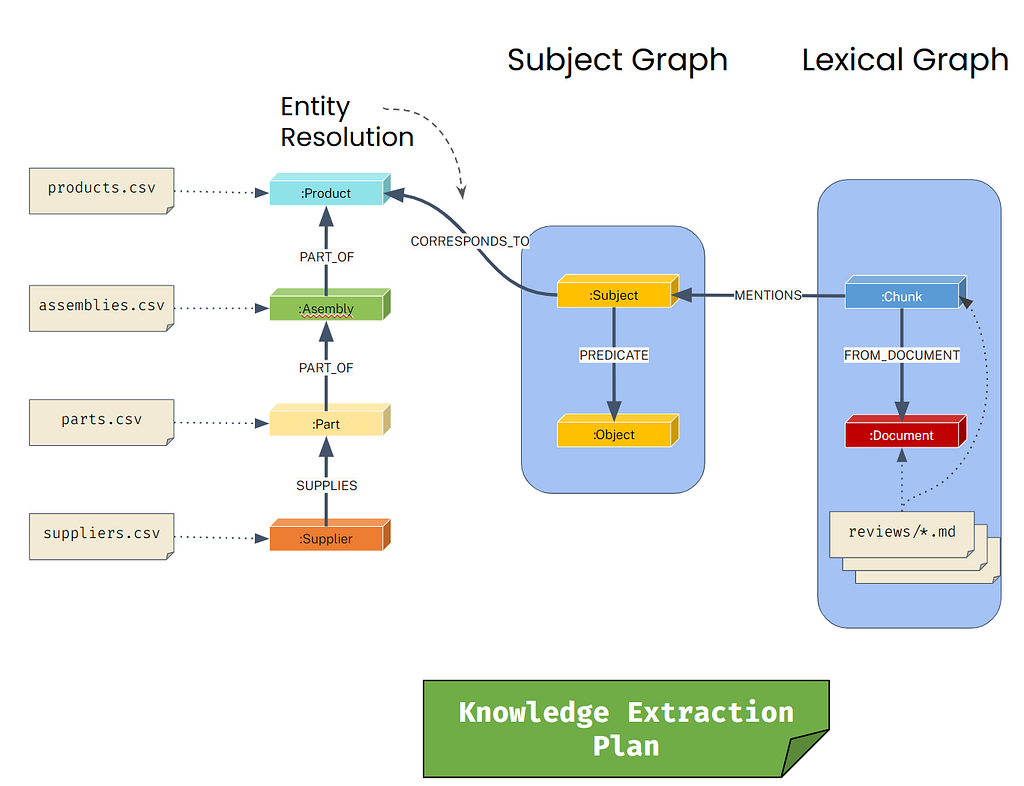
Two tools, with helper functions:
- make_kg_builder - to chunk markdown and produce the lexical and subject graphs
- correlate_subject_and_domain_nodes - to connect the subject graph to the domain graph
- Input: approved_files, approved_construction_plan, approved_entities, approved_fact_types
- Output: a completed knowledge graph with domain, lexical and subject graphs
Workflow
- The context is initialized with an approved_construction_plan and approved_files
- For each markdown file, make_kg_builder is called to create a construction pipeline
- For each resulting entity label, correlate_subject_and_domain_nodes will connect the subject and domain graphs
Define a custom text splitter that uses regex patterns to chunk markdown text. This splitter breaks documents at specified delimiters (like “ — -”) to create meaningful text segments for processing.
from neo4j_graphrag.experimental.components.text_splitters.base import TextSplitter
from neo4j_graphrag.experimental.components.types import TextChunk, TextChunks

# Define a custom text splitter. Chunking strategy could be yet-another-agent
class RegexTextSplitter(TextSplitter):
    """Split text using regex matched delimiters."""
    def __init__(self, re: str):
        self.re = re

    async def run(self, text: str) -> TextChunks:
        """Splits a piece of text into chunks.

        Args:
            text (str): The text to be split.

        Returns:
            TextChunks: A list of chunks.
        """
        texts = re.split(self.re, text)
        i = 0
        chunks = [TextChunk(text=str(text), index=i) for (i, text) in enumerate(texts)]
        return TextChunks(chunks=chunks)
This custom loader adapts the Neo4j GraphRAG PDF loader to work with markdown files. It reads markdown content, extracts the document title from the first H1 header, and wraps it in the expected document format for the pipeline.
# custom file data loader

from neo4j_graphrag.experimental.components.pdf_loader import DataLoader
from neo4j_graphrag.experimental.components.types import PdfDocument, DocumentInfo

class MarkdownDataLoader(DataLoader):
    def extract_title(self,markdown_text):
        # Define a regex pattern to match the first h1 header
        pattern = r'^# (.+)$'

        # Search for the first match in the markdown text
        match = re.search(pattern, markdown_text, re.MULTILINE)

        # Return the matched group if found
        return match.group(1) if match else "Untitled"

    async def run(self, filepath: Path, metadata = {}) -> PdfDocument:
        with open(filepath, "r") as f:
            markdown_text = f.read()
        doc_headline = self.extract_title(markdown_text)
        markdown_info = DocumentInfo(
            path=str(filepath),
            metadata={
                "title": doc_headline,
            }
        )
        return PdfDocument(text=markdown_text, document_info=markdown_info)
Initialize the core components needed for the Neo4j GraphRAG pipeline: an OpenAI LLM for entity extraction, an embeddings model for vectorizing text chunks, and the Neo4j database driver for graph storage.
from neo4j_graphrag.llm import OpenAILLM
from neo4j_graphrag.embeddings import OpenAIEmbeddings

# create an OpenAI client for use by Neo4j GraphRAG
llm_for_neo4j = OpenAILLM(model_name="gpt-4o", model_params={"temperature": 0})

# use OpenAI for creating embeddings
embedder = OpenAIEmbeddings(model="text-embedding-3-large")

# use the same driver set up by neo4j_for_adk.py
neo4j_driver = graphdb.get_driver()
Use the approved entity types from the previous workflow as the allowed node types for entity extraction. This constrains the LLM to only extract entities of these specific types
# approved entities list can be used directly
schema_node_types = approved_entities

print("schema_node_types: ", schema_node_types)
Transform the approved fact types into relationship types by extracting the predicate labels and converting them to uppercase format for the schema.
# the keys from approved fact types dictionary can be used for relationship types
schema_relationship_types = [key.upper() for key in approved_fact_types.keys()]

print("schema_relationship_types: ", schema_relationship_types)
Create relationship patterns by converting fact types into tuples that specify allowed relationships between specific node types (subject-predicate-object patterns).
# rewrite the fact types into a list of tuples
schema_patterns = [
    [ fact['subject_label'], fact['predicate_label'].upper(), fact['object_label'] ]
    for fact in approved_fact_types.values()
]

print("schema_patterns:", schema_patterns)
Assemble the complete entity schema dictionary that will guide the LLM’s entity extraction, combining node types, relationship types, and patterns into a single configuration.
# the complete entity schema
entity_schema = {
    "node_types": schema_node_types,
    "relationship_types": schema_relationship_types,
    "patterns": schema_patterns,
    "additional_node_types": False, # True would be less strict, allowing unknown node types
}
This helper function extracts the first few lines from a file to provide context for entity extraction. This context helps the LLM better understand the document structure and content when processing individual chunks.
def file_context(file_path:str, num_lines=5) -> str:
    """Helper function to extract the first few lines of a file

    Args:
        file_path (str): Path to the file
        num_lines (int, optional): Number of lines to extract. Defaults to 5.

    Returns:
        str: First few lines of the file
    """
    with open(file_path, 'r') as f:
        lines = []
        for _ in range(num_lines):
            line = f.readline()
            if not line:
                break
            lines.append(line)
    return "\n".join(lines)
This function creates a contextualized prompt template for entity and relationship extraction. It combines general extraction instructions with file-specific context to improve the accuracy of the LLM’s entity recognition on each text chunk.
# per-chunk entity extraction prompt, with context
def contextualize_er_extraction_prompt(context:str) -> str:
    """Creates a prompt with pre-amble file content for context during entity+relationship extraction.
    The context is concatenated into the string, which later will be used as a template
    for values like {schema} and {text}.
    """
    general_instructions = """
    You are a top-tier algorithm designed for extracting
    information in structured formats to build a knowledge graph.

    Extract the entities (nodes) and specify their type from the following text.
    Also extract the relationships between these nodes.

    Return result as JSON using the following format:
    {{"nodes": [ {{"id": "0", "label": "Person", "properties": {{"name": "John"}} }}],
    "relationships": [{{"type": "KNOWS", "start_node_id": "0", "end_node_id": "1", "properties": {{"since": "2024-08-01"}} }}] }}

    Use only the following node and relationship types (if provided):
    {schema}

    Assign a unique ID (string) to each node, and reuse it to define relationships.
    Do respect the source and target node types for relationship and
    the relationship direction.

    Make sure you adhere to the following rules to produce valid JSON objects:
    - Do not return any additional information other than the JSON in it.
    - Omit any backticks around the JSON - simply output the JSON on its own.
    - The JSON object must not wrapped into a list - it is its own JSON object.
    - Property names must be enclosed in double quotes
    """

    context_goes_here = f"""
    Consider the following context to help identify entities and relationships:
    <context>
    {context}
    </context>"""

    input_goes_here = """
    Input text:

    {text}
    """

    return general_instructions + "\n" + context_goes_here + "\n" + input_goes_here
This function creates a customized KG builder pipeline for a specific file by extracting file context and creating a contextualized extraction prompt. It combines all the previously defined components (loader, splitter, schema, LLM) into a complete pipeline.
Process each approved markdown file by creating a KG builder pipeline and running it asynchronously. This extracts entities and relationships from the text chunks and stores them in the Neo4j database as the subject graph.
def make_kg_builder(file_path:str) -> SimpleKGPipeline:
    """Builds a KG builder for a given file, which is used to contextualize the chunking and entity extraction."""
    context = file_context(file_path)
    contextualized_prompt = contextualize_er_extraction_prompt(context)

    return SimpleKGPipeline(
        llm=llm_for_neo4j, # the LLM to use for Entity and Relation extraction
        driver=neo4j_driver,  # a neo4j driver to write results to graph
        embedder=embedder,  # an Embedder for chunks
        from_pdf=True,   # sortof True because you will use a custom loader
        pdf_loader=MarkdownDataLoader(), # the custom loader for Markdown
        text_splitter=RegexTextSplitter("---"), # the splitter you defined above
        schema=entity_schema, # that you just defined above
        prompt_template=contextualized_prompt,
    )
from helper import get_neo4j_import_dir

neo4j_import_dir = get_neo4j_import_dir() or "."

for file_name in approved_files:
    file_path = os.path.join(neo4j_import_dir, file_name)
    print(f"Processing file: {file_name}")
    kg_builder = make_kg_builder(file_path)
    results = await kg_builder.run_async(file_path=str(file_path))
    print("\tResults:", results.result)
print("All files processed.")
Connect entities in the subject graph to entities in the domain graph.
For each type of entity in the subject graph, you will devise a strategy for correlating with the right node in the domain graph.
For example, you should expect that Products with product names exist in the subject graph, and that these should correlate with products in the domain graph.
To do this, we will:
- find the unique entity labels in the subject graph
- find the unique node labels in the domain graph
- attempt to correlate property keys
- perform entity resolution by analyzing the similarity of property values
The unique triples of (subject, predicate, object) will give you an idea about what the subject graph looks like.
Query the Neo4j database to find all nodes that have the __Entity__ label (entities created by the knowledge graph builder) and return their distinct label combinations.
# first, take a look at the entity labels
results = graphdb.send_query("""MATCH (n)
    WHERE n:`__Entity__`
    RETURN DISTINCT labels(n) AS entity_labels
    """)

results['query_result']
Flatten the label arrays into individual label strings using UNWIND, which transforms the array of labels into separate rows for each label.
# unwind those lists of labels
results = graphdb.send_query("""MATCH (n)
    WHERE n:`__Entity__`
    WITH DISTINCT labels(n) AS entity_labels
    UNWIND entity_labels AS entity_label
    RETURN DISTINCT entity_label
    """)

results['query_result']
Filter out internal Neo4j labels that start with double underscores (“__”) to focus only on the meaningful entity type labels extracted from the text.
# filter out labels that start with "__"
results = graphdb.send_query("""MATCH (n)
    WHERE n:`__Entity__`
    WITH DISTINCT labels(n) AS entity_labels
    UNWIND entity_labels AS entity_label
    WITH entity_label
    WHERE NOT entity_label STARTS WITH "__"
    RETURN entity_label
    """)

results['query_result']
Combine the previous query steps into a reusable function that returns all unique entity labels from the subject graph, excluding internal Neo4j system labels.
# wrap the query into a callable function
def find_unique_entity_labels():
    result = graphdb.send_query("""MATCH (n)
        WHERE n:`__Entity__`
        WITH DISTINCT labels(n) AS entity_labels
        UNWIND entity_labels AS entity_label
        WITH entity_label
        WHERE NOT entity_label STARTS WITH "__"
        RETURN collect(entity_label) as unique_entity_labels
        """)
    if result['status'] == 'error':
        raise Exception(result['message'])
    return result['query_result'][0]['unique_entity_labels']
Test the function to see what entity labels were actually extracted from the processed markdown files into the subject graph.
# try out the function
unique_entity_labels = find_unique_entity_labels()

print("Unique entity labels: ", unique_entity_labels)
Create a function to find all unique property keys for entities of a specific label in the subject graph. This helps identify what properties are available for matching with domain graph nodes.
def find_unique_entity_keys(entityLabel:str):
    result = graphdb.send_query("""MATCH (n:$($entityLabel))
    WHERE n:`__Entity__`
    WITH DISTINCT keys(n) as entityKeys
    UNWIND entityKeys as entityKey
    RETURN collect(distinct(entityKey)) as unique_entity_keys
    """, {
        "entityLabel": entityLabel
    })
    if result['status'] == 'error':
        raise Exception(result['message'])
    return result['query_result'][0]['unique_entity_keys']

# try out the function to get the unique keys for
# subject nodes labeled as Product
find_unique_entity_keys("Product")
Create a function to find unique property keys for nodes of a specific label in the domain graph (nodes without the __Entity__ label). This enables comparison with subject graph properties for entity resolution.
def find_unique_domain_keys(domainLabel:str):
    result = graphdb.send_query("""MATCH (n:$($domainLabel))
    WHERE NOT n:`__Entity__` // exclude entities created by the KG builder, these should be domain nodes
    WITH DISTINCT keys(n) as domainKeys
    UNWIND domainKeys as domainKey
    RETURN collect(distinct(domainKey)) as unique_domain_keys
    """, {
        "domainLabel": domainLabel
    })
    if result['status'] == 'error':
        raise Exception(result['message'])
    return result['query_result'][0]['unique_domain_keys']

find_unique_domain_keys("Product")
This is a simple version of “stemming” as done in NLP.
Define a function to normalize property key names by removing label prefixes, converting to lowercase, and standardizing spacing. This helps match similar property keys that may have different naming conventions between subject and domain graphs.
def normalize_key(label:str, key:str) -> str:
    """Normalizes a a property key for a given label.

    Keys are normalized by:
    - lowercase the key
    - remove any leading/trailing whitespace
    - remove label prefix from key
    - replace internal whitespace with "_"

    for example:
        - "Product_name" -> "name"
        - "product name" -> "name"
        - "price" -> "price

    Args:
        label (str): The label to normalize keys for
        keys (List[str]): The list of keys to normalize

    Returns:
        List[str]: The normalized list of keys
    """
    lowercase_key = key.lower()
    unprefixed_key = re.sub(f"^{label.lower()}[_ ]*", "", lowercase_key)
    normalized_key = re.sub(" ", "_", unprefixed_key)
    return normalized_key

print(normalize_key("Product", "Product_name"))
print(normalize_key("Product", "Product Name"))
print(normalize_key("Product", "product name"))
print(normalize_key("Product", "price"))
Use fuzzy string matching to find correlations between entity graph property keys and domain graph property keys. This function compares normalized key names and returns matches above a similarity threshold, helping identify which properties can be used for entity resolution
# use the rapidfuzz library for fuzzy text similarity scoring
from rapidfuzz import fuzz

# for a given label, get pairs of entity and domain keys that correlate
def correlate_entity_and_domain_keys(label: str, entity_keys: list[str], domain_keys: list[str], similarity: float = 0.9) -> list[tuple[str, str]]:
    correlated_keys = []
    for entity_key in entity_keys:
        for domain_key in domain_keys:
            # only consider exact matches. this could use fuzzy matching
            normalized_entity_key = normalize_key(label, entity_key)
            normalized_domain_key = normalize_key(label, domain_key)
            # rapidfuzz similarity is 0.0 -> 100.0, so divide by 100 for 0.0 -> 1.0
            fuzzy_similarity = (fuzz.ratio(normalized_entity_key, normalized_domain_key) / 100)
            if (fuzzy_similarity > similarity):
                correlated_keys.append((entity_key, domain_key, fuzzy_similarity))
    correlated_keys.sort(key=lambda x: x[2], reverse=True)
    return correlated_keys

label = "Product"
entity_keys = find_unique_entity_keys(label)
domain_keys = find_unique_domain_keys(label)

# try correlating with a low-ish threshold
correlated_keys = correlate_entity_and_domain_keys(label, entity_keys, domain_keys, similarity=0.5)

print(f"{label} correlated keys (entity key, domain key, similarity score)...")

# show the keys
correlated_keys
The Jaro–Winkler distance is a string comparison method, emphasizing common prefixes to favor strings that match from the start.
- measures “edit distance” between two strings
- produces values from 0.0 (exact match) to 1.0 (no similarity)
- use similarity = 1.0 - distance to get a similarity score
See Jaro-WinklerDistance for details.
Ideally, you would sample a few values that you expect to correlate well, trying different similarity metrics to find one that works well for that particular value pair.
Neo4j provides many text similarity functions. Other options include:
- apoc.text.hammingDistance
- apoc.text.levenshteinSimilarity
- apoc.text.sorensenDiceSimilarity
- apoc.text.fuzzyMatch
And for vector similarity:
- vector.similarity.cosine to directly calculate cosine similarity
- db.index.vector.queryNodes to perform vector similarity search (after first creating a vector index on the domain nodes)
Wrap the entity resolution logic into a reusable function that correlates subject and domain nodes based on property value similarity using Jaro-Winkler distance. This creates the bridge between extracted entities and the existing domain graph.
# use the Jaro-Winkler function to calculate distance between product names
results = graphdb.send_query("""
// MATCH all pairs of subject and domain nodes -- this is an expensive cartesian product
MATCH (entity:$($entityLabel):`__Entity__`), (domain:$($entityLabel))
WITH entity, domain, apoc.text.jaroWinklerDistance(entity[$entityKey], domain[$domainKey]) as score
// experiment with different thresholds to see how the results change
WHERE score < 0.4
RETURN entity[$entityKey] AS entityValue, domain[$domainKey] AS domainValue, score
// experiment with different limits to see more or fewer pairs
LIMIT 3
""", {
    "entityLabel": "Product",
    "entityKey": "name",
    "domainKey": "product_name"
})

results['query_result']
Create CORRESPONDS_TO relationships between subject graph entities and domain graph nodes with similar property values. Uses MERGE to avoid duplicate relationships and adds timestamps to track when correlations were established.
# connect all corresponding nodes with a relationship
results = graphdb.send_query("""
MATCH (entity:$($entityLabel):`__Entity__`),(domain:$($entityLabel))
// use the score as a predicate to filter the pairs. this is better
WHERE apoc.text.jaroWinklerDistance(entity[$entityKey], domain[$domainKey]) < 0.1
MERGE (entity)-[r:CORRESPONDS_TO]->(domain)
ON CREATE SET r.created_at = datetime()
ON MATCH SET r.updated_at = datetime()
RETURN elementId(entity) as entity_id, r, elementId(domain) as domain_id
""", {
    "entityLabel": "Product",
    "entityKey": "name",
    "domainKey": "product_name"
})

results['query_result']

# run this repeatedly to illustrate that MERGE only happens once
est the Jaro-Winkler distance function by finding all pairs of subject and domain Product nodes where the name properties have similarity scores below a threshold, showing potential matches for entity resolution.
# wrap as a function
def correlate_subject_and_domain_nodes(label: str, entity_key: str, domain_key: str, similarity: float = 0.9) -> dict:
    """Correlate entity and domain nodes based on label, entity key, and domain key,
    where the corresponding values of the entity and domain properties are similar

    For example, if you have a label "Person" and an entity key "name", and a domain key "person_name",
    this function will create a relationship like:
    (:Person:`__Entity__` {name: "John"})-[:CORRELATES_TO]->(:Person {person_name: "John"})

    Args:
        label (str): The label of the entity and domain nodes.
        entity_key (str): The key of the entity node.
        domain_key (str): The key of the domain node.
        similarity (float, optional): The similarity threshold for correlation. Defaults to 0.9.

    Returns:
        dict: A dictionary containing the correlation between the entity and domain nodes.
    """
    results = graphdb.send_query("""
    MATCH (entity:$($entityLabel):`__Entity__`),(domain:$($entityLabel))
    WHERE apoc.text.jaroWinklerDistance(entity[$entityKey], domain[$domainKey]) < $distance
    MERGE (entity)-[r:CORRESPONDS_TO]->(domain)
    ON CREATE SET r.created_at = datetime() // MERGE sub-clause when the relationship is newly created
    ON MATCH SET r.updated_at = datetime()  // MERGE sub-clause when the relationship already exists
    RETURN $entityLabel as entityLabel, count(r) as relationshipCount
    """, {
        "entityLabel": label,
        "entityKey": entity_key,
        "domainKey": domain_key,
        "distance": (1.0 - similarity)
    })

    if results['status'] == 'error':
        raise Exception(results['message'])

    return results['query_result']


correlate_subject_and_domain_nodes("Product", "name", "product_name")
Execute the complete entity resolution workflow by iterating through all extracted entity labels, finding the best property key correlations, and automatically creating connections between the subject graph and domain graph to complete the knowledge graph integration.
# do it all:
# - loop over all entity labels
# - correlate the keys
# - correlate (and connect) the nodes
for entity_label in find_unique_entity_labels():
    print(f"Correlating entities labeled {entity_label}...")

    entity_keys = find_unique_entity_keys(entity_label)
    domain_keys = find_unique_domain_keys(entity_label)

    correlated_keys = correlate_entity_and_domain_keys(entity_label, entity_keys, domain_keys, similarity=0.8)

    if (len(correlated_keys) > 0):
        top_correlated_keypair = correlated_keys[0]
        print("\tbased on:", top_correlated_keypair)
        correlate_subject_and_domain_nodes(entity_label, top_correlated_keypair[0], top_correlated_keypair[1])
    else:
        print("\tNo correlation found")
This is how we transform structured and unstructured data into knowledge graph. we also created specialized agents and defined what prompt to use and what tools to define and how to share the context
References:
- https://go.neo4j.com/rs/710-RRC-335/images/Building-Knowledge-Graphs-Practitioner's-Guide-OReilly-book.pdf
- https://learn.deeplearning.ai/courses/agentic-knowledge-graph-construction