LangChain — In Depth Guide from Document parsing to AI Agents
The challenge in building good LLM is effectively building the prompt sent to the model and process the model’s predictions to return an accurate output. In this article, you will learn about LangChain and how it enables you to build LLM applications.
LangChain comes with reference implementations of the most common LLM application patterns which is quick way to get started with LLM. The building blocks of the LangChain can be swapped out of alternatives as your need changes. When we want to switch from one GPT like OpenAI to Ollama or anthropic you end up with issues, but in langchain it abstracts these differences and make your code independent of the provider.
First and Foremost, for the langchain to work, we have to use the dependencies. We want one provider like OpenAI/ Ollama, Vector Store in this case we are using Postgres Pgvector but you can use the alternatives like Weaviate, FAISS etc.,
pip install langchain langchain-openai langchain-community
pip install langchain-text-splitters langchain-postgres
LangChain provides 2 simple interfaces to interact with any LLM API provider — Chat Models , LLMs : Takes string prompt as input and pass it to model provider and returns the model prediction as output
from langchain_openai import OpenAI  # completions (LLM)

llm_text = OpenAI(
    model="openai/gpt-oss-20b:free",  # example that supports /completions
    temperature=0.2,
    max_tokens=200,
)
print(llm_text.invoke("Write a one-paragraph summary of PEFT."))
As you can see we can pass 3 main parameters which is the model, temperature that controls sampling algorithm and lower value produces predictable outputs and max_tokens to limit the size of the output
The other chat model interface enables back and forth conversations between user and model. The reason for separate interface is because OpenAI like models differentiate messages sent to and from the model into user assistant, and system roles.
System Role — used for instructions the model should use to answer a user question
User Role — used for the user’s query and any other content produced by the user
Assistant Role — Used for content generated by the model
The chat model’s interface makes it easier to configure and manage conversations in your AI chatbot application
from langchain_openai.chat_models import ChatOpenAI
from langchain_core.messages import HumanMessage

model = ChatOpenAI()
prompt = [HumanMessage("What is the capital of France?")]
model.invoke(prompt)
Instead of single prompt string, chat models make use of different types of chat message interfaces associated with each role mentioned previously like
HumanMessage — A message sent from the perspective of human with user role
AIMessage — A message sent from the perspective of the AI that the human is interacting with, with assistant role
SystemMessage — A message setting the instructions the AI should follow, with the system role
ChatMessage — A message allowing for arbitrary setting of the role.
from langchain_core.messages import HumanMessage, SystemMessage
from langchain_openai.chat_models import ChatOpenAI
model = ChatOpenAI()
system_msg = SystemMessage(
 '''You are a helpful assistant that responds to questions with three
 exclamation marks.'''
)
human_msg = HumanMessage('What is the capital of France?')
model.invoke([system_msg, human_msg])
The model obeyed the instruction provided in the SystemMessage even though it wasn’t present in the user’s question. This enables you to preconfigure your AI application to respond in a relatively predictable manner based on the user’s input.
Prompts
Prompts help the model understand the context and generate relevant answers to queries. Although the prompt looks like simple string, the challenge is figuring out what the text should contain and how it should vary based on the user input. Langchain provides prompt template interfaces that make it easy to construct prompts with dynamic inputs
from langchain_core.prompts import PromptTemplate

template = PromptTemplate.from_template("""Answer the question based on the
 context below. If the question cannot be answered using the information
 provided, answer with "I don't know".
Context: {context}
Question: {question}
Answer: """)

prompt = template.invoke({
 "context": """The most recent advancements in NLP are being driven by Large
 Language Models (LLMs). These models outperform their smaller
 counterparts and have become invaluable for developers who are creating
 applications with NLP capabilities. Developers can tap into these
 models through Hugging Face's `transformers` library, or by utilizing
 OpenAI and Cohere's offerings through the `openai` and `cohere`
 libraries, respectively.""",
 "question": "Which model providers offer LLMs?"
})
The example taks the static prompt from the previous block and makes it dynamic. The template contain the structure of the final prompt alongside the definition of where the dynamic inputs will be inserted.
LangChain prompt follows Python’s f-string syntax for defining dynamic parameters — any word surrounded by curly braces. Now we can feed into the model
model = OpenAI()
completion = model.invoke(prompt)
For the Chat application, we can use the template of prompt as follows
from langchain_openai.chat_models import ChatOpenAI
from langchain_core.prompts import ChatPromptTemplate

# both `template` and `model` can be reused many times
template = ChatPromptTemplate.from_messages([
 ('system', '''Answer the question based on the context below. If the
 question cannot be answered using the information provided, answer
 with "I don\'t know".'''),
 ('human', 'Context: {context}'),
 ('human', 'Question: {question}'),
])
model = ChatOpenAI()
# `prompt` and `completion` are the results of using template and model once
prompt = template.invoke({
 "context": """The most recent advancements in NLP are being driven by
 Large Language Models (LLMs). These models outperform their smaller
 counterparts and have become invaluable for developers who are creating
 applications with NLP capabilities. Developers can tap into these models through hugging faces transofrmers library or by utilizing
OpenAI and Cohere's offerings through the `openai` and `cohere`
 libraries, respectively.""",
 "question": "Which model providers offer LLMs?"
})
model.invoke(prompt)
Output Formats of LLM
Plain text output is useful but in some use cases we might need structured output that is machine readable format such as JSON, XML, CSV. This is useful to hand that off to some other piece of code, making an LLM play a part in your larger application. Let us see example of JSON output format. For this, we make use of pydantic library
from langchain_openai import ChatOpenAI
from langchain_core.pydantic_v1 import BaseModel

class AnswerWithJustification(BaseModel):
   '''An answer to the user's question along with justification for the
   answer.'''
   answer: str
   '''The answer to the user's question'''
   justification: str
   '''Justification for the answer'''
llm = ChatOpenAI(model="gpt-3.5-turbo", temperature=0)
structured_llm = llm.with_structured_output(AnswerWithJustification)
structured_llm.invoke("""What weighs more, a pound of bricks or a pound
 of feathers""")
First we define the schema using Pydantic library and this outputs the JSONSchema object which is sent to LLM. The schema will be useful to validate the output format returned by the LLM before returning it.
For other formats like CSV or XML we can use Output Parsers classes that help you structure large language model responses. It serves 2 functions
- Output parsers are used to inject some additional instructions in the prompt that will help guide the LLM to output text in the format it knows how to parse
- Take textual output of the LLM or chat model and render it to a more structured format such as list, XML or other format like removing extra information, correcting incomplete output and validating parsed values
from langchain_core.output_parsers import CommaSeparatedListOutputParser

parser = CommaSeparatedListOutputParser()
items = parser.invoke("apple, banana, cherry")
As you have seen, the model, prompt template or the output parser all have the similar interface which uses invoke() method to generate outputs from the model. All components have the following
- Invoke — Transforms single input to an output
- batch — efficiently transforms multiple inputs into multiple outputs
- stream — streams output from a single input as it is produced
There are also built-in utilities for retries, fallbacks, schemas and runtime configurability. and all the three methods have asyncio equivalents
from langchain_openai.llms import ChatOpenAI

model = ChatOpenAI()
completion = model.invoke('Hi there!')
# Hi!

completions = model.batch(['Hi there!', 'Bye!'])
# ['Hi!', 'See you!']

for token in model.stream('Bye!'):
 print(token)
 # Good
 # by
In some cases, when the underlying component does not support iterative output, there will be single part conataining all output. We can combine in 2 ways
- Imperative — Call your components directly using invoke() method. Here the parallel execution is achieved by Python threads or coroutines, Streaming using yield keyword and Async execution using async functions
- Declarative — Using LangChain Expression Language (LCEL). Here the parallel execution, Streaming and Async execution is all automatic
from langchain_openai.chat_models import ChatOpenAI
from langchain_core.prompts import ChatPromptTemplate
from langchain_core.runnables import chain

# the building blocks
template = ChatPromptTemplate.from_messages([
 ('system', 'You are a helpful assistant.'),
 ('human', '{question}'),
])
model = ChatOpenAI()

# combine them in a function
# @chain decorator adds the same Runnable interface for any function you write
@chain
def chatbot(values):
 prompt = template.invoke(values)
 return model.invoke(prompt)

# use it
chatbot.invoke({"question": "Which model providers offer LLMs?"})
If we have enable streaming and async support we have to modify the function to support it.
@chain
def chatbot(values):
   prompt = template.invoke(values)
   for token in model.stream(prompt):
       yield token
for part in chatbot.stream({
 "question": "Which model providers offer LLMs?"
}):
    print(part)
You can enable streaming for your custom function by yielding the values you want to stream and then calling it with stream. For asynchronous execution, we can rewrite your function like
@chain
async def chatbot(values):
   prompt = await template.ainvoke(values)
   return await model.ainvoke(prompt)

await chatbot.ainvoke({"question": "Which model providers offer LLMs?"})
# > AIMessage(content="""Hugging Face's `transformers` library, OpenAI using
   the `openai` library, and Cohere using the `cohere` library offer LLMs.""")
Declarative Composition
LCEL is declarative language for composing LangChain components which compiles LCEL compositions to an optimized execution plan with automatic parallelization, streaming, tracing and async support.
from langchain_openai.chat_models import ChatOpenAI
from langchain_core.prompts import ChatPromptTemplate

# the building blocks
template = ChatPromptTemplate.from_messages([
 ('system', 'You are a helpful assistant.'),
 ('human', '{question}'),
])
model = ChatOpenAI()

# combine them with the | operator
chatbot = template | model

# use it
chatbot.invoke({"question": "Which model providers offer LLMs?"})

# Stream
for part in chatbot.stream({
   "question": "Which model providers offer LLMs?"
  }):
   print(part)
 # > AIMessageChunk(content="Hugging")
 # > AIMessageChunk(content=" Face

# Async
await chatbot.ainvoke({
 "question": "Which model providers offer LLMs?"
})
Retrieval Augmented Generation (RAG)
Indexing the Data
In the above scenario with langchain, we have built a AI chatbot with just few lines of code but what if the chatbot needs to answer questions that are related to specific domain. The training data of LLM is public data. If the information needed to answer the question is private data that is not publicly available and also training LLM with this data is costly and time consuming. The data in LLM can also have knowledge cutoff as it is not real time data. In this case, the pretrained LLM most likely hallucinate and respond with inaccurate information. Adapting the prompt to resolve the issue may not solve this problem.
The challenge here is making data available to LLMs is first and foremost a quantity problem. You have more information than can fit in each prompt you send to the LLM. To overcome this challenge —
- Indexing your documents — Preprocessing them in a way where your application can easily find the most relevant ones for each question
- Retrieving this external data from the index and using it as context for the LLM to generate an accurate output based on your data
This technique is called Retrieval Augmented Generation (RAG). There are 4 steps to achieve this —

- Extract the text from the document
- Split text into manageable chunks
- Convert the text into numbers that computers can understand
- Store these number representations of your text that makes it easy and fast to retrieve the relevant sections of your document to answer a given question
The process of preprocessing and transformation of your documents is known as ingestion. Ingestion is simply the process of converting your documents into numbers that computers can understand and analyze and storing them in a special type of database for effecient retrieval. These numbers are known as embeddings and special type of database is known as vector store.
Embeddings — Convert Text to Numbers
Embedding refers to representing text as a sequence of numbers. These embeddings were initially used for full-text search capabilities in websites or to classify emails as spam. In this model, the embedding for a sentence is sequence of numbers called bag-of-words model and these embeddings are called sparse embeddings because a lot of numbers will be 0. Most english sentences use only a very small subset of all existing english words.
Keyword search — you can find which documents contain a given word or words
Classification of documents — You can calculate embeddings for a collection of examples previously labeled as email spam or not spam, average them out and obtain average word frequencies for each of the classes.
The limitation is that the model has no awareness of meaning, only of the actual words used. The solution for this is semantic embeddings
LLM Based Embeddings
The LLM training process enables LLM to complete a prompt with the most appropriate continuation. The capability stems from an understanding the meaning of words and sentences in the context of the surrounding text, learned from how words are used together in the training texts. This understanding of the meaning of the prompt can be extracted as a numeric representation of the input text.
An embedding model then is an algorithm that takes a piece of text and outputs a numerical representation of its meaning. These are also called dense embeddings as opposed to the sparse embeddings. Different models produce different numbers and different sizes of lists. Even if the size of the lists matches, you cannot compare embeddings from different models. Combining embeddings from different models should always be avoided.
Semantic Embeddings
Numbers themselves have no particular meaning, but instead the sequences of numbers for 2 words that are close in meaning should be closer than those of unrelated words.Each number is a floating point vlaue and each of them represents a semantic dimension. When it is plotted on the multi dimensional space, the angles between each plot varies depending on how similar they are. The narrower the angle or shorter the distance between two vectors the close their similarities.
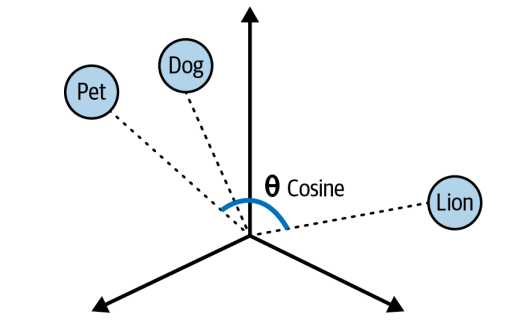
We calculate the degree of similarity between two vectors in the multi dimensional space is called cosine similarity. Cosine similarity computes the dot product of vectors and divides it by the product of their magnitudes to output a number between -1 and 1 where 0 means the vectors share no correlation, -1 means they are absolutely dissimilar and 1 means they are absolutely similar.
The ability to convert sentences into embeddings that capture semantic meaning and then perform calculations to find semantic similarities between different sentences enables us to get an LLM to find the most relevant documents to answer questions about a large body of text.
Converting Documents to Text
The first step in preprocessing yout document is to convert it to text. For this, we need to build the logic to parse and extract the document with minimal loss of quality. Langchain provides document loaders that handle the parsing logic and enable you to load data from various sources into a Document class that consists of text and associated metadata.
from langchain_community.document_loaders import TextLoader

loader = TextLoader("./test.txt")
loader.load()
We can use WebBaseLoader to load HTML from web URLs and parse it to text
from langchain_community.document_loaders import WebBaseLoader

loader = WebBaseLoader("https://www.langchain.com/")
loader.load()
For parsing PDF documents we can use PDFLoader in LangChain
from langchain_community.document_loaders import PyPDFLoader

loader = PyPDFLoader("./test.pdf")
pages = loader.load()
The text is extracted and stored in Document class. The loaded document is over 100,000 characters long so it wont fit into the context window of the vast majority of LLM or embedding model. To overcome this, we have to use the split the Document into manageable chunks of text that we can later convert into embeddings and semantically search.
LLMs and embedding models are designed with a hard limit on the size of input and output tokens they can handle. This limit is usually called context window, and usually applies to the combi‐ nation of input and output. Context windows are usually measured in number of tokens. Tokens are representation of text as numbers with each token covering between 3–4 characters of english text
Splitting text into Chunks
Splitting of large body of text into chunks is straight forward but keeping semantically related chunks of text together is complex. LangChain provides RecursiveCharacterTextSplitter which does —
- Take list of separators in order of importance \n\n (paragraph separator), \n (line separator), space (word separator)
- Considers the chunk size. If the chunk size is greater than desired length -split by next separator.
- Emit all the chunk as Document with metadata of the original document passed with additional information about the position in original document
from langchain_text_splitters import RecursiveCharacterTextSplitter

loader = TextLoader("./test.txt") # or any other loader
docs = loader.load()

splitter = RecursiveCharacterTextSplitter(
 chunk_size=1000,
 chunk_overlap=200,
)
splitted_docs = splitter.split_documents(docs)
This splits the chunks of 1000 characters each with some overlap of characters to maintain some context. This RecursiveCharacterTextSplit can also be used to split code languages and markdown into semantic chunks. This can be done using keyword specific to each language as seperators. LangChains has separators for number of popular languages such as Python, JS, Markdown, HTML and many more.
from langchain_text_splitters import (
 Language,
 RecursiveCharacterTextSplitter,
)

PYTHON_CODE = """
def hello_world():
 print("Hello, World!")
# Call the function
hello_world()
"""
python_splitter = RecursiveCharacterTextSplitter.from_language(
 language=Language.PYTHON, chunk_size=50, chunk_overlap=0
)
python_docs = python_splitter.create_documents([PYTHON_CODE], [{"source": "https://www.langchain.com"}])
This has create_documents which accepts the list of strings rather than documents. Also, it accepts metadata for the particular string and it allows us to track where the document came from
Generating Text Embeddings
LangChain also has the Embeddings class designed to inerface with text embedding models including OpenAI, Cohere and HuggingFace and generate vector representations of text. This class provides 2 methods: one for embedding documents and one for embedding a query.
from langchain_openai import OpenAIEmbeddings

model = OpenAIEmbeddings()
embeddings = model.embed_documents([
 "Hi there!",
 "Oh, hello!",
 "What's your name?",
 "My friends call me World",
 "Hello World!"
])
We can embed multiple documents at the same time. We get list numbers each inner list is a vector or embedding.
Let us see end to end flow that we did till now
from langchain_community.document_loaders import TextLoader
from langchain_text_splitters import RecursiveCharacterTextSplitter
from langchain_openai import OpenAIEmbeddings

## Load the document
loader = TextLoader("./test.txt")
doc = loader.load()
"""
[
 Document(page_content='Document loaders\n\nUse document loaders to load data
 from a source as `Document`\'s. A `Document` is a piece of text\nand
 associated metadata. For example, there are document loaders for
 loading a simple `.txt` file, for loading the text\ncontents of any web
 page, or even for loading a transcript of a YouTube video.\n\nEvery
 document loader exposes two methods:\n1. "Load": load documents from
 the configured source\n2. "Load and split": load documents from the
 configured source and split them using the passed in text
 splitter\n\nThey optionally implement:\n\n3. "Lazy load": load
 documents into memory lazily\n', metadata={'source': 'test.txt'})
]
"""
## Split the document
text_splitter = RecursiveCharacterTextSplitter(
 chunk_size=1000,
 chunk_overlap=20,
)
chunks = text_splitter.split_documents(doc)
## Generate embeddings
embeddings_model = OpenAIEmbeddings()
embeddings = embeddings_model.embed_documents(
 [chunk.page_content for chunk in chunks]
)
"""
[[0.0053587136790156364,
 -0.0004999046213924885,
 0.038883671164512634,
 -0.003001077566295862,
 -0.00900818221271038, ...], ...]
"""
Now that we got the embeddings, let us store it in vector store.
Store Embeddings in a Vector Store
A vector store is a database designed to store vectors and perform complex calculations like cosine similarity, efficiently and quickly. These stores handles unstructured data including text and images. It is capable of performing create, read, update, delete (CRUD) and search operations.
There are multiple capabilities that vector store provides us like multitenancy, metadata filtering capabilities, performance, cost and scalability. It should be choosen based on our use case.
Vector Store capabilities have recently been extended to PostgresSQL via the pgvector extension. This enables us to use same database for both transactional tables and vector search tables.
In this case, I have run it with docker container
docker run \
 --name pgvector-container \
 -e POSTGRES_USER=langchain \
 -e POSTGRES_PASSWORD=langchain \
 -e POSTGRES_DB=langchain \
 -p 6024:5432 \
 -d pgvector/pgvector:pg16
The postgres starts running on 6024 port and we can use connection string to connect to it
postgresql+psycopg://langchain:langchain@localhost:6024/langchain
Working with vector stores
In the above code, we have created embeddings, now to store the embeddings in pgvector
# embed each chunk and insert it into the vector store
embeddings_model = OpenAIEmbeddings()
connection = 'postgresql+psycopg://langchain:langchain@localhost:6024/langchain'
db = PGVector.from_documents(documents, embeddings_model, connection=connection)
Now we can search the documents using
db.similarity_search("query", k=4)The query will be sent to the database and create an embeddings. It will find the N stored embeddings that are most similar to your query. Finally, it will fetch the text content and metadata that relates to each of those embeddings
We can also add more documents to an existing database
ids = [str(uuid.uuid4()), str(uuid.uuid4())]
db.add_documents(
 [
 Document(
 page_content="there are cats in the pond",
 metadata={"location": "pond", "topic": "animals"},
 ),
 Document(
 page_content="ducks are also found in the pond",
 metadata={"location": "pond", "topic": "animals"},
 ),
 ],
 ids=ids,
)
we are also using optional ids argument to assign identifiers to each document which allows us to update or delete them later
db.delete(ids=[1])
Tracking changes to your document
One key challenge is working with the changing data because changes means re-indexing. This leads to costly recomputations of embeddings and duplications of preexisting content.
LangChain provides an indexing API to make it easy to keep your documents in sync with your vector store. The API utilizes a class RecordManager to keep track of document writes into the vector store. When indexing content, hashes are computed for each document and the following information is stored
- Document Hash ( hash of both page content and metadata)
- Write Time
- The source ID ( metadata has the source of this document)
Indexing API also provides cleanup modes to help you decide how to delete existing documents in the vector store. The modes are —
- None mode does not do any automatic cleanup, allowing the user to manually do cleanup of old content
- Incremental and full modes delete the previous versions of the content if the content of the source document or derived documents has changed
- full model will additionally delete any documents not included inthe documents currently being indexed
from langchain.indexes import SQLRecordManager, index
from langchain_postgres.vectorstores import PGVector
from langchain_openai import OpenAIEmbeddings
from langchain.docstore.document import Document

connection = "postgresql+psycopg://langchain:langchain@localhost:6024/langchain"
collection_name = "my_docs"
embeddings_model = OpenAIEmbeddings(model="text-embedding-3-small")
namespace = "my_docs_namespace"

vectorstore = PGVector(
 embeddings=embeddings_model,
 collection_name=collection_name,
 connection=connection,
 use_jsonb=True,
)
record_manager = SQLRecordManager(
 namespace,
 db_url="postgresql+psycopg://langchain:langchain@localhost:6024/langchain",
)

# Create the schema if it doesn't exist
record_manager.create_schema()

# Create documents
docs = [
 Document(page_content='there are cats in the pond', metadata={
 "id": 1, "source": "cats.txt"}),
 Document(page_content='ducks are also found in the pond', metadata={
 "id": 2, "source": "ducks.txt"}),
]

# Index the documents
index_1 = index(
 docs,
 record_manager,
 vectorstore,
 cleanup="incremental", # prevent duplicate documents
 source_id_key="source", # use the source field as the source_id
)
print("Index attempt 1:", index_1)

# second time you attempt to index, it will not add the documents again
index_2 = index(
 docs,
 record_manager,
 vectorstore,
 cleanup="incremental",
 source_id_key="source",
)
print("Index attempt 2:", index_2)

# If we mutate a document, the new version will be written and all old
# versions sharing the same source will be deleted.
docs[0].page_content = "I just modified this document!"
index_3 = index(
 docs,
 record_manager,
 vectorstore,
 cleanup="incremental",
 source_id_key="source",
)
print("Index attempt 3:", index_3)
We create record manager to keep track of which documents have been indexed before and index function to synchronize your vector store with new list of documents.
Indexing Optimization
A basic RAG indexing involves text splitting and embedding of chunks of given document. But this has inconsistent retrieval results and high occurances of hallucinations. Various strategies are present to enhance the accuracy and performance of the indexing stage — MultiVectorRetriever, RAPTOR, and ColBERT
MultiVectorRetriever — A document that contains a mixture of text and tables cannot be simply split by text into text into chunks and embedded as context. The entire table will be lost. We can decouple the documents that we want to use for answer synthesis from a reference that we want to use for retriever. Suppose we have a table in the document, we summarize the table data and store it as embeddings and also source as id by storing it separately in Docstore. When we pass it to LLM, we pass the entire table along with the prompt.
# The vectorstore to use to index the child chunks
vectorstore = PGVector(
 embeddings=embeddings_model,
 collection_name=collection_name,
 connection=connection,
 use_jsonb=True,
)

# The storage layer for the parent documents
store = InMemoryStore()
id_key = "doc_id"

# indexing the summaries in our vector store, whilst retaining the original
# documents in our document store:
retriever = MultiVectorRetriever(
 vectorstore=vectorstore,
 docstore=store,
 id_key=id_key,
)

# Changed from summaries to chunks since we need same length as docs
doc_ids = [str(uuid.uuid4()) for _ in chunks]

# Each summary is linked to the original document by the doc_id
summary_docs = [
 Document(page_content=s, metadata={id_key: doc_ids[i]})
 for i, s in enumerate(summaries)
]

# Add the document summaries to the vector store for similarity search
retriever.vectorstore.add_documents(summary_docs)

# Store the original documents in the document store, linked to their summaries
# via doc_ids
# This allows us to first search summaries efficiently, then fetch the full
# docs when needed
retriever.docstore.mset(list(zip(doc_ids, chunks)))

# vector store retrieves the summaries
sub_docs = retriever.vectorstore.similarity_search(
 "chapter on philosophy", k=2)

# Whereas the retriever will return the larger source document chunks:
retrieved_docs = retriever.invoke("chapter on philosophy")
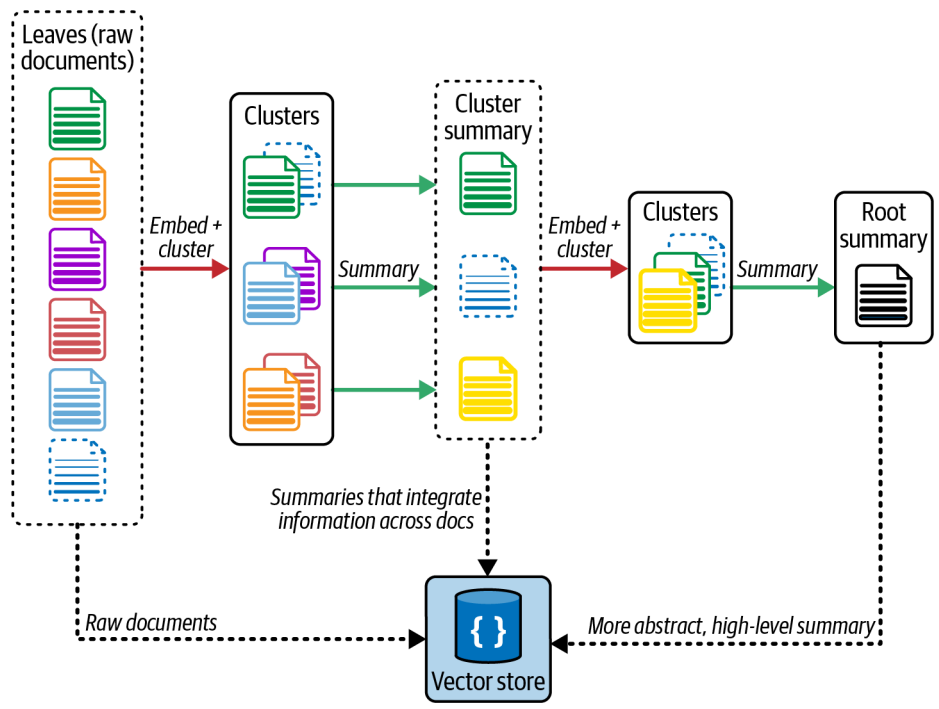
RAPTOR — Recursive Abstractive Processing for Tree-Organized Retreival — RAG systems also have to handle lower-level questions that reference specific facts found in the single document or higher level questions that distill ideas that span many documents. Handling both is challenging with KNN approach
RAPTOR is an effective strategy that involves creating document summaries that capture higher-level concepts, embedding and clustering those documents and then summarizing each cluster. This is done recursively producing tree of summaries with increasingly high level concepts. The summaries and initial documents are then indexed together giving coverage across lower-to higher level user questions.
ColBERT — Optimizing Embeddings — Most embedding models (like Sentence-BERT) take an entire document and turn it into one single vector — a compressed summary of the whole text. That’s efficient, but it has two weaknesses:
- It blends all words together, losing fine-grained context.
- It can embed irrelevant parts (boilerplate, side topics) that confuse retrieval or make the LLM hallucinate later.
ColBERT’s key idea is instead of a single embedding per document, and creates many small embeddings — one for each token (word or subword).
- Each document becomes a matrix of token embeddings rather than one vector.
- Each query is also encoded token-by-token.
Then, during retrieval: For every query token, compute its similarity with every document token. Keep the maximum similarity for that query token (i.e., which part of the document best matches that token).Sum all these max similarities — that becomes the final relevance score for that document. So, a document scores high if each query term finds a good contextual match somewhere inside it. There is a library that makes ColBERT simple
from ragatouille import RAGPretrainedModel
RAG = RAGPretrainedModel.from_pretrained("colbert-ir/colbertv2.0")
import requests

def get_wikipedia_page(title: str):
     """
     Retrieve the full text content of a Wikipedia page.
     :param title: str - Title of the Wikipedia page.
     :return: str - Full text content of the page as raw string.
     """
     # Wikipedia API endpoint
     URL = "https://en.wikipedia.org/w/api.php"
     # Parameters for the API request
     params = {
     "action": "query",
     "format": "json",
     "titles": title,
     "prop": "extracts",
     "explaintext": True,
     }
     # Custom User-Agent header to comply with Wikipedia's best practices
     headers = {"User-Agent": "RAGatouille_tutorial/0.0.1"}
     response = requests.get(URL, params=params, headers=headers)
     data = response.json()
     # Extracting page content
     page = next(iter(data["query"]["pages"].values()))
     return page["extract"] if "extract" in page else None
full_document = get_wikipedia_page("Hayao_Miyazaki")
## Create an index
RAG.index(
 collection=[full_document],
 index_name="Miyazaki-123",
 max_document_length=180,
 split_documents=True,
)

#query
results = RAG.search(query="What animation studio did Miyazaki found?", k=3)
results

#utilize langchain retriever
retriever = RAG.as_langchain_retriever(k=3)
retriever.invoke("What animation studio did Miyazaki found?")
Retrieval
RAG is essential component of building chat-enabled LLM apps that are accurate, efficient and up to date. We have seen Indexing which is the first step of this RAG. Let us see how can we retrieve the embeddings
# create retriever with k=2
retriever = db.as_retriever(search_kwargs={"k": 2})

# fetch relevant documents
docs = retriever.invoke("""Who are the key figures in the ancient greek
 history of philosophy?"
We are using vector store method. This function abstracts the logic of embedding the user query and underlying similarity search calculations performed by vector store. The argument k indicates number of relevant documents to fetch from the vector store.
Generating LLM Predictions using Relevant Documents
Once we retrieved the relevant documents based on the user query, the final step is to add them to original prompt as context and then invoke the model to generate a final output.
from langchain_openai import ChatOpenAI
from langchain_core.prompts import ChatPromptTemplate

retriever = db.as_retriever()
prompt = ChatPromptTemplate.from_template("""Answer the question based only on
                                               the following context:
                                              {context}
                                              Question: {question}
                                              """)
llm = ChatOpenAI(model_name="gpt-3.5-turbo", temperature=0)
chain = prompt | llm

# fetch relevant documents
docs = retriever.get_relevant_documents("""Who are the key figures in the
                               ancient greek history of philosophy?""")
# run
chain.invoke({"context": docs,"question": """Who are the key figures in the
                                     ancient greek history of philosophy?"""})
This is dynamic PromptTemplate with context and question variables and we define ChatOpenAI interface to act as our LLM. Temperature is set to 0 to eliminate the creativity in output. Created chain using | operator which takes output of prompt and uses it to input LLM. Finally we used invoke method to generate final output.
from langchain_openai import ChatOpenAI
from langchain_core.prompts import ChatPromptTemplate
from langchain_core.runnables import chain
retriever = db.as_retriever()
prompt = ChatPromptTemplate.from_template("""Answer the question based only on
 the following context:
{context}
Question: {question}
""")
llm = ChatOpenAI(model="gpt-3.5-turbo", temperature=0)

@chain
def qa(input):
     # fetch relevant documents
     docs = retriever.get_relevant_documents(input)
     # format prompt
     formatted = prompt.invoke({"context": docs, "question": input})
     # generate answer
     answer = llm.invoke(formatted)
     return answer
# run
qa.invoke("Who are the key figures in the ancient greek history of philosophy?")
we now have a new runnable qa function that can be called with just a question and takes care to first fetch the relevant docs for context, format them into the prompt, and finally generate the answer. @chain decorator turns the function into a runnable chain.
We built an end to end RAG system but is this production ready?
Production-ready RAG System
There are different effective strategies to optimize the accuracy of the RAG system
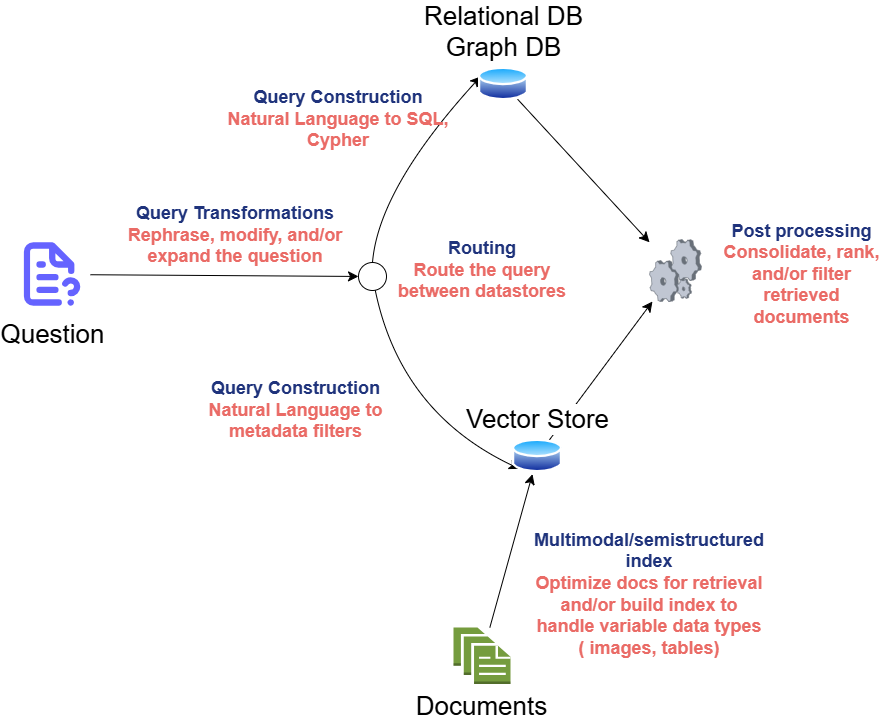
Query Transformation
Major problem with RAG system is it depends on quality of user query and it can be incomplete, ambiguous or poorly worded and lead to more hallucination. Query Transformation is a subset of strategies designed to modify the user input to answer. The range of query transformation strategies ranges from making user input more or less abstract in order to generate an accurate LLM output.

Rewrite-Retrieve-Read — Simply prompts the LLM to rewrite the user query before performing retrieval.
rewrite_prompt = ChatPromptTemplate.from_template("""Provide a better search
 query for web search engine to answer the given question, end the queries
 with ’**’. Question: {x} Answer:""")

def parse_rewriter_output(message):
   return message.content.strip('"').strip("**")
rewriter = rewrite_prompt | llm | parse_rewriter_output

@chain
def qa_rrr(input):
    # rewrite the query
     new_query = rewriter.invoke(input)
     # fetch relevant documents
     docs = retriever.get_relevant_documents(new_query)
     # format prompt
     formatted = prompt.invoke({"context": docs, "question": input})
     # generate answer
     answer = llm.invoke(formatted)
     return answer
# run
qa_rrr.invoke("""Today I woke up and brushed my teeth, then I sat down to read
 the news. But then I forgot the food on the cooker. Who are some key figures in the acient greek history of philosophy?""")

// Based on the given context, some key figures in the ancient greek history of
// Philosophers include: Themistocles (an Athenian statesman), Pythagoras, and Plato.
This technique can be used with any retrieval method be a vector store. But this approach introduces additional latency into your chain because we need to perform two LLM calls in sequence.
Multi-Query Retrieval — It instructs an LLM to generate multiple queries based on the user initial query executing a parallel retrieval of each query from the data source and then inserting the retrieved results as prompt context to generate a final model output. Mainly useful if single query rely on multiple perspectives to provide an answer
from langchain.prompts import ChatPromptTemplate

perspectives_prompt = ChatPromptTemplate.from_template("""You are an AI language
 model assistant. Your task is to generate five different versions of the
 given user question to retrieve relevant documents from a vector database.
 By generating multiple perspectives on the user question, your goal is to
 help the user overcome some of the limitations of the distance-based
 similarity search. Provide these alternative questions separated by
 newlines. Original question: {question}""")

def parse_queries_output(message):
   return message.content.split('\n')
query_gen = perspectives_prompt | llm | parse_queries_output

def get_unique_union(document_lists):
     # Flatten list of lists, and dedupe them
     deduped_docs = {
     doc.page_content: doc
     for sublist in document_lists for doc in sublist
     }
     # return a flat list of unique docs
     return list(deduped_docs.values())
retrieval_chain = query_gen | retriever.batch | get_unique_union
Prompt template generates variations of questions based on user initial query and then retrieval is done parallel then combine using unique union of all relevant documents. We deduplicate them to remove any repeated queries and get dictionary values. Finally, the prompt is constructed including user question and combined retrieved relevant documents and a model interface to generate prediction
prompt = ChatPromptTemplate.from_template("""Answer the following question based
 on this context:
{context}
Question: {question}
""")
@chain
def multi_query_qa(input):
     # fetch relevant documents
     docs = retrieval_chain.invoke(input)
     # format prompt
     formatted = prompt.invoke({"context": docs, "question": input})
     # generate answer
     answer = llm.invoke(formatted)
     return answer
# run
multi_query_qa.invoke("""Who are some key figures in the ancient greek history
 of philosophy?""")
RAG-Fusion — Similar to multi-query retrieval strategy except we apply final reranking step to all the retrieved documents. It makes use of reciprocal rank fusion(RRF) algorithm, combining ranks from different queries and pulling the most relevant documents to final list.
from langchain.prompts import ChatPromptTemplate
from langchain_openai import ChatOpenAI

prompt_rag_fusion = ChatPromptTemplate.from_template("""You are a helpful
 assistant that generates multiple search queries based on a single input
 query. \n
 Generate multiple search queries related to: {question} \n
 Output (4 queries):""")

def parse_queries_output(message):
     return message.content.split('\n')

llm = ChatOpenAI(temperature=0)
query_gen = prompt_rag_fusion | llm | parse_queries_output

def reciprocal_rank_fusion(results: list[list], k=60):
     """reciprocal rank fusion on multiple lists of ranked documents
     and an optional parameter k used in the RRF formula
     """

     # Initialize a dictionary to hold fused scores for each document
     # Documents will be keyed by their contents to ensure uniqueness
     fused_scores = {}
     documents = {}

     # Iterate through each list of ranked documents
     for docs in results:
         # Iterate through each document in the list,
         # with its rank (position in the list)
         for rank, doc in enumerate(docs):
             # Use the document contents as the key for uniqueness
             doc_str = doc.page_content
             # If the document hasn't been seen yet,
             # - initialize score to 0
             # - save it for later
             if doc_str not in fused_scores:
                 fused_scores[doc_str] = 0
                 documents[doc_str] = doc
             # Update the score of the document using the RRF formula:
             # 1 / (rank + k)
             fused_scores[doc_str] += 1 / (rank + k)
              # Sort the documents based on their fused scores in descending order
               # to get the final reranked results
             reranked_doc_strs = sorted(
             fused_scores, key=lambda d: fused_scores[d], reverse=True
             )
             # retrieve the corresponding doc for each doc_str
    return [documents[doc_str] for doc_str in reranked_doc_strs]

retrieval_chain = generate_queries | retriever.batch | reciprocal_rank_fusion
The function reciprocal_rank_fusion takes a list of the search results of each query, so a list of lists of documents, where each inner list of documents is sorted by their relevance to that query. The RRF algorithm then calculates a new score for each document based on its ranks (or positions) in the different lists and sorts them to create a final reranked list. After calculating the fused scores, the function sorts the documents in descending order of these scores to get the final reranked list, which is then returned.
Notice that the function also takes a k parameter, which determines how much influence documents in each query’s result sets have over the final list of documents. A higher value indicates that lower-ranked documents have more influence.
Finally, we combine our new retrieval chain with the full chain we have seen earlier. RAG-fusion strength lies in its ability to capture the user intended expression, navigate complex queries and broaden the scope of retrieved documents.
Hypothetical Document Embeddings
It is strategy that involves creating a hypothetical document based on the user query, embedding the document and retrieving relevant documents based on vector similarity.
from langchain.prompts import ChatPromptTemplate
from langchain_core.output_parsers import StrOutputParser
from langchain_openai import ChatOpenAI

prompt_hyde = ChatPromptTemplate.from_template("""Please write a passage to  answer the question.\n Question: {question} \n Passage:""")
generate_doc = (
 prompt_hyde | ChatOpenAI(temperature=0) | StrOutputParser()
)
Now we take this and use it as input to retriever which will generate its embedding and search for similar documents in the vector store
retrieval_chain = generate_doc | retriever
Finally we take retrieved documents and pass then as context to the final prompt and instruct the model to generate the output.
Rewriting the query can take many forms —
- Removing irrelevant/unrelated text from the query
- Grounding the query with past conversation history.
- Casting a wider net for relevant documents by also fetching documents for related queries
- Decomposing a complex question into multiple, simpler questions and then including results for all of them in the final prompt to generate an answer.
The right rewriting strategy to use will depend on your use case.
Query Routing
The required data may live in variety of data sources. This is the strategy used to forward user query to the relevant data source
Logical Routing — we give LLM knowledge of various data sources at our disposal and let LLM reason which data source to apply based on user query. We use function calling models like GPT-3.5 Turbo to help classify each query into one of the available routes. Function call involves defining a schema that the model can use to generate arguments of a function based on query. This enables us to generate structured outputs that can be used to run other functions
from typing import Literal
from langchain_core.prompts import ChatPromptTemplate
from langchain_core.pydantic_v1 import BaseModel, Field
from langchain_openai import ChatOpenAI
# Data model
class RouteQuery(BaseModel):
   """Route a user query to the most relevant datasource."""
   datasource: Literal["python_docs", "js_docs"] = Field(
   ...,
   description="""Given a user question, choose which datasource would be
   most relevant for answering their question""",
   )
# LLM with function call
llm = ChatOpenAI(model="gpt-3.5-turbo", temperature=0)
structured_llm = llm.with_structured_output(RouteQuery)

# Prompt
system = """You are an expert at routing a user question to the appropriate data source.
Based on the programming language the question is referring to, route it to the relevant data source."""
prompt = ChatPromptTemplate.from_messages(
 [
 ("system", system),
 ("human", "{question}"),
 ]
)
# Define router
router = prompt | structured_llm
Now we invoke the LLM to extract the data source based on predefined schema
question = """Why doesn't the following code work:
from langchain_core.prompts import ChatPromptTemplate
prompt = ChatPromptTemplate.from_messages(["human", "speak in {language}"])
prompt.invoke("french")
"""
result = router.invoke({"question": question})
result.datasource

# { datasource: "python_docs" }
LLM produced JSOM output confirming the schema we defined. We can now pass the value into another function to execute additional logic as required
def choose_route(result):
     if "python_docs" in result.datasource.lower():
     ### Logic here
     return "chain for python_docs"
     else:
     ### Logic here
     return "chain for js_docs"
full_chain = router | RunnableLambda(choose_route)
We do not do exact string comparison but instead first turn the generated output to lowercase and then do substring match. This makes our chain more resilient to LLM.
Logical routing is most suitable when you have a defined list of data sources from which relevant data can be retrieved and utilized by the LLM to generate an accurate output.
Semantic Routing — It involves embedding various prompts that represent various data sources alongside the user query and then performing vector similarity search to retrieve the most similar prompt.
from langchain.utils.math import cosine_similarity
from langchain_core.output_parsers import StrOutputParser
from langchain_core.prompts import PromptTemplate
from langchain_core.runnables import chain
from langchain_openai import ChatOpenAI, OpenAIEmbeddings

# Two prompts
physics_template = """You are a very smart physics professor. You are great at
 answering questions about physics in a concise and easy-to-understand manner.
 When you don't know the answer to a question, you admit that you don't know.
Here is a question:
{query}"""
math_template = """You are a very good mathematician. You are great at answering
 math questions. You are so good because you are able to break down hard
 problems into their component parts, answer the component parts, and then
 put them together to answer the broader question.
Here is a question:
{query}"""

# Embed prompts
embeddings = OpenAIEmbeddings()
prompt_templates = [physics_template, math_template]
prompt_embeddings = embeddings.embed_documents(prompt_templates)

# Route question to prompt
@chain
def prompt_router(query):
   # Embed question
   query_embedding = embeddings.embed_query(query)

  #Compute similarity
   similarity = cosine_similarity([query_embedding], prompt_embeddings)[0]
   # Pick the prompt most similar to the input question
   most_similar = prompt_templates[similarity.argmax()]
   return PromptTemplate.from_template(most_similar)

semantic_router = (
 prompt_router
 | ChatOpenAI()
 | StrOutputParser()
)
print(semantic_router.invoke("What's a black hole"))
Query Construction
RAG is effective way to embed and retrieve relevant unstructured data from a vector store based on query. But most data available for production apps is structured and stored in relational databases. Query construction is the process of transforming a natural language query into the query language of database or data source you are interacting with.
Text-to-Metadata Filter — During embedding process we can attach metadata key value pairs to vectors in an index and then later specify filter expressions when you query the index. LangChain provides a SelfQueryRetriever that abstracts the logic and makes it easier to translate natural language queries into structured queries for various data sources. It utilizes an LLM to extract and execute the relevant metadata filters based on a users query and predefined metadata schema
from langchain.chains.query_constructor.base import AttributeInfo
from langchain.retrievers.self_query.base import SelfQueryRetriever
from langchain_openai import ChatOpenAI

fields = [
 AttributeInfo(
 name="genre",
 description="The genre of the movie",
 type="string or list[string]",
 ),
 AttributeInfo(
 name="year",
 description="The year the movie was released",
 type="integer",
 ),
 AttributeInfo(
 name="director",
 description="The name of the movie director",
 type="string",
 ),
 AttributeInfo(
 name="rating", description="A 1-10 rating for the movie", type="float"
 ),
]
description = "Brief summary of a movie"

llm = ChatOpenAI(temperature=0)
retriever = SelfQueryRetriever.from_llm(
 llm, db, description, fields,
)
print(retriever.invoke(
 "What's a highly rated (above 8.5) science fiction film?"))
The retriever takes the user query and split into filter to apply on the metadata of each document first and query to use for semantic search on the documents. To do this, we have to describe which fields the metadata of our documents contain then the retriever
- Sends the query generation prompt to the LLM
- Parse metadata filter and rewritten search query from the LLM output
- convert the metadata filter generated by the LLM to the format appropriate for our vector store
- Issue a similarity search against the vector store, filtered to only match documents whos metadata passes the generated filter
Text-to-SQL — We can use LLM to translate a user query to SQL queries there is little margin for error. The useful strategies are
Database Description — Providing LLM with the CREATE TABLE description for each table including column names and types. we can also provide a few example rows from the table
Few-shot examples — Feed the prompt with few shot examples of question-query matches can improve the query generation accuracy
from langchain_community.tools import QuerySQLDatabaseTool
from langchain_community.utilities import SQLDatabase
from langchain.chains import create_sql_query_chain
from langchain_openai import ChatOpenAI

# replace this with the connection details of your db
db = SQLDatabase.from_uri("sqlite:///Chinook.db")
llm = ChatOpenAI(model="gpt-4", temperature=0)

# convert question to sql query
write_query = create_sql_query_chain(llm, db)

# Execute SQL query
execute_query = QuerySQLDatabaseTool(db=db)

# combined
chain = write_query | execute_query

# invoke the chain
chain.invoke('How many employees are there?');
The user query is converted to SQL query appropriate to the dialect of our database. Then we execute that query on database. As security measure, use the queries to run on database with read-only permissions and we should provide limited access. Add timeout to the queries run by this application to ensure expensive queries are cancelled
Add Memory to the Chatbot
LLM are stateless which means each time the model is prompted to generate new response it has no memory of the prior prompt or model response. To provide historical information to the model, we need robust memory system that keep track of previous conversations and context
Chatbot Memory System
A simple way to build a chatbot memory system that incorporates effective solutions to these design decisions is to store and reuse the history of all chat interactions between user and model. The state of this memory system can be:
- Stored list of messages
- updated by appending recent messages after each turn
- Appended into the prompt by inserting the messages into the prompt
Simple version of memory system using LangChain
from langchain_core.prompts import ChatPromptTemplate
from langchain_openai import ChatOpenAI

prompt = ChatPromptTemplate.from_messages([
 ("system", """You are a helpful assistant. Answer all questions to the best
 of your ability."""),
 ("placeholder", "{messages}"),
])

model = ChatOpenAI()

chain = prompt | model
chain.invoke({
 "messages": [
 ("human","""Translate this sentence from English to French: I love
 programming."""),
 ("ai", "J'adore programmer."),
 ("human", "What did you just say?"),
 ],
})
# I said, "J'adore programmer," which means "I love programming" in French.
Some challenges in production are
- You‘ll need to update memory after every interaction automatically
- Want to store those memories in durable storage such as relational database.
- Want to control how many and which messages are stored for later and how many used for new interactions
- Want to inspect and modify this state outside a call to an LLM
LangGraph
LangGraph was designed to enable developers to implement multifactor, multistep, stateful cognitive architectures called graphs. An LLM prompt can be more powerful when paired with search engine or even with different LLM prompts.
- Define actors involved ( nodes in graph) and how they hand off work to each other
- Schedule execution of each actor at the appropriate time — in parallel if needed — with deterministic results
Communication across steps which is handing off from one actor to other until last step is reached requires tracking some state. Otherwise, we get the same result as first time. We can have all actors colloborate on updating single central state
- Snapshot and store the central state during or after each computation
- Pause and resume execution, which makes it easy to recover from errors
- Implement human-in-loop controls
Each graph is made up of
- State — Data received from outside the application, modified and produced by the application while it is running
- Nodes — Each step to be taken. Nodes are simply Python functions, which receives the current state as input and can return an update to that state.
- Edges — The connections between nodes. They determine the path taken from the first node to the last and they can be fixed or conditional.
LangGraph offers visualizing the graphs and numerous features to debug their workings while in development and can be deployed to serve production workloads at high scale
Let us create simple chatbot with LangGraph
from typing import Annotated, TypedDict
from langgraph.graph import StateGraph, START, END
from langgraph.graph.message import add_messages

class State(TypedDict):
     # Messages have the type "list". The `add_messages`
     # function in the annotation defines how this state should
     # be updated (in this case, it appends new messages to the
     # list, rather than replacing the previous messages)
    messages: Annotated[list, add_messages]
builder = StateGraph(State)
The first thing we do is define graph. The state consists of the shape / Schema of the graph state as well as reducer functions that specify how to apply updates to the state. Here add_messages append the new messages to the existing list.
Node represent unit of work and it will receive the current state as input and return value that updates that state. Let us add the chatbot node
from langchain_openai import ChatOpenAI

model = ChatOpenAI()

def chatbot(state: State):
   answer = model.invoke(state["messages"])
   return {"messages": [answer]}
# The first argument is the unique node name
# The second argument is the function or Runnable to run
builder.add_node("chatbot", chatbot)
This mode receives the current state does the LLM call and then returns an update to the state containing the new message produced by the LLM. The add_messages reducer appends this message to the messages already in the state. Finally we add edges
builder.add_edge(START, 'chatbot')
builder.add_edge('chatbot', END)

graph = builder.compile()
It tells the graph where to start its work each time you run it and where to exit. It compiles the graph into a runnable object with the familiar invoke and stream methods.
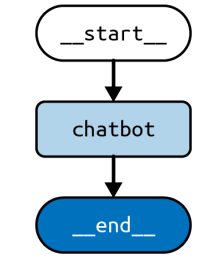
We can draw visual representation of the graph
graph.get_graph().draw_mermaid_png()
input = {"messages": [HumanMessage('hi!)]}

for chunk in graph.stream(input):
   print(chunk)

# { "chatbot": { "messages": [AIMessage("How can I help you?")] } }
Adding memory to StateGraph
LangGraph has built-in persistence. We will recompile our graph now attaching a checkpointer which is storage adapter for LangGraph. It also have several adapters like in-memory adapter, SQLite Adapter for local apps and testing, Postgres adapter for large scale applications
from langgraph.checkpoint.memory import MemorySaver

graph = builder.compile(checkpointer=MemorySaver())
This returns a runnable object with the same methods as the one we use previously but now it stores the state at the end of each step so every invocation after the first doen’t start from blank state. Any time the graph is called, it starts by using the checkpointer to fetch the most recent saved state and combines the new input with the previous state.
thread1 = {"configurable": {"thread_id": "1"}}
result_1 = graph.invoke(
 { "messages": [HumanMessage("hi, my name is Jack!")] },
 thread1
)
// { "chatbot": { "messages": [AIMessage("How can I help you, Jack?")] } }
result_2 = graph.invoke(
 { "messages": [HumanMessage("what is my name?")] },
 thread1
)
// { "chatbot": { "messages": [AIMessage("Your name is Jack")] } }
The object thread1 identifies the current interaction as belonging to a particular history of interactions which is called threads in LangGraph. Threads are automatically created when first used. Any string is valid identifier for the thread. We can now use multiple users with independent conversations that never mixed up. You can also inspect and update the state directly
graph.get_state(thread1)
graph.update_state(thread1, [HumanMessage('I like LLMs!)])
Modifying chat history — The chat history messages are not best state or format to generate accurate response from the model. We can modify by trimming, filtering and merging messages
Trimming — LLM have limited context windows and max number of tokens that LLM can receive the prompt. Excessive information can also distract the model and lead to hallucination. So we should limit the number of messages that are retrieved from chat history and appended to the prompt. LangChain has built-in trim_messages helper that incorporates various strategies to meet these requirements.
from langchain_core.messages import SystemMessage, trim_messages
from langchain_openai import ChatOpenAI

trimmer = trim_messages(
 max_tokens=65,
 strategy="last",
 token_counter=ChatOpenAI(model="gpt-4o"),
 include_system=True,
 allow_partial=False,
 start_on="human",
)

messages = [
 SystemMessage(content="you're a good assistant"),
 HumanMessage(content="hi! I'm bob"),
 AIMessage(content="hi!"),
 HumanMessage(content="I like vanilla ice cream"),
 AIMessage(content="nice"),
 HumanMessage(content="what's 2 + 2"),
 AIMessage(content="4"),
 HumanMessage(content="thanks"),
 AIMessage(content="no problem!"),
 HumanMessage(content="having fun?"),
 AIMessage(content="yes!"),
]
trimmer.invoke(messages)

```Output
[SystemMessage(content="you're a good assistant"),
 HumanMessage(content='what's 2 + 2'),
 AIMessage(content='4'),
 HumanMessage(content='thanks'),
 AIMessage(content='no problem!'),
 HumanMessage(content='having fun?'),
 AIMessage(content='yes!')]
```
The parameter strategy controls whether to start from the beginning or the end of the list. We have given last which prioritizes most recent messages
token_counter is an LLM or chat model which is used to count tokens using tokenizer appropriate to that model. We can add parameter include_system=True to ensure the trimmer keeps system message. allow_partial determines whether the cut the last messages content to fit within the limit, we set to false so it completely removes the message. start_on=”human” ensures we never remove an AIMessage without also removing a corresponding HumanMessage
Filtering Messages — As the list of chat history messages grows a wider variety of types, subchains and models may be utilized. LangChain’s filter_messages helper makes it easier to filter the chat history messages by type, ID or name
from langchain_core.messages import (
 AIMessage,
 HumanMessage,
 SystemMessage,
 filter_messages,
)
messages = [
 SystemMessage("you are a good assistant", id="1"),
 HumanMessage("example input", id="2", name="example_user"),
 AIMessage("example output", id="3", name="example_assistant"),
 HumanMessage("real input", id="4", name="bob"),
 AIMessage("real output", id="5", name="alice"),
]
filter_messages(messages, include_types="human")
"""
HumanMessage(content='example input', name='example_user', id='2'),
HumanMessage(content='real input', name='bob', id='4')]
"""

filter_messages(messages, exclude_names=["example_user", "example_assistant"])
"""
[SystemMessage(content='you are a good assistant', id='1'),
HumanMessage(content='real input', name='bob', id='4'),
AIMessage(content='real output', name='alice', id='5')]
"""
filter_messages(
 messages,
 include_types=[HumanMessage, AIMessage],
 exclude_ids=["3"]
)
"""
[HumanMessage(content='example input', name='example_user', id='2'),
 HumanMessage(content='real input', name='bob', id='4'),
 AIMessage(content='real output', name='alice', id='5')]
Filter message helper can also be used imperatively or declaratively making it easy to compose with other components in a chain
model = ChatOpenAI()
filter_ = filter_messages(exclude_names=["example_user", "example_assistant"])
chain = filter_ | model
Merging Consecutive Messages — certain models dont support inputs, consecutive messages of same type.LangChain’s merge_message_runs utility makes it easy to merge consecutive messages of same type
from langchain_core.messages import (
 AIMessage,
 HumanMessage,
 SystemMessage,
 merge_message_runs,
)
messages = [
 SystemMessage("you're a good assistant."),
 SystemMessage("you always respond with a joke."),
 HumanMessage(
 [{"type": "text", "text": "i wonder why it's called langchain"}]
 ),
 HumanMessage("and who is harrison chasing anyway"),
 AIMessage(
 '''Well, I guess they thought "WordRope" and "SentenceString" just
 didn\'t have the same ring to it!'''
 ),
 AIMessage("""Why, he's probably chasing after the last cup of coffee in the
 office!"""),
]

merge_message_runs(messages)
"""
[SystemMessage(content="you're a good assistant.\nyou always respond with a
 joke."),
 HumanMessage(content=[{'type': 'text', 'text': "i wonder why it's called
 langchain"}, 'and who is harrison chasing anyway']),
 AIMessage(content='Well, I guess they thought "WordRope" and "SentenceString"
 just didn\'t have the same ring to it!\nWhy, he\'s probably chasing after
 the last cup of coffee in the office!')]
"""
List of merged messages will have content blocks and if both messages to merge have string contents, then those are concatenated with a newline character.
model = ChatOpenAI()
merger = merge_message_runs()
chain = merger | model
Cognitive Architecture with LangGraph
An LLM cognitive architecture can be defined as a recipe for the steps to be taken by LLM application. A step is retrieval of relevant documents or calling an LLM with chain-of-thought prompt. Let us use the chatbot we created earlier that will respond directly to user messages. Now let us include chain where multiple LLM calls are made. One LLM call to generate SQL query and other one LLM call write explanation of the query
from typing import Annotated, TypedDict
from langchain_core.messages import HumanMessage, SystemMessage
from langchain_openai import ChatOpenAI
from langgraph.graph import END, START, StateGraph
from langgraph.graph.message import add_messages
# useful to generate SQL query
model_low_temp = ChatOpenAI(temperature=0.1)
# useful to generate natural language outputs
model_high_temp = ChatOpenAI(temperature=0.7)
class State(TypedDict):
     # to track conversation history
     messages: Annotated[list, add_messages]
     # input
     user_query: str
     # output
     sql_query: str
     sql_explanation: str
class Input(TypedDict):
     user_query: str
class Output(TypedDict):
     sql_query: str
     sql_explanation: str
generate_prompt = SystemMessage(
 """You are a helpful data analyst who generates SQL queries for users based
 on their questions."""
)
def generate_sql(state: State) -> State:
     user_message = HumanMessage(state["user_query"])
     messages = [generate_prompt, *state["messages"], user_message]
     res = model_low_temp.invoke(messages)
     return {
     "sql_query": res.content,
     # update conversation history
     "messages": [user_message, res],
     }
explain_prompt = SystemMessage(
 "You are a helpful data analyst who explains SQL queries to users."
)
def explain_sql(state: State) -> State:
     messages = [
     explain_prompt,
     # contains user's query and SQL query from prev step
     *state["messages"],
     ]
     res = model_high_temp.invoke(messages)
     return  { "sql_explanation": res.content,
       # update conversation history
       "messages": res,
       }
builder = StateGraph(State, input=Input, output=Output)
builder.add_node("generate_sql", generate_sql)
builder.add_node("explain_sql", explain_sql)
builder.add_edge(START, "generate_sql")
builder.add_edge("generate_sql", "explain_sql")
builder.add_edge("explain_sql", END)
graph = builder.compile()

graph.invoke({
 "user_query": "What is the total sales for each product?"
})

'''
{
 "sql_query": "SELECT product_name, SUM(sales_amount) AS total_sales\nFROM
 sales\nGROUP BY product_name;",
 "sql_explanation": "This query will retrieve the total sales for each product
 by summing up the sales_amount column for each product and grouping the
 results by product_name.",
}
'''
First generate_sql is executed which populates sql_query in the state and updates the messages key with the new messages. Then explain_sql node runs, taking the SQL query generated in previous step and populating the sql_explanation key in the state. The remaining state keys are used by the graph nodes internally to keep intermediate state and are made available to the user as part of the streaming output produced by stream()
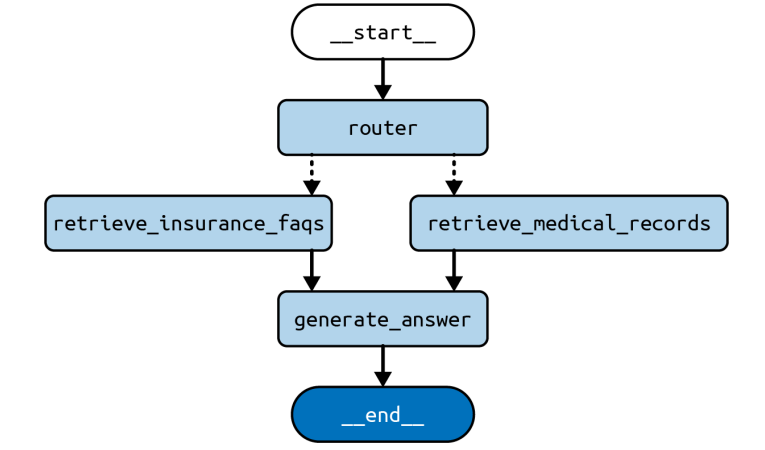
Now let us use Router which decides which indexes to pick and send to the LLM
from typing import Annotated, Literal, TypedDict
from langchain_core.documents import Document
from langchain_core.messages import HumanMessage, SystemMessage
from langchain_core.vectorstores.in_memory import InMemoryVectorStore
from langchain_openai import ChatOpenAI, OpenAIEmbeddings
from langgraph.graph import END, START, StateGraph
from langgraph.graph.message import add_messages

embeddings = OpenAIEmbeddings()
# useful to generate SQL query
model_low_temp = ChatOpenAI(temperature=0.1)
# useful to generate natural language outputs
model_high_temp = ChatOpenAI(temperature=0.7)

class State(TypedDict):
    # to track conversation history
     messages: Annotated[list, add_messages]
     # input
     user_query: str
     # output
     domain: Literal["records", "insurance"]
     documents: list[Document]
     answer: str
class Input(TypedDict):
     user_query: str
class Output(TypedDict):
     documents: list[Document]
     answer

medical_records_store = InMemoryVectorStore.from_documents([], embeddings)
medical_records_retriever = medical_records_store.as_retriever()
insurance_faqs_store = InMemoryVectorStore.from_documents([], embeddings)
insurance_faqs_retriever = insurance_faqs_store.as_retriever()
router_prompt = SystemMessage(
 """You need to decide which domain to route the user query to. You have two
 domains to choose from:
 - records: contains medical records of the patient, such as
 diagnosis, treatment, and prescriptions.
 - insurance: contains frequently asked questions about insurance
 policies, claims, and coverage.
Output only the domain name."""
)
def router_node(state: State) -> State:
     user_message = HumanMessage(state["user_query"])
     messages = [router_prompt, *state["messages"], user_message]
     res = model_low_temp.invoke(messages)
     return {
     "domain": res.content,
     # update conversation history
     "messages": [user_message, res],
     }
def pick_retriever(
 state: State,
) -> Literal["retrieve_medical_records", "retrieve_insurance_faqs"]:
     if state["domain"] == "records":
     return "retrieve_medical_records"
     else:
     return "retrieve_insurance_faqs"

def retrieve_medical_records(state: State) -> State:
     documents = medical_records_retriever.invoke(state["user_query"])
     return {
     "documents": documents,
     }
def retrieve_insurance_faqs(state: State) -> State:
     documents = insurance_faqs_retriever.invoke(state["user_query"])
     return {
     "documents": documents,
     }
medical_records_prompt = SystemMessage(
 """You are a helpful medical chatbot who answers questions based on the
 patient's medical records, such as diagnosis, treatment, and
 prescriptions."""
)
insurance_faqs_prompt = SystemMessage(
 """You are a helpful medical insurance chatbot who answers frequently asked
 questions about insurance policies, claims, and coverage."""
)
def generate_answer(state: State) -> State:
     if state["domain"] == "records":
     prompt = medical_records_prompt
     else:
     prompt = insurance_faqs_prompt
     messages = [
     prompt,
     *state["messages"],
     HumanMessage(f"Documents: {state["documents"]}"),
     ]
     res = model_high_temp.invoke(messages)
     return {
     "answer": res.content,
     # update conversation history
     "messages": res,
     }
builder = StateGraph(State, input=Input, output=Output)
builder.add_node("router", router_node)
builder.add_node("retrieve_medical_records", retrieve_medical_records)
builder.add_node("retrieve_insurance_faqs", retrieve_insurance_faqs)
builder.add_node("generate_answer", generate_answer)
builder.add_edge(START, "router")
builder.add_conditional_edges("router", pick_retriever)
builder.add_edge("retrieve_medical_records", "generate_answer")
builder.add_edge("retrieve_insurance_faqs", "generate_answer")
builder.add_edge("generate_answer", END)
graph = builder.compile()
input = {
 "user_query": "Am I covered for COVID-19 treatment?"
}
for c in graph.stream(input):
   print(c)

'''
Output -{
 "router": {
 "messages": [
 HumanMessage(content="Am I covered for COVID-19 treatment?"),
 AIMessage(content="insurance"),
 ],
 "domain": "insurance",
 }
}
{
 "retrieve_insurance_faqs": {
 "documents": [...]
 }
}
{
 "generate_answer": {
 "messages": AIMessage(
 content="...",
 ),
 "answer": "...",}}
'''
This output stream contains the values returned by each node that ran during this execution of the graph.
Agent Architecture
We might need more tasks like deciding what to do and having access to more possible actions and need to access infromation about external environment. So agentic LLM uses an LLM to pick from one or more possible action given some context about the current state of the world or some desired next state.
- Tool Calling — Include a list of external functions that the LLM can make use of in your prompt and provide instructions on how to format its choice in the output it generates
- Chain-of-thought — This is done by giving instruction “think step by step”
Plan-Do loop
By loop we run the same code multiple times until a stop condition is hit. The key to agent architecture is to have an LLM control the stop condition and decide when to stop looping.
Let us implement it with some additional dependencies like DuckDuckGo search tool.
pip install duckduckgo-search

import ast
from typing import Annotated, TypedDict
from langchain_community.tools import DuckDuckGoSearchRun
from langchain_core.tools import tool
from langchain_openai import ChatOpenAI
from langgraph.graph import START, StateGraph
from langgraph.graph.message import add_messages
from langgraph.prebuilt import ToolNode, tools_condition

@tool
def calculator(query: str) -> str:
 """A simple calculator tool. Input should be a mathematical expression."""
     return ast.literal_eval(query)

search = DuckDuckGoSearchRun()
tools = [search, calculator]
model = ChatOpenAI(temperature=0.1).bind_tools(tools)

class State(TypedDict):
     messages: Annotated[list, add_messages]
def model_node(state: State) -> State:
     res = model.invoke(state["messages"])
     return {"messages": res}

builder = StateGraph(State)
builder.add_node("model", model_node)
builder.add_node("tools", ToolNode(tools))
builder.add_edge(START, "model")
builder.add_conditional_edges("model", tools_condition)
builder.add_edge("tools", "model")
graph = builder.compile()
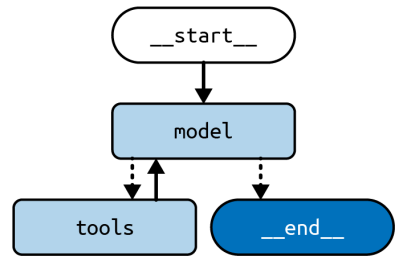
We used 2 tools search and calculator we can add more too. ToolNode serves as a node in our graph, it executes the tool calls requested in the latest AI message found in the state and returns ToolMessage with the result of each ToolNode also handles exceptions raised by tools using error message to build a ToolMessage then passed to LLM which may decide what to do with the error
tools_condition serves as a conditional edge function that looks at the latest AI message in the state and routes to the tools node if there are any tools to execute otherwise, end the graph.
The graph loops between model and tools nodes. Model itself decides when to end the computation which is the key attribute of the agent architecture.
input = {
 "messages": [
 HumanMessage("""How old was the 30th president of the United States
 when he died?""")
 ]
}
for c in graph.stream(input):
 print(c)
In the standard Agent architecture the LLM is always called upon to decide what tool to call next. The LLM has flexibility to adapt the behavior of the application to each user query that comes in. but this is unpredictable. So the search tool should always be called first to reduce latency and errors.
@tool
def calculator(query: str) -> str:
 """A simple calculator tool. Input should be a mathematical expression."""
   return ast.literal_eval(query)
search = DuckDuckGoSearchRun()
tools = [search, calculator]
model = ChatOpenAI(temperature=0.1).bind_tools(tools)

class State(TypedDict):
   messages: Annotated[list, add_messages]
def model_node(state: State) -> State:
   res = model.invoke(state["messages"])
   return {"messages": res}
def first_model(state: State) -> State:
   query = state["messages"][-1].content
   search_tool_call = ToolCall(
   name="duckduckgo_search", args={"query": query}, id=uuid4().hex
   )
   return {"messages": AIMessage(content="", tool_calls=[search_tool_call])}

builder = StateGraph(State)
builder.add_node("first_model", first_model)
builder.add_node("model", model_node)
builder.add_node("tools", ToolNode(tools))
builder.add_edge(START, "first_model")
builder.add_edge("first_model", "tools")
builder.add_conditional_edges("model", tools_condition)
builder.add_edge("tools", "model")

graph = builder.compile()
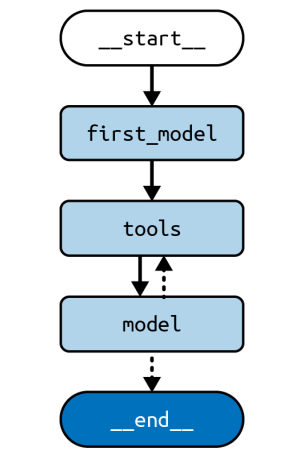
Now we will start all invocations by first calling first_model whcih doesnt call LLM and calls search tool for the users message.
If the LLM is given too much excessive information in the prompt. When given many tools the planning performance starts to suffer. One solution is to use RAG step to preselct the most relevant tools for the current query and then feed the LLM only the subset of tools instead of entire list. This help reduce cost of calling the LLM. RAG step can cause additinal latency which should be taken care of.
import ast
from typing import Annotated, TypedDict
from langchain_community.tools import DuckDuckGoSearchRun
from langchain_core.documents import Document
from langchain_core.messages import HumanMessage
from langchain_core.tools import tool
from langchain_core.vectorstores.in_memory import InMemoryVectorStore
from langchain_openai import ChatOpenAI, OpenAIEmbeddings
from langgraph.graph import START, StateGraph
from langgraph.graph.message import add_messages
from langgraph.prebuilt import ToolNode, tools_condition
@tool
def calculator(query: str) -> str:
 """A simple calculator tool. Input should be a mathematical expression."""
     return ast.literal_eval(query)
search = DuckDuckGoSearchRun()

tools = [search, calculator]
embeddings = OpenAIEmbeddings()
model = ChatOpenAI(temperature=0.1)

tools_retriever = InMemoryVectorStore.from_documents(
 [Document(tool.description, metadata={"name": tool.name}) for tool in tools],
 embeddings,
).as_retriever()

class State(TypedDict):
   messages: Annotated[list, add_messages]
   selected_tools: list[str]
def model_node(state: State) -> State:
   selected_tools = [
   tool for tool in tools if tool.name in state["selected_tools"]
   ]
   res = model.bind_tools(selected_tools).invoke(state["messages"])
   return {"messages": res}
def select_tools(state: State) -> State:
   query = state["messages"][-1].content
   tool_docs = tools_retriever.invoke(query)
   return {"selected_tools": [doc.metadata["name"] for doc in tool_docs]}
builder = StateGraph(State)
builder.add_node("select_tools", select_tools)
builder.add_node("model", model_node)
builder.add_node("tools", ToolNode(tools))
builder.add_edge(START, "select_tools")
builder.add_edge("select_tools", "model")
builder.add_conditional_edges("model", tools_condition)
builder.add_edge("tools", "model")

graph = builder.compile()

input = {
 "messages": [
 HumanMessage("""How old was the 30th president of the United States when
 he died?""")
 ]
}
for c in graph.stream(input):
    print(c)
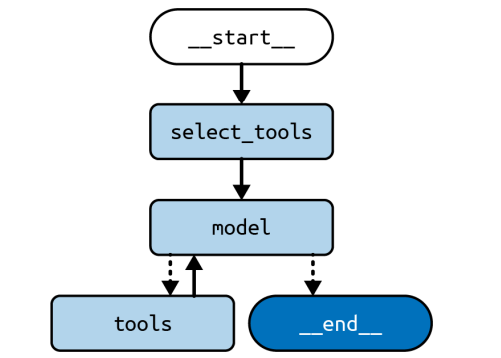
Reflection
Reflection is the creation of a loop between a creator prompt and the reviser prompt. This mirrors the creation process for many human created artifacts. Reflection can be combined with other techniques like chain-of-thought and tool calling.
We implement reflection as a graph with two nodes generate and reflect. This graph will be tasked with writing three-paragraph essays with the generate node writing or revising drafts of the essay and reflect writing a critique to inform the next revision. We ll run the loop fixed number of times but a variation of the technique would be to have the reflect node decide when to finish
from typing import Annotated, TypedDict
from langchain_core.messages import (
 AIMessage,
 BaseMessage,
 HumanMessage,
 SystemMessage,
)
from langchain_openai import ChatOpenAI
from langgraph.graph import END, START, StateGraph
from langgraph.graph.message import add_messages
model = ChatOpenAI()
class State(TypedDict):
   messages: Annotated[list[BaseMessage], add_messages]
generate_prompt = SystemMessage(
 """You are an essay assistant tasked with writing excellent 3-paragraph
 essays."""
 "Generate the best essay possible for the user's request."
 """If the user provides critique, respond with a revised version of your
 previous attempts."""
)
def generate(state: State) -> State:
   answer = model.invoke([generate_prompt] + state["messages"])
   return {"messages": [answer]}

reflection_prompt = SystemMessage(
 """You are a teacher grading an essay submission. Generate critique and
 recommendations for the user's submission."""
 """Provide detailed recommendations, including requests for length, depth,
 style, etc."""
)

def reflect(state: State) -> State:
   # Invert the messages to get the LLM to reflect on its own output
   cls_map = {AIMessage: HumanMessage, HumanMessage: AIMessage}
   # First message is the original user request.
   # We hold it the same for all nodes
   translated = [reflection_prompt, state["messages"][0]] + [
   cls_map[msg.__class__](content=msg.content)
   for msg in state["messages"][1:]
   ]
   answer = model.invoke(translated)
   # We treat the output of this as human feedback for the generator
   return {"messages": [HumanMessage(content=answer.content)]}
def should_continue(state: State):
   if len(state["messages"]) > 6:
       # End after 3 iterations, each with 2 messages
       return END
   else:
       return "reflect"

builder = StateGraph(State)
builder.add_node("generate", generate)
builder.add_node("reflect", reflect)
builder.add_edge(START, "generate")
builder.add_conditional_edges("generate", should_continue)
builder.add_edge("reflect", "generate")
graph = builder.compile()
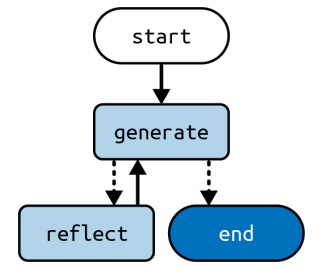
the reflect node tricks the LLM into thinking it is critiquing essays written by the user. the generate node is made to think that the critique comes from the user. This simple type of reflection can sometimes improve performance by giving the LLM multiple attempts at refining its output and by letting the reflection node adopt a different persona while critiquing the output.
In certain use cases, it could be helpful to ground the critique with external informa‐ tion. For instance, if you were writing a code-generation agent, you could have a step before reflect that would run the code through a linter or compiler and report any errors as input to reflect.
Subgraphs in LangGraph
Subgraphs are graphs that are used as part of another graph. It is useful in cases where you have to build multi-agent systems, when we want to reuse a set of nodes in multiple graphs.
There are 2 ways we add subgraph nodes to the parent graph
- Add a node that calls the subgraph directly
- Add a node with a function that invokes the subgraph
Calling subgraph directly — This is the simplest way to create subgraphs and parent and subgraph share same state keys and used to communicate
from langgraph.graph import START, StateGraph
from typing import TypedDict

class State(TypedDict):
   foo: str # this key is shared with the subgraph
class SubgraphState(TypedDict):
   foo: str # this key is shared with the parent graph
   bar: str
# Define subgraph
def subgraph_node(state: SubgraphState):
   # note that this subgraph node can communicate with the parent graph
   # via the shared "foo" key
   return {"foo": state["foo"] + "bar"}
subgraph_builder = StateGraph(SubgraphState)
subgraph_builder.add_node(subgraph_node)
...
subgraph = subgraph_builder.compile()
# Define parent graph
builder = StateGraph(State)
builder.add_node("subgraph", subgraph)
...
graph = builder.compile()
Calling subgraph with a function — When we want to define a subgraph with completely different schema. We create a node with function that invokes the subgraph. this function will need to transform the input state to the subgraph state before invoking the subgraph and transform the results back to the parent state before returning the state update from the node.
class State(TypedDict):
   foo: str
class SubgraphState(TypedDict):
   # none of these keys are shared with the parent graph state
   bar: str
   baz: str
  # Define subgraph
def subgraph_node(state: SubgraphState):
   return {"bar": state["bar"] + "baz"}
subgraph_builder = StateGraph(SubgraphState)
subgraph_builder.add_node(subgraph_node)
...
subgraph = subgraph_builder.compile()
# Define parent graph
def node(state: State):
   # transform the state to the subgraph state
   response = subgraph.invoke({"bar": state["foo"]})
   # transform response back to the parent state
   return {"foo": response["bar"]}
builder = StateGraph(State)
# note that we are using `node` function instead of a compiled subgraph
builder.add_node(node)
...
graph = builder.compile()
Multi-Agent Architecture
As the LLM agents grow in size, scope and complexity we get several issues that impact the performance. The agent have too many tools to choose from or the context grows too complex for single agent to keep track of and the size of prompts and things mentioned goes beyond scope and also you may want to use specialized subsystem for a praticular area.
To tackle these problems, we might need to consider breaking the application into multiple smaller, independent agents and composing them into multi-agent system. There are several ways to connect agents in multi-agent system
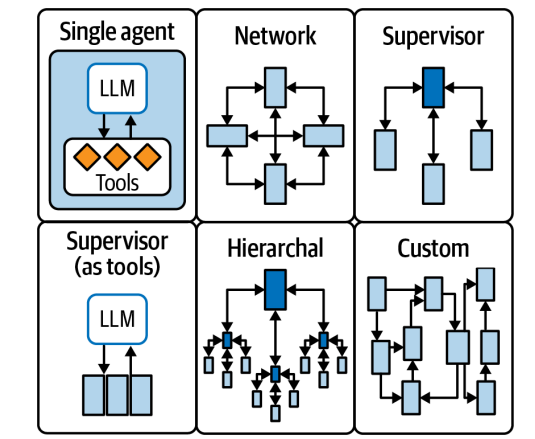
Network — Each agent can communicate with every other agent. Any agent can decide which other agent is to be executed next
Supervisor — Each agent communicates with single agent called supervisor and it makes decisions on which agent should be called next.
Hierarchial — It is like supervisor of supervisors. Generalization of supervisor architecture
Custom multi-agent workflow — Each agent communicates with only a subset of agents. Parts of the flow are deterministic, and only select agents can decide which other agents to call next
Let us see supervisor architecture
Supervisor Architecture — We add agent to the graph as a node and also add a supervisor node which decides which agents should be called next. We use conditional edges to route execution to the appropriate agent node based on supervisor decision
from typing import Literal
from langchain_openai import ChatOpenAI
from pydantic import BaseModel

class SupervisorDecision(BaseModel):
   next: Literal["researcher", "coder", "FINISH"]

model = ChatOpenAI(model="gpt-4o", temperature=0)
model = model.with_structured_output(SupervisorDecision)
agents = ["researcher", "coder"]

system_prompt_part_1 = f"""You are a supervisor tasked with managing a
conversation between the following workers: {agents}. Given the following user
request, respond with the worker to act next. Each worker will perform a
task and respond with their results and status. When finished,
respond with FINISH."""
system_prompt_part_2 = f"""Given the conversation above, who should act next? Or
 should we FINISH? Select one of: {', '.join(agents)}, FINISH"""

def supervisor(state):
   messages = [
   ("system", system_prompt_part_1),
   *state["messages"],
   ("system", system_prompt_part_2)
   ]
   return model.invoke(messages)
We can also provide description of each agent so the LLM can decide which worker to call. Let us see how to integrate this supervisor node into the larger graph that includes two other subagents which we will call researcher and coder.
from typing import Literal
from langchain_openai import ChatOpenAI
from langgraph.graph import StateGraph, MessagesState, START
model = ChatOpenAI()

class AgentState(BaseModel):
   next: Literal["researcher", "coder", "FINISH"]

def researcher(state: AgentState):
   response = model.invoke(...)
   return {"messages": [response]}
def coder(state: AgentState):
   response = model.invoke(...)
   return {"messages": [response]}

builder = StateGraph(AgentState)
builder.add_node(supervisor)
builder.add_node(researcher)
builder.add_node(coder)

builder.add_edge(START, "supervisor")
# route to one of the agents or exit based on the supervisor's decision
builder.add_conditional_edges("supervisor", lambda state: state["next"])
builder.add_edge("researcher", "supervisor")
builder.add_edge("coder", "supervisor")
supervisor = builder.compile()
Both subagents can see each other’s work as all progress is recorded in the messages list. Subagent could be its own graph that maintains internal state and only outputs a summary of the work it did. After each agent executes, we route back to the supervisor node, which decides if there is more work to be done and which agent to delegate.
Best Practices for Agents and LLM
There should be tradeoff between agency (LLM’s capacity to act autonomously) and reliability ( degree to which we can trust the output). The chain architecture has relatively low agency but higher reliability and agent architecture has higher agency at the expense of lower realiability. The objectives of LLM apps should be minimum latency, minimize interruptions for human input and minimize variation between invocations
Let us see some of the techniques to design the best LLM
Structured Output
LLMs return structed output either because a downstream use of that output expects a specific schema or purely to reduce variance to what would otherwise be completely free form text output.
Prompting — We ask LLM to return output in desired format but it does not guarantee that the output will come out in this format
Tool Calling — LLMs fine tuned to pick from a list of possible output schemas and produce that conforms chosen one.
JSON mode — Available in some LLM that enforces the LLM to output a valid JSON document.
LangChain models implement a common interface a method called .with_structured_output By invoking this method and passing in a JSON schema or pydantic the model will add model parameters and output parsers are necessary to produce and return the structured output.
from pydantic import BaseModel, Field
class Joke(BaseModel):
   setup: str = Field(description="The setup of the joke")
   punchline: str = Field(description="The punchline to the joke")
We also provide description along with the key. LLM will decide what part to go in which field. Now we can use the LLM to generate output
from langchain_openai import ChatOpenAI

model = ChatOpenAI(model="gpt-3.5-turbo", temperature=0)
model = model.with_structured_output(Joke)

model.invoke("Tell me a joke about cats")
Low temperature is good fit for structured output. we attach schema to the model which returns new object that produces output same as input.
Intermediate output
More complex architectures adds more lantency which can be blocker to user adoption of LLM application. To mitigate the issue we use streaming output which receives output from the application while it is running
input = {
 "messages": [
 HumanMessage("""How old was the 30th president of the United States
 when he died?""")
 ]
}
for c in graph.stream(input, stream_mode='updates'):
 print(c)
LangGraph supports more stream modes
updates — default mode
values — yields the current state of the graph every time it changes, that is after each set of nodes finishes executing.
debug — Detailed events every time something happens in your graph
We can also combine these modes in list
Streaming LLM output Token-by-Token
Streaming output from each LLM call inside your large application. This is useful when we want to display each token when it is produced by LLM
input = {
 "messages": [
 HumanMessage("""How old was the 30th president of the United States
 when he died?""")
 ]
}
output = app.astream_events(input, version="v2")
async for event in output:
   if event["event"] == "on_chat_model_stream":
     content = event["data"]["chunk"].content
     if content:
       print(content)
Human-in-Loop Modalities
As we move to the agency mode, we might give up control in exchange of capability. The shared state pattern used in LangGraph makes it easier to observe, interrupt and modify the application. We can use human-in-loop modes or ways for the developer/end user of the application to influence what the LLM is up to.
from langgraph.checkpoint.memory import MemorySaver
graph = builder.compile(checkpointer=MemorySaver())
This returns instance of the graph that stores the state at the end of each step. Any time the graph is called, it starts by using the checkpointer to fetch the most recent saved state. and combines the new input with the previous state.
The first mode interrupt is the simplest form of control the user is looking at streaming output of the application as it is prodcued. manually interrupts when he sees fit. The state is saved as of the last complete step prior to the user hitting the interrupt button.
import asyncio
event = asyncio.Event()
input = {
 "messages": [
 HumanMessage("""How old was the 30th president of the United States
 when he died?""")
 ]
}
config = {"configurable": {"thread_id": "1"}}
async with aclosing(graph.astream(input, config)) as stream:
   async for chunk in stream:
     if event.is_set():
       break
     else:
         ... # do something with the output
# Somewhere else in your application
event.set()
This makes use of an event so that you can control interruption from outside of running application. Python code aclosing ensures the stream is properly closed when interrupted. Checkpointer requires passing in an identifier for this thread, to distinguish this interaction with the graph from all others.
Second control mode is authorize, where the user defines ahead of time that they want the application to hand off control to them every time a particular node is about to be called. This is usually implemented for tool confirmation before any tool is called, the application will pause and ask for confirmation at which point the user can again — resume computation accepting the tool call and send a new message to guide the bot in different direction or do nothing.
input = {
 "messages": [
 HumanMessage("""How old was the 30th president of the United States
 when he died?""")
 ]
}
config = {"configurable": {"thread_id": "1"}}
output = graph.astream(input, config, interrupt_before=['tools'])
async for c in output:
 ... # do something with the output
This will run graph up until it is about to enter the node called tools so we can inspect the current state and decide whether to proceed or not. interrupt_before is a list here order is not important. If you pass multiple node names, it will interrupt before entering each of them.
Resume — To proceed with interrupted graph we can use 2 previous patterns. We need to reinvoke the graph with null input.
config = {"configurable": {"thread_id": "1"}}
output = graph.astream(None, config, interrupt_before=['tools'])
async for c in output:
 ... # do something with the output
Restart — If you want to interrupted graph to start over from first node with additional new input you just need to invoke it with new input
input = {
 "messages": [
 HumanMessage("""How old was the 30th president of the United States
 when he died?""")
 ]
}
config = {"configurable": {"thread_id": "1"}}
output = graph.astream(input, config)
async for c in output:
 ... # do something with the output
This will keep the current state of the graph merge it with the new input and start again from first node. If we want to lose current state, just change thread_id which will start a new interaction from blank slate. Any string value is a valid thread_id we would recommend using UUIDs as thread IDs
Edit state
Sometimes you might want to update the state of the graph before resuming this is possible with the update_state method. you will usually want to first inspect the current state with get_state
config = {"configurable": {"thread_id": "1"}}
state = graph.get_state(config)
# something you want to add or replace
update = { }
graph.update_state(config, update)
Fork
You can also browse the history if all past state the graph has passed through and any of them can be visited again. This can be very useful in more creative applications, where each run through the graph is expected to produce different output.
config = {"configurable": {"thread_id": "1"}}
history = [
 state for state in
 graph.get_state_history(config)
]
# replay a past state
graph.invoke(None, history[2].config)
Mutitasking LLM
As the LLM start doing the mutitask it is often evident that there is additional latency introduced into the flow for complex usecases. Let us see what option we have to reduce this
Refuse concurrent inputs — Any input while processing a previous one is rejected. This is simplest strategy, but unlikely cover all needs, as it effectively means handing off concurrency management to the caller.
Handle independently — Treat any input as an independent invocation, creating new thread and producing output in the context. The downside of needing to be shown to the user as two separate and unreconcilable invocations, which isnt always possible or desirable.
Queue concurrent inputs — Any input received while processing a previous one is queued up and handled when the current one is finished. It supports receiving an arbitrary number of concurrent requests. We wait for current input to finish processing. The drawbacks are it may take a while to process all queued inputs and the inputs may be stale by the time they get processed given that they are queued before seeing the response to the previous one and not altered afterwards
Interrupt — When new input is received while another is being processed, abandon processing of the current one and restart the chain with the new input. Few options are Keep nothing and keep the last completed step. Keep the last completed step as well as the current in-progress step. Wait for the current node to finish then save and interrupt. Some pros are new input is handled as soon as possible reducing latency and the chance of producing stale outputs. For the keep nothing variant the final output doesn’t depend on when the new input was received. The drawbacks are this strategy is limited to processing one input at a time and keeping partial state updates for the net run requires the state to be designed with that in mind.
Fork and merge — Another option is to handle new input in parallel, forking the state of the thread as it is when the new input is received and merging the final states as inputs finish being handled. This option requires designing state to either be mergeable without conflicts or having the user manually resolve conflicts before you are able to make senese of the output or send new input in their thread. If either of those requirements is met this is likely the best option.
References
- Theodore R. Sumers et al., “Cognitive Architectures for Language Agents”, arXiv, September 5, 2023, updated March 15, 2024.
- Learning LangChain — Building AI and LLM Applications with LangChain and LangGraph— Mayo Oshin & Nuno Campos