Back to Basics — Servers and Virtualization
Servers are the important factor in any network. They provide shared resources that network users crave such as file storage, databases, email, web services and so on. choosing which servers your network needs and selecting the type of equipment you use to implement your servers are among the key decisions you’ll make when you set up a network.
Understanding Network Operating System
The server operating system is what enables your server computers to function as servers rather than as ordinary windows clients.
Server Operating systems provide essential functions such as providing basic security services, sharing disk storage and printers and so on. Some of the features include —
Network Services
A server operating system must provide networking capabilities in order for it to function on a network. If your client computers cannot connect to your servers, your network will be useless. For this reason, the server computer must have more than one network interface. Even if one fails. the other can pick up the slack and keep your server connected to your network
One of your servers be responsible for provideing essential software services that are required to keep a networking operating in effecient manner. One of them is called Dynamic Host Configuration Protocol. It is the service that recognizes computers and other devices that want to join the network, providing each with a unique address so that all the devices on the network can identify one another.
A second basci service that is provided by one of the servers on your network is called Domain Name System(DNS). this service is what enables people to use network names instead of actual addresses that are handed out by DHCP.
File Sharing Services
One of the important functions of a server operating system is to share resources with other network users. The most common resource that is shared is the server file system — Organized disk space that a server must be able to share with other users.
The server OS allows the system administrator to determine which portions of the server’s file system to share.
Because file sharing is the reason why many network servers exist, server OS has more sophisticated disk management features than are found in desktop OS.
Multi Tasking
Multiple users simultaneously use the server computers. As a result, server OS must provide support for multiple users who access the server remotely via the network.
Multitasking is the capability of an OS to execute more than one program at a time. Although multitasking creates the appearance that two or more programs are executing on the computer at one time, in reality, a computer with a single processor can execute only one program at a time. The OS switches the CPU from one program to another to create the appearance that several programs are executing simultaneously but at any given moment, only one program is executing.
For multitasking to work reliably, the server OS must completely isolate the executing programs from each other. Multitasking OS do this by providing each task with its own unique address space that makes it almost impossible for one task to affect memory that belongs to other task.
Directory Services
Networks have directories providing information about the resources that are available on the network: users, computers, printers. shared folders and files. Directories are essential part of any server operating system.
The most popular modern directory service is called Active Directory. It is a standard component for all windows OS, and because its is so popular most other OS support it as well. Active Directory is a database that organizes information about a network and all its computers and users.
Security Services
All server OS must provide some measure of security to protect the network from unauthorized access.
The most basic type of security is handled through user accounts, which grant individual users the right to access the network resources and govern which resources user can access.
- Establish Password policies
- Set Passwords to expire after certain number of days
- Encrypt network data
- Manage digital certificates
Windows is not only the server OS but Linux and apple OS also makes a good server OS.
What is important in a Server
Scalability
Scalability is the ability to increase the size and capacity of the server computer without unreasonable hassle.
Reliability
When a client computer fails, only one person who uses the computer is affected. But if server fails, the whole network is affected.
Availability
When the server computer fails, how long will it take to correct the problem and get the server up and running again. Server components are designed so their components can be easily diagnosed and replaced, which minimizes the downtime that results when a component fails. Some servers are fault-tolerant so that they can continue to operate even if a major component fails.
Service and Support
If a component in the server computer fails, do you have someone on-site to fix it.
Components of a Server computer
The hardware components of the server computer is usually built from higher grade components than client computers.
Motherboard
A motherboard is the computer’s main electronic circuit board to which all the other components of your computer are connected. More than any other component, motherboard is the computer and all the other components are attached to it.
Processor
The CPU is the brain of the computer. Processor like Intel’s Xeon processor is designed specifically used for server computers rather than client computers and offers 4 to 22 independent processor cores, depending on the model.
CPUs come in two basic mounting styles: slot or socket. Some server motherboards have two or more slots or sockets to hold two or more CPUs
Clock Speed refers to how fast the basic clock that drives the processor’s operation ticks. Faster the clock speed, faster the processor.
The more core the server has, the more tasks the server can perform simultaneously.
Processor cores utilize a technology called hyperthreading, which effectively lets each processor core juggle two threads at once. Because each core can handle two simultaneous threads, a processor with four cores can handle eight concurrent threads.
Memory
The total memory capacity of the server depends on the motherboard. Server are configures with anywhere from 32 GB to 512GB of RAM
Hard Drives
Performance and reliability is important in server computers. So many servers rely on faster and more reliable SCSI or Serial Attached SCSI (SAS) disk drives instead. For the best performance, solid state drive (SSDs) can be used. These drives have no mechanical parts. so they are considerably faster than traditional spinning disks.
Network Interfaces
The network connection is one of the most important parts of any server. Server should have at least two network interfaces. Additional network interfaces not only improve the performance of your server but also makes it more reliable.
Server’s network interfaces should be 10Gbps interfaces. Then you can use 10Gbpx switches to connect the servers to each other and to your access switches. With many users contending for access to the servers simultaneously. 1Gbps interfaces can easily become a performance limiting bottlenecks
Video
Fancy graphics are not that important for a server computer. The built in video interface is sufficient for it.
Power Supply
Because a server usually has more devices than a typical desktop computer, it requires a larger power supply (typically 600 watts), If the server houses a large number of hard drives, if any require even more larger power supply.
Because the power supply is one of the most likely components to fail, man y server computers have two built in power supplies for redundancy.
Server Form Factors
Form factor refers to the size, shape and packaging of a hardware device. Server computers typically come in one of the three form factors:
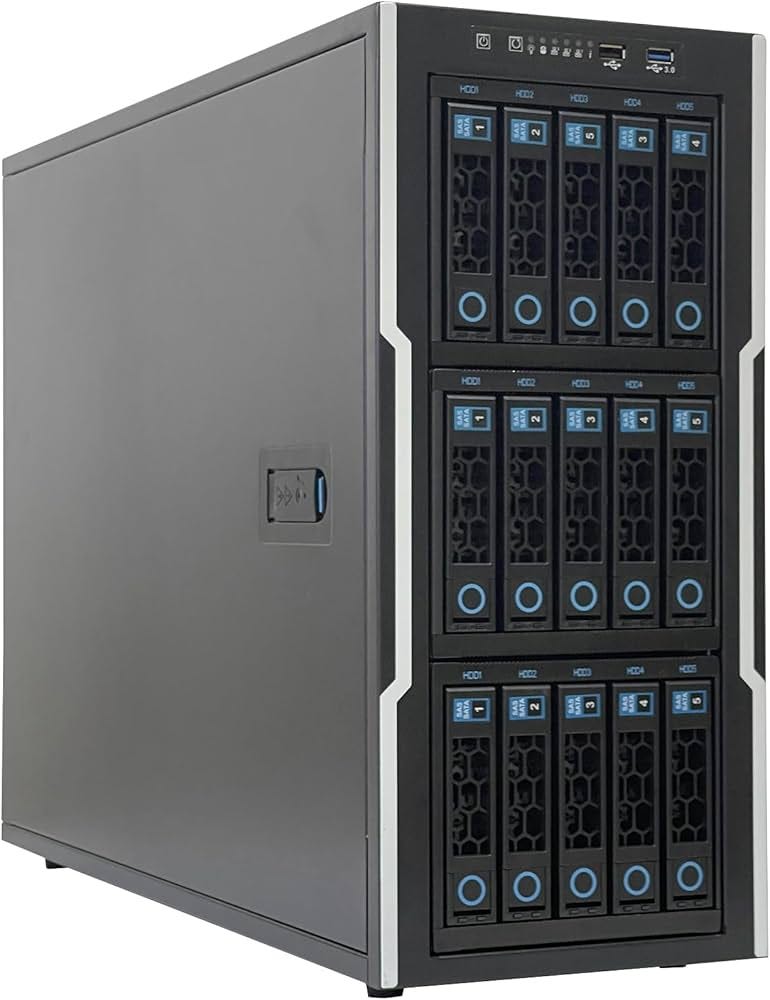
Tower Case
Most servers are housed in a traditional tower case. A typical tower case is 18 inches high, 20 inches deep and 9 inches wide with room for a motherboard, five or more hard drives and other components
Some server cases include advanced features specially designed for servers such as redundant power supplies, hot swappable fans, and hot swappable disk drive bays
Rack Mount
If you need just few servers, tower cases are fine. If you have more servers space can be issue.
Rack-mount servers are designed to save space when you need more than a few servers in a confined area. A rack-mount server is housed in a small chassis that is designed to fit into a standard 19 inch equipment rack. The rack allows you to vertically stack servers to save space.

Blade Servers
These are designed to save even more space than rack-mount servers. A blade server is a server on a single card that can be mounted alongside other blade servers in a blade chassis which itself fits into a standard 19 inch equipment rack. A typical blade chassis holds six or more servers depending on manufacturer
We do not need power supply for each server. Instead, blade enclosure provides power for all its blade servers. Some blade server systems provide rack mounted power supplies that can serve several blade enclosures mounted in single rack.
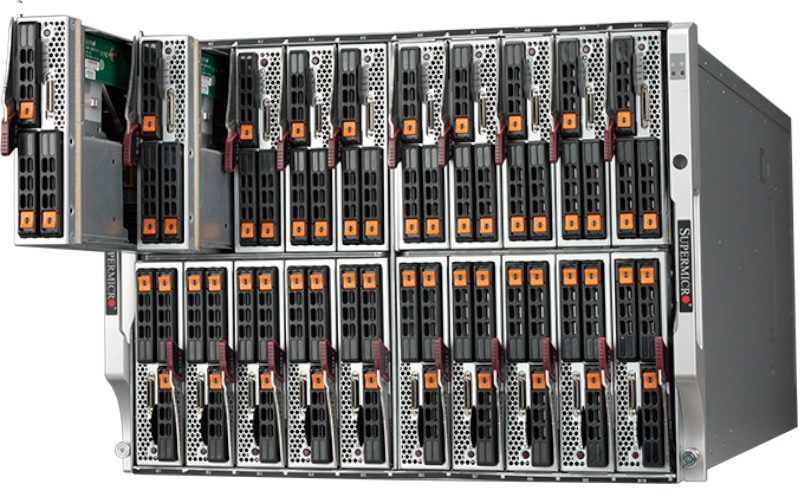
Also the blade enclosure provides keyboard, video and mouse switching so that you don’t have to use a separate KVM switch. They can control more computers using a pop up menu or a special keyboard combination to switch among the computers. Some advanced KVMs can even control the mix of PCs
Virtualization
In the modern networking environments, a single physical computer system is used to run more than one virtual machine. A VM is a simulation of an actual computer system. This concept is called virtualization. When virtualization is used, a single physical server computer actually runs more than one virtual server
Virtualization is the reason that server computer hardware often has such high performance specifications such as dual processors with multiple cores each and a large amount of RAM (256 GB or more). In most environments,, no single server really need that much capacity. But when a single physical computer is responsible for running multiple virtual servers, the physical server must have sufficient capacity to run all tis virtual servers
Happy Learning!!