AWS Series — Do you know how to optimize cost of S3 Storage?
S3 is the key AWS service and is used by other AWS services in the back ground. It is very important to be aware of S3 concepts and the ability of it.
If you are not sure what S3 is go over these articles
- AWS Series — Simple Storage Service : The most used storage in cloud
- AWS Series — How do we secure S3 data?
Now that you got fair idea of what is S3 and How to secure the data. Let us see how we can choose the S3 storage classes based on our need. This will not only optimize cost but also give good understanding of segregating the need for the data in our application.
S3 Storage Classes
S3 Standard
- High Availability and Durability — Data is stored redundantly across multiple devices in multiple facilities(≥ 3 AZs)
- It has 99.99% availability and 99.99999999999% durability (11 9's)
- Designed for Frequent Access data
- Suitable for Most workloads and it is default storage class.
- Use cases includes websites, content distribution, mobile and gaming applications and big data analytics.
S3 Standard-Infrequent Access ( S3 Standard-IA)
- Designed for Infrequently accessed data
- It has 99.99% availability and 99.99999999999% durability (11 9's)
- It is used for data that is accessed less frequently but requires rapid access when needed.
- There is low per GB storage price and a per GB retrieval fee
- Great for long-term storage, backups, and as a data store for disaster recovery files.
S3 One Zone Infrequent Access
- It is like S3 Standard-IA, but data is stored redundantly within a single AZ.
- Cost is 20% less than regular S3 Standard- IA
- Great for long-lived, infrequently accessed, non-critical data
- It has 99.5% availability and 99.99999999999% durability (11 9's)
What if I don’t know if I will be accessing my data frequently or infrequently?
Sometimes there might be situation where I need to access my data frequently, and other times I will access it infrequently. There is one more category which is S3 Intelligent-Tiering.
S3 Intelligent-Tiering
- It has 2 tiers
- Frequent and Infrequent Access
- Automatically moves your data to the most cost-effective tier based on how frequently you access each object
- It has 99.9% availability and 99.99999999999% durability (11 9's)
- This optimizes the cost. Monthly fee of $0.0025 per 1000 objects.
Glacier and Glacier Deep Archive
- You pay each time you access your data.
- Use only for archiving data
- Glacier is cheap storage
- Optimized for data that is very infrequently accessed
There are 3 options in Glacier
- Glacier Instant Retrieval — Provides long-term data archiving with instant retrieval time for your data
- Glacier Flexible Retrieval — Ideal storage class for archive data that does not require immediate access but needs the flexibility to retrieve large sets of data at no cost, such as backup or disaster recovery use cases. Can be minutes or up to 12 hours.
- Glacier Deep Archive — Cheapest storage class and designed for customers that retain data sets for 7–10 years or longer to meet customer needs and regulatory compliance requirements. The standard retrieval time is 12 hours, and the bulk retrieval time is 48 hours
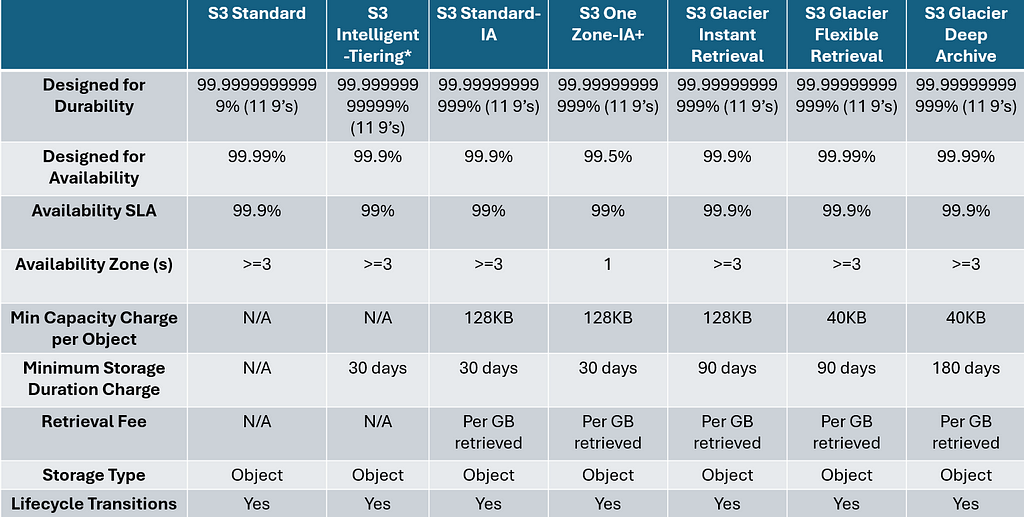
Regarding the Storage cost,
S3 Storage costs —
- S3 Standard is Highest Cost
- S3 Intelligent Tiering — Saves the cost for unknown access patterns
- S3 Infrequent Access — Retrieval fees applies so make sure to compare the prices and choose the storage wisely.
S3 Glacier Storage Costs —
- S3 Glacier — Highest Cost
- S3 Glacier Flexible Retrieval and Deep Archive — Retrieval fees applies
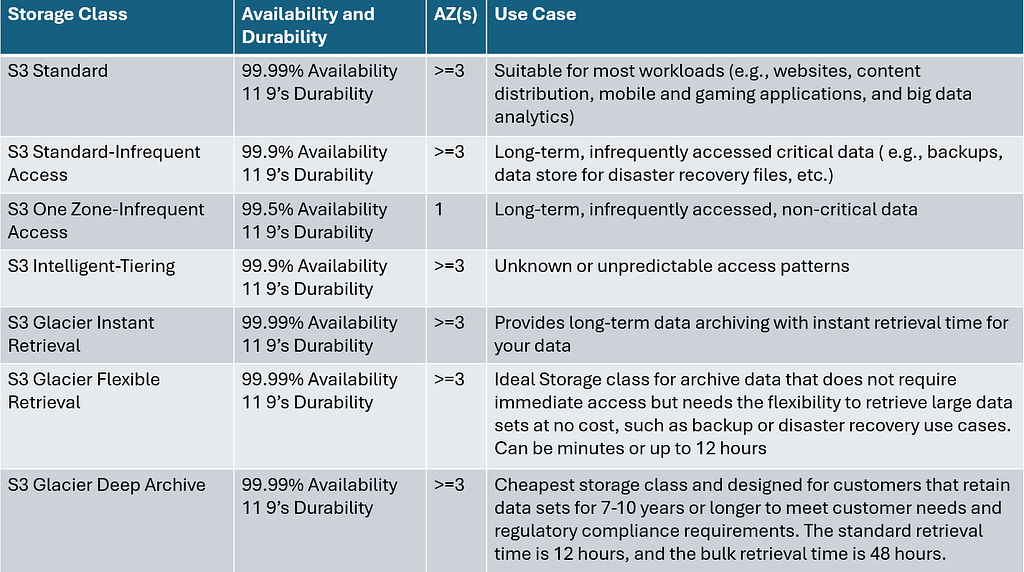
At a Glance —
Lifecycle Management —
Lifecycle management automates moving your objects between the different storage tiers, thereby maximizing cost effectiveness.
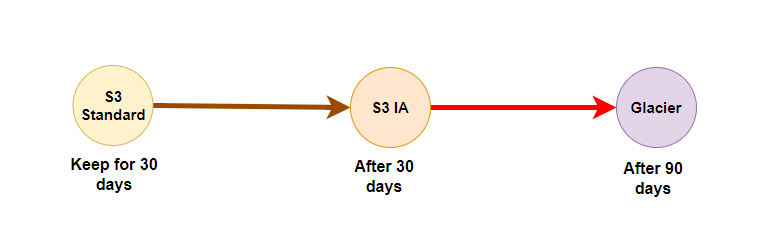
Combining Lifecycle Management with Versioning
You can use lifecycle management to move different versions of objects to different storage tiers.
Go to AWS Management Console > S3 > Create Bucket with default settings > Upload the object into S3 bucket.
Go to Management > Create lifecycle rule
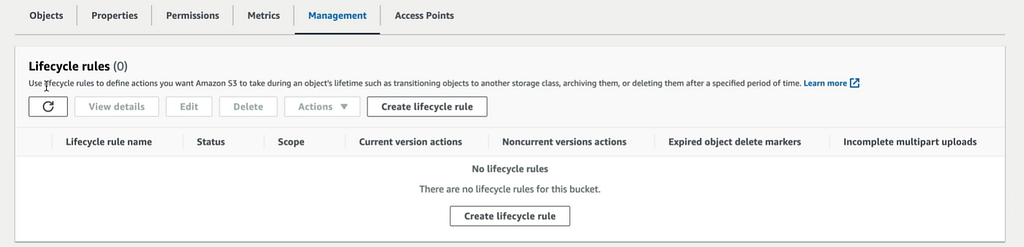
Give a name to the rule and select Apply all objects in the bucket and check the acknowledge.
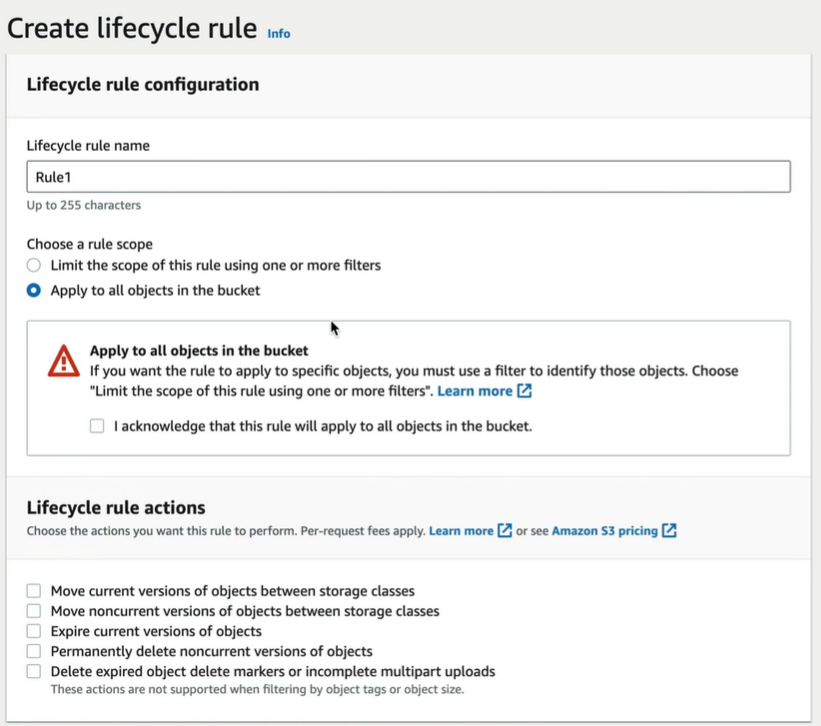
Now select the lifecycle rule actions like Move current versions of objects between storage classes.
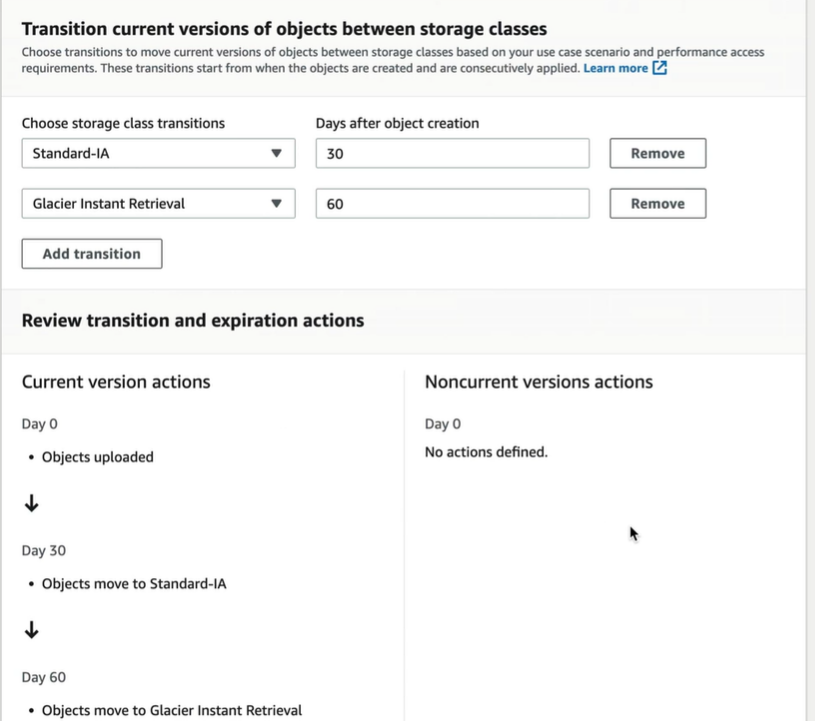
We can choose and create rules like after x number of days move my objects to particular storage class. In this example, we are saying after 30 days move to Standard Infrequently Access and after 60 days move to Glacier Instant Retrieval. Create the rule.
Also we would want to do this on current version of objects. Consider turning the versioning on for the objects. The rules are completely configurable and can be moved around.
Points to Remember for Lifecycle Management—
- Automates moving objects between different storage tiers
- Can be used in conjunction with versioning
- Can be applied to current versions and previous versions.