AWS Series — Do you know these storages exist in cloud?
There are different kinds of storages we use day to day for files. Linux machines supports different type of storage, Windows has different storage system. Do you know that in cloud we are flexible to choose any file system we want to adapt for any OS requirements. Let us see some of them.
Elastic File System
EFS is the Elastic File System which is managed NFS ( network file system) that can be mounted on many EC2 instances.
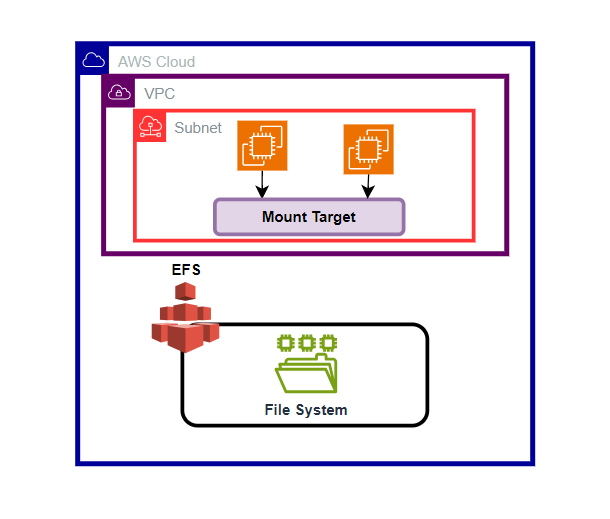
- EFS works with EC2 instances in multiple Availability Zones.
- Highly Available and scalable; however, it is expensive.
Where do we use this?
- We can use it for things like Content Management systems, as you can easily share content between EC2 instances.
- Web servers are also a great fit. Have just a single folder structure for your website.
EFS Performance —
- EFS supports thousands of concurrent connections (EC2 instances)
- EFS can handle up to 10 Gbps throughput
- Scale your storage to petabytes which is really really large
We can control the performance of EFS when creating an EFS file system, you can set what performance characteristics you want.
- General purpose — Used for things like web servers, CMS etc
- Max I/O — Used for big data, media processing etc.,
Storage Tiers
EFS comes with storage tiers and lifecycle management, allowing you to move your data from one tier to another after X number of days
Standard Storage Tiers — For frequently accessed
Infrequently Accessed — For files that are not frequently accessed
How to create EFS?
Go to AWS Management Console > Storage > Elastic File System
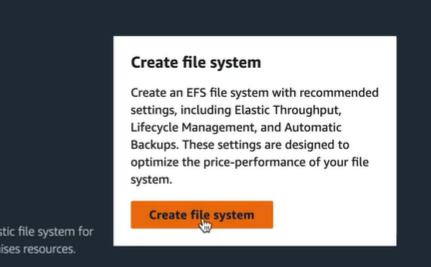
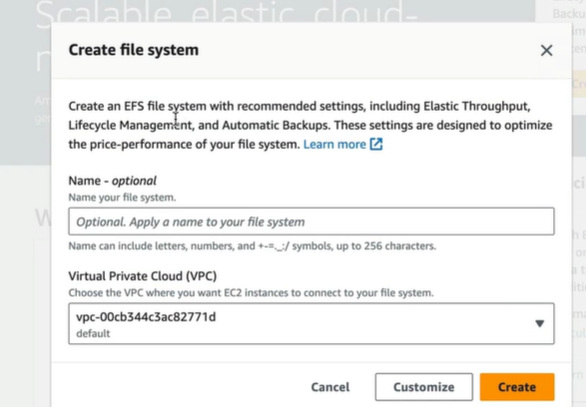
Give it a name, select the VPC and create.
This will create new File System
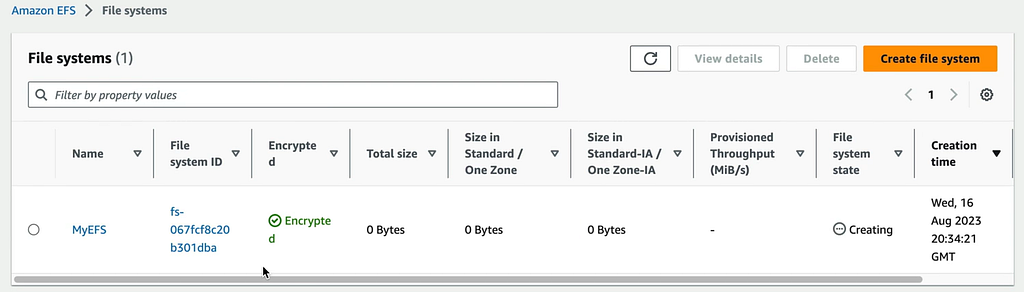
By default, this is encrypted. The size is 6kB initially but it is grown up later. We can edit it. The Automatic Backup is enabled automatically.
Points to Remember —
- Support the Network File System (NFSv4) protocol.
- Compatible with Linux- based AMI ( windows not supported at this time)
- Encryption at rest using KMS
- File system scales automatically; no capacity planning required
- Only pay for the storage you use (no pre-provisioning required).
- Can scale up to petabytes
- Can support thousands of concurrent NFS connections
- Data is stored across multiple AZs within a region.
- Real-after-write consistency.
We use the EFS mainly when we need highly scalable shared storage using NFS
FSx for Windows
Amazon FSx for Windows File Server provides a fully managed native Microsoft Windows file system so you can easily move your Windows- based applications that require file storage to AWS.
Amazon FSX is built on windows server.
How is FSx for Windows is different from EFS?
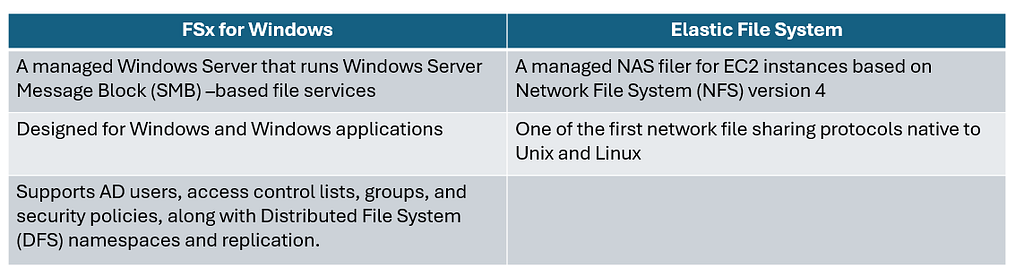
Amazon FSx for Lustre
A fully managed file system that is optimized for compute-intensive workloads
- High performance Computing
- Machine Learning
- Media Data Processing Workflows
- Electronic Design Automation
It is mostly used when we have something to do with AI and machine learning which needs high computing capacity
With Amazon FSx, you can launch and run a Lustre file system that can process massive datasets at up to hundreds of gigabytes per second of throughput, millions of IOPS, and sub-millisecond latencies.
Which one should you choose for which use case?
- EFS — When you need distributed, highly resilient storage for Linux instances and Linux — based applications.
- Amazon FSx for Windows — When you need centralized storage for Windows-based applications, such as SharePoint, Microsoft SQL Server, workspaces, IIS Web Server, or any other native Microsoft application.
- Amazon FSx for Lustre — When you need high — speed, high — capacity distributed storage. This will be for applications that do high performance computing (HPC), financial modeling etc., Remember that FSx for Lustre can store data directly on S3
What is AWS Backup?
Backup allows you to consolidate your backups across multiple AWS services, such as EC2, EBS, EFS, Amazon FSx for Lustre, Amazon FSx for Windows File Server, and AWS Storage Gateway.
It can include other services, such as database technologies like RDS and DynamoDB.
AWS Backup can be used with AWS organizations to back up multiple AWS accounts in your organization. It gives you centralized control across all AWS services, in multiple AWS accounts across the organization
Benefits of AWS Backup —
- Central Management — Use a single, central backup console, allowing you to centralize your backups across multiple AWS services and multiple AWS accounts.
- Automation — You can create automated backup schedules and retention policies. You can also create lifecycle policies, allowing you to expire unnecessary backups after a period of time.
- Improve Compliance — Backup policies can be enforced while backups can be encrypted both at rest and in transit, allowing alignment to regulatory compliance. Auditing is made easy due to a consolidated view of backups across many AWS services.
Points to Remember —
- Consolidation — Use AWS backup to back up AWS services, such as EC2, EBS, EFS, Amazon FSx for Lustre, Amazon FSx for Window File Server, and AWS Storage Gateway
- Organizations — You can use AWS Organizations in conjunction with AWS Backup to back up your different AWS services across multiple AWS accounts.
- Benefits — Backup gives you centralized control, letting you automate your backups and define lifecycle policies for your data. You get better compliance, as you can enforce your backup policies, ensure your backups are encrypted, and audit them once complete.