LlamaIndex — Did you try End to End document workflows
LlamaIndex is most popular framework in the world of open source libraries. They offer cool features mainly related to document parsing and end to end document processing workflows. In this article, I would like to brief of one of the feature where you can automate end to end document processing workflow. Suppose you want to enrich invoices with Product Info then the agent workflow will extract the item description from the invoice which is from input document and then use the knowledge of the product from the RAG knowledge database. Combining this will output an invoice with the Product Info.

But this workflow can be optimized with the event driven mechanism. We can encapsulate the agent’s logic in chain of steps where each step emits events to trigger further steps. We will also see the features of llamaIndex where we can do code branching and looping within the workflow, Create concurrent events and collect multiple events at a given step
Let us define some terms —
To those who are new to RAG —
RAG — Retrieval Augmented Generation which is the knowledge database that you want LLM to have knowledge on. LLM is trained on General purpose data and they do not have knowledge on your product in the above example. because of context window size limitation we cannot have millions of tokens in the prompt. we have to be selective of what data to send to LLM. So knowledge database has the information about the product adds value to the prompt. The information in the knowledge database is converted to embeddings and stored in vector space. when we have question about data, we run through same embedding model and it maps to some vector space. We search for near by vectors and get the relevant data. We add this data to the prompt and then asks to answer.
With RAG the limitation is multi-part questions where RAG searches for the embeddings of multi-part which becomes less focused context. So we can divide the complex questions into simpler questions and get much more focused context. Now glue the answer back together. This is the task for the agent we are building which splits up a complicated question and glue the answers back together.
For those who are new to agent —
It is semi-autonomous software which uses tools and work towards a goal. Unlike traditional programming languages, it does not need us to provide step by step instructions on how to achieve that goal.
What is the workflow in this context?
Workflow is nothing but the building blocks of agentic system which is event based and it provides structure to the agents. Often agents do not have structure. Here we are building agentic document workflow.
Let us learn basics of building a workflow
- Import the special events and core of the workflows from llama_index library
from llama_index.core.workflow import (
    StartEvent,
    StopEvent,
    Workflow,
    step,
    Context
)
2. Next define the MyWorkflow which is regular class declaration and step decorator and async function for my_step. We define the event of special type a start event and we will say it emits a specific type of event called a stop event. The start event is triggered when the workflow starts and when a stop event is triggered, a workflow will automatically stop.
The async keyword defines asynchronous functions, which can be paused and resumed, allowing other tasks to run in the meantime.
class MyWorkflow(Workflow):
    # declare a function as a step
    @step
    async def my_step(self, ev: StartEvent) -> StopEvent:
        # do something here
        return StopEvent(result="Hello, world!")
3. You can instantiate and run your workflow like this. We create timeout of 10s, and in this case we are going to set verbose to false.
# instantiate the workflow
basic_workflow = MyWorkflow(timeout=10, verbose=False)
# run the workflow
result = await basic_workflow.run()
print(result)
Once we got the workflow we can run it using run. we use await keyword because this is asynchronous.
4. We can use built-in visualizer, which we are going to import now. This is the function to draw all possible flows.
from llama_index.utils.workflow import draw_all_possible_flows

draw_all_possible_flows(
    basic_workflow,
    filename="workflows/basic_workflow.html"
)
It takes two arguments, one of which is the workflow that you want to visualize and other is the file name where you want it to output the visualization. It outputs the HTML file containing an interactive visualization of your workflow. Use this helper function to display the HTML content
def extract_html_content(filename):
    try:
        with open(filename, 'r') as file:
            html_content = file.read()
            html_content = f""" <div style="width: 100%; height: 800px; overflow: hidden;"> {html_content} </div>"""
            return html_content
    except Exception as e:
        raise Exception(f"Error reading file: {str(e)}")
We can use the extract HTML content method like this
html_content = extract_html_content("workflows/basic_workflow.html")
display(HTML(html_content), metadata=dict(isolated=True))
Now that we are good with basics lets dive into multi step workflow. Multiple steps are created by defining custom events that can be emitted by steps and trigger other steps.
from llama_index.core.workflow import Event

class FirstEvent(Event):
    first_output: str

class SecondEvent(Event):
    second_output: str
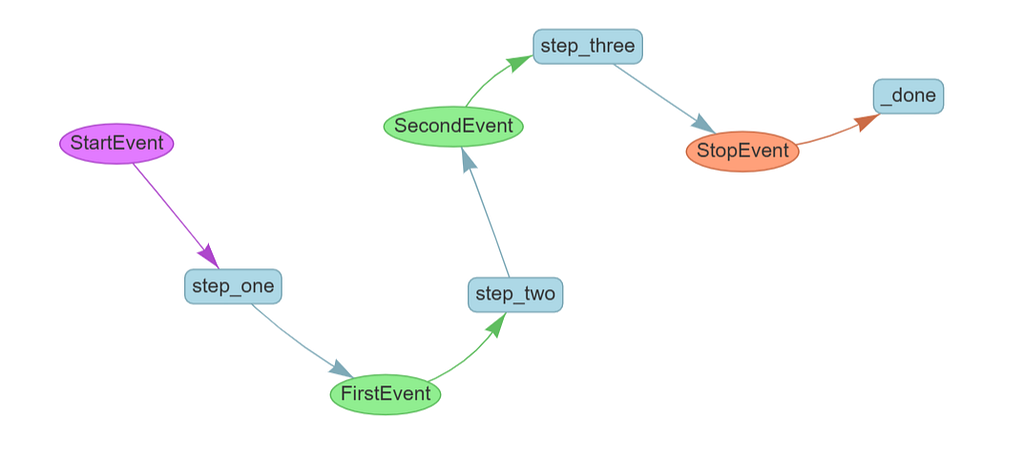
Now you define the workflow itself. You do this by defining the input and output types on each step.
- step_one takes a StartEvent and returns a FirstEvent
- step_two takes a FirstEvent and returns a SecondEvent
- step_three takes a SecondEvent and returns a StopEvent
- For StartEvent, you define its properties and pass in their values when you run the workflow as shown in the next cell.
- For StopEvent, by default, it only has one property result. You can always create a class that inherits StopEvent so you can customize what it returns.
class MyWorkflow(Workflow):
    @step
    async def step_one(self, ev: StartEvent) -> FirstEvent:
        print(ev.first_input)
        return FirstEvent(first_output="First step complete.")

    @step
    async def step_two(self, ev: FirstEvent) -> SecondEvent:
        print(ev.first_output)
        return SecondEvent(second_output="Second step complete.")

    @step
    async def step_three(self, ev: SecondEvent) -> StopEvent:
        print(ev.second_output)
        return StopEvent(result="Workflow complete.")
Now let us run the workflow
workflow = MyWorkflow(timeout=10, verbose=False)
result = await workflow.run(first_input="Start the workflow.")
print(result)
We can visualize like above and it looks like this.
Creating Loops
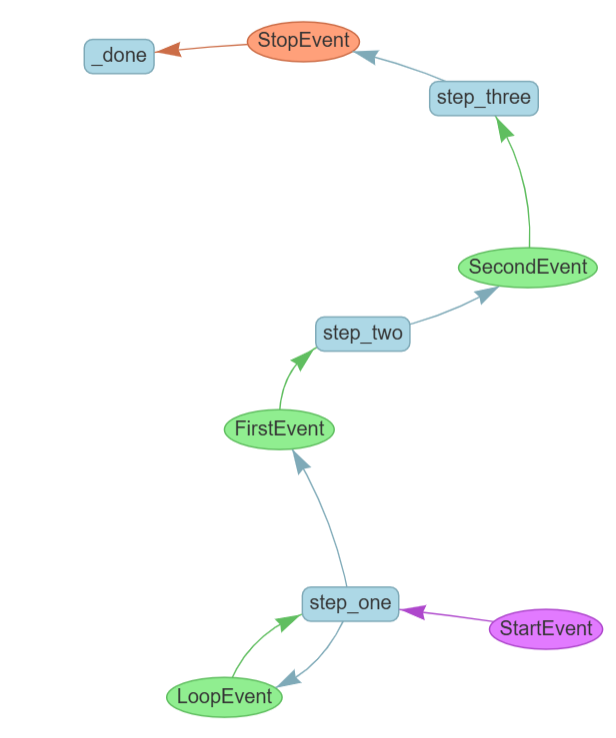
As real time scenario, we will usually have branching and looping logic. Let us see how we can implement it. For this let us define the LoopEvent Class
class LoopEvent(Event):
    loop_output: str
Now you’ll edit your step_one to make a random decision about whether to execute serially or loop back
class MyWorkflow(Workflow):
    @step
    async def step_one(self, ev: StartEvent | LoopEvent) -> FirstEvent | LoopEvent:
        if random.randint(0, 1) == 0:
            print("Bad thing happened")
            return LoopEvent(loop_output="Back to step one.")
        else:
            print("Good thing happened")
            return FirstEvent(first_output="First step complete.")

    @step
    async def step_two(self, ev: FirstEvent) -> SecondEvent:
        print(ev.first_output)
        return SecondEvent(second_output="Second step complete.")

    @step
    async def step_three(self, ev: SecondEvent) -> StopEvent:
        print(ev.second_output)
        return StopEvent(result="Workflow complete.")
Note the new type annotations on step_one: the step now accepts either a StartEvent or a LoopEvent to trigger the step, and it also emits either a FirstEvent or a LoopEvent.
You run it as usual. You might need to run it a couple of times to see the loop happen.
loop_workflow = MyWorkflow(timeout=10, verbose=False)
result = await loop_workflow.run(first_input="Start the workflow.")
print(result)
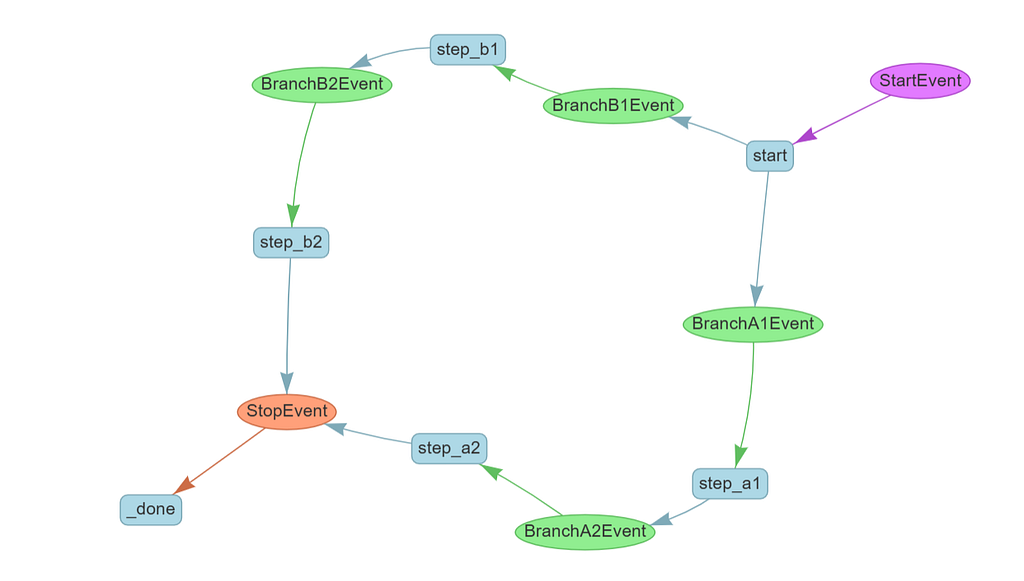
The same constructs that allow you to loop allow you to create branches. Here’s a workflow that executes two different branches depending on an early decision
class BranchA1Event(Event):
    payload: str

class BranchA2Event(Event):
    payload: str

class BranchB1Event(Event):
    payload: str

class BranchB2Event(Event):
    payload: str
Let us create the BranchWorkflow class where we have start method and based on condition it calls the different branches.
class BranchWorkflow(Workflow):
    @step
    async def start(self, ev: StartEvent) -> BranchA1Event | BranchB1Event:
        if random.randint(0, 1) == 0:
            print("Go to branch A")
            return BranchA1Event(payload="Branch A")
        else:
            print("Go to branch B")
            return BranchB1Event(payload="Branch B")

    @step
    async def step_a1(self, ev: BranchA1Event) -> BranchA2Event:
        print(ev.payload)
        return BranchA2Event(payload=ev.payload)

    @step
    async def step_b1(self, ev: BranchB1Event) -> BranchB2Event:
        print(ev.payload)
        return BranchB2Event(payload=ev.payload)

    @step
    async def step_a2(self, ev: BranchA2Event) -> StopEvent:
        print(ev.payload)
        return StopEvent(result="Branch A complete.")

    @step
    async def step_b2(self, ev: BranchB2Event) -> StopEvent:
        print(ev.payload)
        return StopEvent(result="Branch B complete.")
Let us visualize it
The final form of flow control you can implement in workflows is concurrent execution. This allows you to efficiently run long-running tasks in parallel, and gather them together when they are needed. Let’s see how this is done.
You’ll be using a new concept, the Context object. This is a form of shared memory available to every step in a workflow: to access it, declare it as an argument to your step and it will be automatically populated.
In this example, you’ll use Context.send_event rather than returning an event. This allows you to emit multiple events in parallel rather than returning just one as you did previously.
import asyncio

class StepTwoEvent(Event):
    query: str

class ParallelFlow(Workflow):
    @step
    async def start(self, ctx: Context, ev: StartEvent) -> StepTwoEvent:
        ctx.send_event(StepTwoEvent(query="Query 1"))
        ctx.send_event(StepTwoEvent(query="Query 2"))
        ctx.send_event(StepTwoEvent(query="Query 3"))

    @step(num_workers=4)
    async def step_two(self, ctx: Context, ev: StepTwoEvent) -> StopEvent:
        print("Running slow query ", ev.query)
        await asyncio.sleep(random.randint(1, 5))

        return StopEvent(result=ev.query)
Let us run the parallel workflow
parallel_workflow = ParallelFlow(timeout=10, verbose=False)
result = await parallel_workflow.run()
print(result)
But what if you do want the output of all 3 events? Another method, Context.collect_events, exists for that purpose
class StepThreeEvent(Event):
    result: str

class ConcurrentFlow(Workflow):
    @step
    async def start(self, ctx: Context, ev: StartEvent) -> StepTwoEvent:
        ctx.send_event(StepTwoEvent(query="Query 1"))
        ctx.send_event(StepTwoEvent(query="Query 2"))
        ctx.send_event(StepTwoEvent(query="Query 3"))

    @step(num_workers=4)
    async def step_two(self, ctx: Context, ev: StepTwoEvent) -> StepThreeEvent:
        print("Running query ", ev.query)
        await asyncio.sleep(random.randint(1, 5))
        return StepThreeEvent(result=ev.query)

    @step
    async def step_three(self, ctx: Context, ev: StepThreeEvent) -> StopEvent:
        # wait until we receive 3 events
        result = ctx.collect_events(ev, [StepThreeEvent] * 3)
        if result is None:
            print("Not all events received yet.")
            return None

        # do something with all 3 results together
        print(result)
        return StopEvent(result="Done")
What collect_events does is store the events in the context until it has collected the number and type of events specified in its second argument. In this case, you've told it to wait for 3 events.
If an event fires and collect_events hasn't yet seen the right number of events, it returns None, so you tell step_three to do nothing in that case. When collect_events receives the right number of events it returns them as an array, which you can see being printed in the final output.
This flow control lets you perform map-reduce style tasks.To implement a map-reduce pattern, you would split your task up into as many steps as necessary, and use Context to store that number with ctx.set("num_events", some_number). Then in step_three you would wait for the number stored in the context using await ctx.get("num_events"). So you don't need to know in advance exactly how many concurrent steps you're taking.
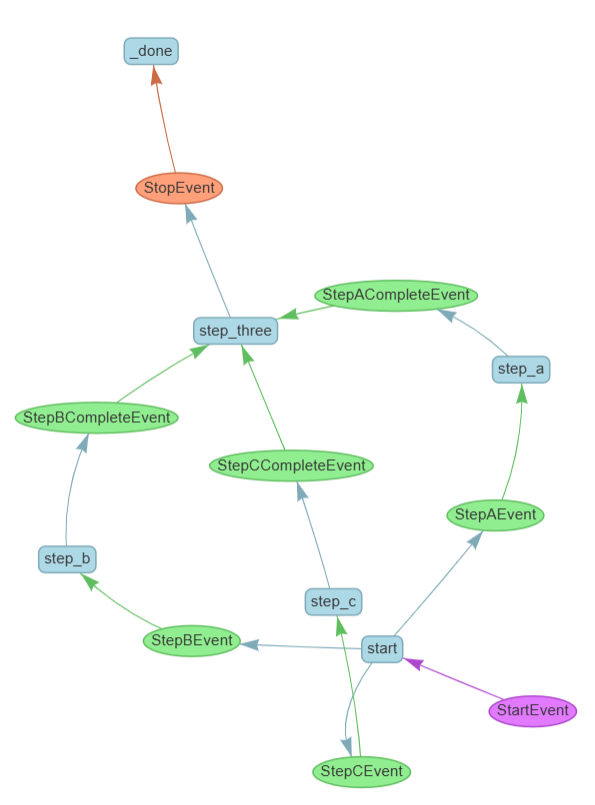
You don’t just have to wait for multiple events of the same kind. In this example, you’ll emit 3 totally different events and collect them at the end.
class StepAEvent(Event):
    query: str

class StepACompleteEvent(Event):
    result: str

class StepBEvent(Event):
    query: str

class StepBCompleteEvent(Event):
    result: str

class StepCEvent(Event):
    query: str

class StepCCompleteEvent(Event):
    result: str
Let us create ConcurrentFlow class
class ConcurrentFlow(Workflow):
    @step
    async def start(
        self, ctx: Context, ev: StartEvent
    ) -> StepAEvent | StepBEvent | StepCEvent:
        ctx.send_event(StepAEvent(query="Query 1"))
        ctx.send_event(StepBEvent(query="Query 2"))
        ctx.send_event(StepCEvent(query="Query 3"))

    @step
    async def step_a(self, ctx: Context, ev: StepAEvent) -> StepACompleteEvent:
        print("Doing something A-ish")
        return StepACompleteEvent(result=ev.query)

    @step
    async def step_b(self, ctx: Context, ev: StepBEvent) -> StepBCompleteEvent:
        print("Doing something B-ish")
        return StepBCompleteEvent(result=ev.query)

    @step
    async def step_c(self, ctx: Context, ev: StepCEvent) -> StepCCompleteEvent:
        print("Doing something C-ish")
        return StepCCompleteEvent(result=ev.query)

    @step
    async def step_three(
        self,
        ctx: Context,
        ev: StepACompleteEvent | StepBCompleteEvent | StepCCompleteEvent,
    ) -> StopEvent:
        print("Received event ", ev.result)

        # wait until we receive 3 events
        events = ctx.collect_events(
            ev,
            [StepCCompleteEvent, StepACompleteEvent, StepBCompleteEvent],
        )
        if (events is None):
            return None

        # do something with all 3 results together
        print("All events received: ", events)
        return StopEvent(result="Done")
When you run it, it will do all three things and wait for them in step_three
In practical use, agents can take a long time to run. It’s a poor user-experience to have the user execute a workflow and then wait a long time to see if it works or not; it’s better to give them some indication that things are happening in real-time, even if the process is not complete.
To do this, Workflows allow streaming events back to the user. Here you’ll use Context.write_event_to_stream to emit these events.
The specific event we’ll be sending back is the “delta” responses from the LLM. When you ask an LLM to generate a streaming response as you’re doing here, it sends back each chunk of its response as it becomes available. This is available as the “delta”. You’re going to wrap the delta in a TextEventand send it back to the Workflow’s own stream.
class MyWorkflow(Workflow):
    @step
    async def step_one(self, ctx: Context, ev: StartEvent) -> FirstEvent:
        ctx.write_event_to_stream(ProgressEvent(msg="Step one is happening"))
        return FirstEvent(first_output="First step complete.")

    @step
    async def step_two(self, ctx: Context, ev: FirstEvent) -> SecondEvent:
        llm = OpenAI(model="gpt-4o-mini", api_key=api_key)
        generator = await llm.astream_complete(
            "Please give me the first 50 words of Moby Dick, a book in the public domain."
        )
        async for response in generator:
            # Allow the workflow to stream this piece of response
            ctx.write_event_to_stream(TextEvent(delta=response.delta))
        return SecondEvent(
            second_output="Second step complete, full response attached",
            response=str(response),
        )

    @step
    async def step_three(self, ctx: Context, ev: SecondEvent) -> StopEvent:
        ctx.write_event_to_stream(ProgressEvent(msg="Step three is happening"))
        return StopEvent(result="Workflow complete.")
You can work with the emitted events by getting a streaming endpoint from the run command, and then filtering it for the types of events we want to see (you could print every event if you wanted to but that would be quite noisy).
In this case you’ll just print out the progressevents and the textevents.
workflow = MyWorkflow(timeout=30, verbose=False)
handler = workflow.run(first_input="Start the workflow.")

async for ev in handler.stream_events():
    if isinstance(ev, ProgressEvent):
        print(ev.msg)
    if isinstance(ev, TextEvent):
        print(ev.delta, end="")

final_result = await handler
print("Final result = ", final_result)
Adding RAG to the workflow
For this, let us build the agent where we are given a fake resume and we have to fille the fake job application with the details. We use Llama_parse to parse the resume and load the extracted information into the vector store and then run basic queries to test it.
Using LLamaParse, you will transform the resume into a list of Document objects. By default, a Document object stores text along with some other attributes:
- metadata: a dictionary of annotations that can be appended to the text.
- relationships: a dictionary containing relationships to other Documents.
You can tell LlamaParse what kind of document it’s parsing, so that it will parse the contents more intelligently. In this case, you tell it that it’s reading a resume.
from llama_parse import LlamaParse
documents = LlamaParse(
    api_key=llama_cloud_api_key,
    base_url=os.getenv("LLAMA_CLOUD_BASE_URL"),
    result_type="markdown",
    content_guideline_instruction="This is a resume, gather related facts together and format it as bullet points with headers"
).load_data(
    "data/fake_resume.pdf",
)
We can feed this Document objects to VectorStoreIndex and use embedding model to embed the text, turn into vectors that you can search. The VectorStoreIndex will return an index object, which is a data structure that allows you to quickly retrieve relevant context for your query.
from llama_index.embeddings.openai import OpenAIEmbedding
from llama_index.core import VectorStoreIndex
index = VectorStoreIndex.from_documents(
    documents,
    embed_model=OpenAIEmbedding(model_name="text-embedding-3-small",
                                api_key= openai_api_key)
)
With an index, you can create a query engine and ask questions. Let’s try it out! Asking questions requires an LLM, so let’s use OpenAI again.
from llama_index.llms.openai import OpenAI

llm = OpenAI(model="gpt-4o-mini")

query_engine = index.as_query_engine(llm=llm, similarity_top_k=5)
response = query_engine.query("What is this person's name and what was their most recent job?")
print(response)

Indexes can be persisted to disk. This is useful in a notebook that you might run several times! In a production setting, you would probably use a hosted vector store of some kind. Let’s save your index to disk.
storage_dir = "./storage"

index.storage_context.persist(persist_dir=storage_dir)

from llama_index.core import StorageContext, load_index_from_storage
You can check if your index has already been stored, and if it has, you can reload an index from disk using the load_index_from_storage method, like this:
# Check if the index is stored on disk
if os.path.exists(storage_dir):
    # Load the index from disk
    storage_context = StorageContext.from_defaults(persist_dir=storage_dir)
    restored_index = load_index_from_storage(storage_context)
else:
    print("Index not found on disk.")
response = restored_index.as_query_engine().query("What is this person's name and what was their most recent job?")
print(response)
With a RAG pipeline in hand, let’s turn it into a tool that can be used by an agent to answer questions. This is a stepping-stone towards creating an agentic system that can perform your larger goal.
from llama_index.core.tools import FunctionTool
from llama_index.core.agent import FunctionCallingAgent
First, create a regular python function that performs a RAG query. It’s important to give this function a descriptive name, to mark its input and output types, and to include a docstring (that’s the thing in triple quotes) which describes what it does. The framework will give all this metadata to the LLM, which will use it to decide what a tool does and whether to use it.
def query_resume(q: str) -> str:
    """Answers questions about a specific resume."""
    # we're using the query engine we already created above
    response = query_engine.query(f"This is a question about the specific resume we have in our database: {q}")
    return response.response
The next step is to create the actual tool. There’s a utility function, FunctionTool.from_defaults, to do this for you.
resume_tool = FunctionTool.from_defaults(fn=query_resume)
Now you can instantiate a FunctionCallingAgent using that tool. There are a number of different agent types supported by LlamaIndex; this one is particularly capable and efficient.
You pass it an array of tools (just one in this case), you give it the same LLM we instantiated earlier, and you set Verbose to true so you get a little more info on what your agent is up to.
agent = FunctionCallingAgent.from_tools(
    tools=[resume_tool],
    llm=llm,
    verbose=True
)
Now you can chat to the agent! Let’s ask it a quick question about our applicant.
response = agent.chat("How many years of experience does the applicant have?")
print(response)
Let us wrap into the workflow
from llama_index.core.workflow import (
    StartEvent,
    StopEvent,
    Workflow,
    step,
    Event,
    Context
)

class QueryEvent(Event):
    query: str

class RAGWorkflow(Workflow):
    storage_dir = "./storage"
    llm: OpenAI
    query_engine: VectorStoreIndex

    # the first step will be setup
    @step
    async def set_up(self, ctx: Context, ev: StartEvent) -> QueryEvent:

        if not ev.resume_file:
            raise ValueError("No resume file provided")

        # define an LLM to work with
        self.llm = OpenAI(model="gpt-4o-mini")

        # ingest the data and set up the query engine
        if os.path.exists(self.storage_dir):
            # you've already ingested your documents
            storage_context = StorageContext.from_defaults(persist_dir=self.storage_dir)
            index = load_index_from_storage(storage_context)
        else:
            # parse and load your documents
            documents = LlamaParse(
                result_type="markdown",
                content_guideline_instruction="This is a resume, gather related facts together and format it as bullet points with headers"
            ).load_data(ev.resume_file)
            # embed and index the documents
            index = VectorStoreIndex.from_documents(
                documents,
                embed_model=OpenAIEmbedding(model_name="text-embedding-3-small")
            )
            index.storage_context.persist(persist_dir=self.storage_dir)

        # either way, create a query engine
        self.query_engine = index.as_query_engine(llm=self.llm, similarity_top_k=5)

        # now fire off a query event to trigger the next step
        return QueryEvent(query=ev.query)

    # the second step will be to ask a question and return a result immediately
    @step
    async def ask_question(self, ctx: Context, ev: QueryEvent) -> StopEvent:
        response = self.query_engine.query(f"This is a question about the specific resume we have in our database: {ev.query}")
        return StopEvent(result=response.response)
You’ve successfully created an agent with RAG tools.
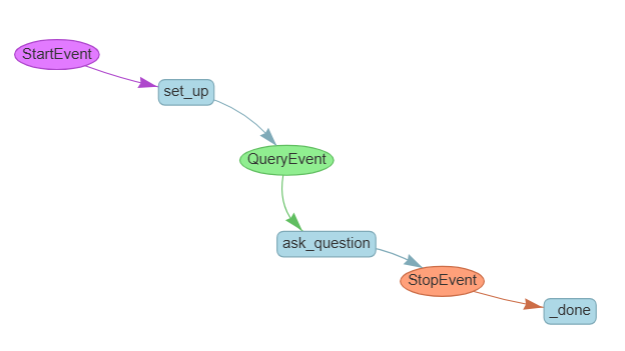
Form Filling Agent
Let us create the parser which will parse the form so it can be filled
parser = LlamaParse(
    api_key=llama_cloud_api_key,
    base_url=os.getenv("LLAMA_CLOUD_BASE_URL"),
    result_type="markdown",
    content_guideline_instruction="This is a job application form. Create a list of all the fields that need to be filled in.",
    formatting_instruction="Return a bulleted list of the fields ONLY."
)
result = parser.load_data("data/fake_application_form.pdf")[0]
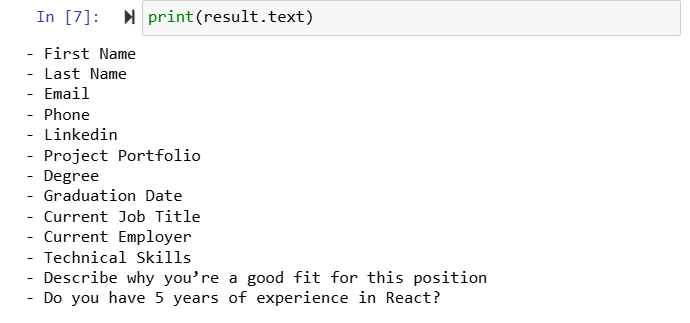
We can ask LLM to turn human readable format into machine readable one which turns list into a JSON object with list of fields
llm = OpenAI(model="gpt-4o-mini")
raw_json = llm.complete(
    f"""
    This is a parsed form.
    Convert it into a JSON object containing only the list
    of fields to be filled in, in the form {{ fields: [...] }}.
    <form>{result.text}</form>.
    Return JSON ONLY, no markdown."""
)
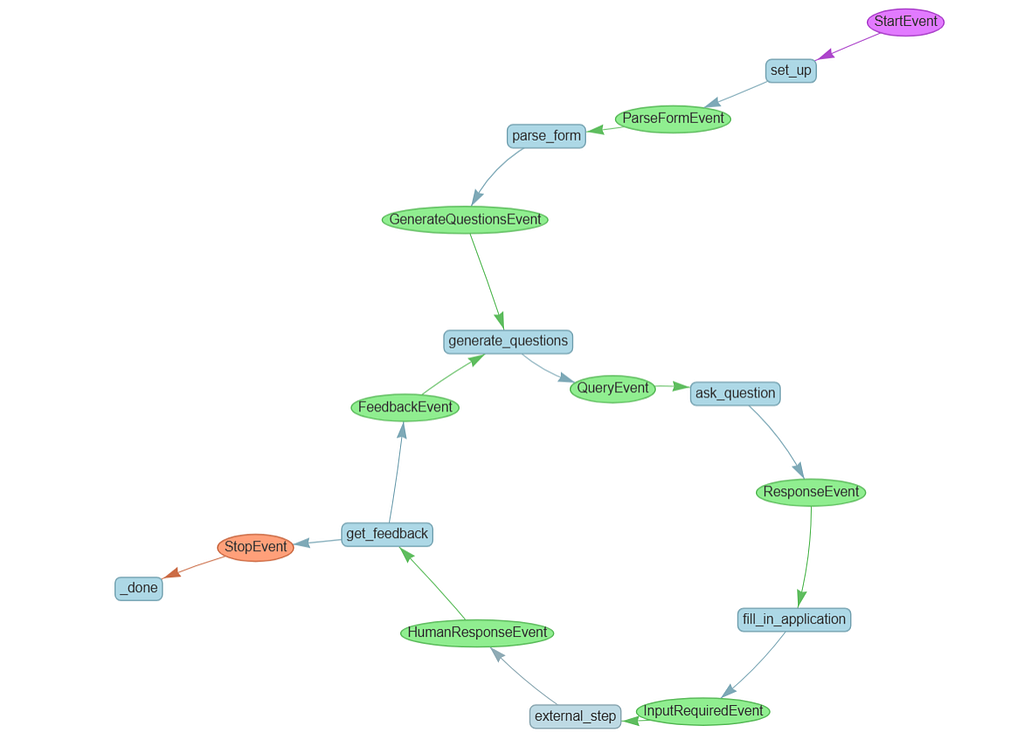
You will now use the same RAG workflow but set_up step now emits a ParseFormEvent whcih triggers your new step, parse_form
- Generate a QueryEvent for each of the questions you pulled out of the form
- Create a fill_in_application step which will take all the responses to the questions and aggregate them into a coherent response
- Add a ResponseEvent to pass the results of queries to fill_in_application
class ParseFormEvent(Event):
    application_form: str

class QueryEvent(Event):
    query: str
    field: str

# new!
class ResponseEvent(Event):
    response: str
RAG Workflow
class RAGWorkflow(Workflow):

    storage_dir = "./storage"
    llm: OpenAI
    query_engine: VectorStoreIndex

    @step
    async def set_up(self, ctx: Context, ev: StartEvent) -> ParseFormEvent:

        if not ev.resume_file:
            raise ValueError("No resume file provided")

        if not ev.application_form:
            raise ValueError("No application form provided")

        # define the LLM to work with
        self.llm = OpenAI(model="gpt-4o-mini")

        # ingest the data and set up the query engine
        if os.path.exists(self.storage_dir):
            # you've already ingested the resume document
            storage_context = StorageContext.from_defaults(persist_dir=self.storage_dir)
            index = load_index_from_storage(storage_context)
        else:
            # parse and load the resume document
            documents = LlamaParse(
                api_key=llama_cloud_api_key,
                base_url=os.getenv("LLAMA_CLOUD_BASE_URL"),
                result_type="markdown",
                content_guideline_instruction="This is a resume, gather related facts together and format it as bullet points with headers"
            ).load_data(ev.resume_file)
            # embed and index the documents
            index = VectorStoreIndex.from_documents(
                documents,
                embed_model=OpenAIEmbedding(model_name="text-embedding-3-small")
            )
            index.storage_context.persist(persist_dir=self.storage_dir)

        # create a query engine
        self.query_engine = index.as_query_engine(llm=self.llm, similarity_top_k=5)

        # you no longer need a query to be passed in,
        # you'll be generating the queries instead
        # let's pass the application form to a new step to parse it
        return ParseFormEvent(application_form=ev.application_form)

    @step
    async def parse_form(self, ctx: Context, ev: ParseFormEvent) -> QueryEvent:
        parser = LlamaParse(
            api_key=llama_cloud_api_key,
            base_url=os.getenv("LLAMA_CLOUD_BASE_URL"),
            result_type="markdown",
            content_guideline_instruction="This is a job application form. Create a list of all the fields that need to be filled in.",
            formatting_instruction="Return a bulleted list of the fields ONLY."
        )

        # get the LLM to convert the parsed form into JSON
        result = parser.load_data(ev.application_form)[0]
        raw_json = self.llm.complete(
            f"""
            This is a parsed form.
            Convert it into a JSON object containing only the list
            of fields to be filled in, in the form {{ fields: [...] }}.
            <form>{result.text}</form>.
            Return JSON ONLY, no markdown.
            """)
        fields = json.loads(raw_json.text)["fields"]

        # new!
        # generate one query for each of the fields, and fire them off
        for field in fields:
            ctx.send_event(QueryEvent(
                field=field,
                query=f"How would you answer this question about the candidate? {field}"
            ))

        # store the number of fields so we know how many to wait for later
        await ctx.set("total_fields", len(fields))
        return

    @step
    async def ask_question(self, ctx: Context, ev: QueryEvent) -> ResponseEvent:
        response = self.query_engine.query(f"This is a question about the specific resume we have in our database: {ev.query}")
        return ResponseEvent(field=ev.field, response=response.response)

    # new!
    @step
    async def fill_in_application(self, ctx: Context, ev: ResponseEvent) -> StopEvent:
        # get the total number of fields to wait for
        total_fields = await ctx.get("total_fields")

        responses = ctx.collect_events(ev, [ResponseEvent] * total_fields)
        if responses is None:
            return None # do nothing if there's nothing to do yet

        # we've got all the responses!
        responseList = "\n".join("Field: " + r.field + "\n" + "Response: " + r.response for r in responses)

        result = self.llm.complete(f"""
            You are given a list of fields in an application form and responses to
            questions about those fields from a resume. Combine the two into a list of
            fields and succinct, factual answers to fill in those fields.

            <responses>
            {responseList}
            </responses>
        """)
        return StopEvent(result=result)
Run the RAG workflow as
w = RAGWorkflow(timeout=120, verbose=False)
result = await w.run(
    resume_file="data/fake_resume.pdf",
    application_form="data/fake_application_form.pdf"
)
print(result)
Feedback Loop
Use the InputRequiredEvent and HumanResponseEvent, new special events specifically designed to allow you to exit the workflow, and get feedback back into it.
You used to have a single step which parsed your form and fired off all your questions. Since we now might loop back and ask questions several times, we don’t need to parse the form every time, so we’ll split up those steps. This kind of refactoring is very common as you create a more complex workflow:
- Your new generate_questions step will be triggered either by a GenerateQuestionsEvent, triggered by the form parser, or by a FeedbackEvent, which is the loop we'll take after getting feedback.
fill_in_application will emit an InputRequiredEvent, and in the external_step you'll wait for a HumanResponseEvent. This will pause the whole workflow waiting for outside input.
Finally, you’ll use the LLM to parse the feedback and decide whether it means you should continue and output the results, or if you need to loop back.
class RAGWorkflow(Workflow):

    storage_dir = "./storage"
    llm: OpenAI
    query_engine: VectorStoreIndex

    @step
    async def set_up(self, ctx: Context, ev: StartEvent) -> ParseFormEvent:

        if not ev.resume_file:
            raise ValueError("No resume file provided")

        if not ev.application_form:
            raise ValueError("No application form provided")

        # define the LLM to work with
        self.llm = OpenAI(model="gpt-4o-mini")

        # ingest the data and set up the query engine
        if os.path.exists(self.storage_dir):
            # you've already ingested the resume document
            storage_context = StorageContext.from_defaults(persist_dir=
                                                           self.storage_dir)
            index = load_index_from_storage(storage_context)
        else:
            # parse and load the resume document
            documents = LlamaParse(
                api_key=llama_cloud_api_key,
                base_url=os.getenv("LLAMA_CLOUD_BASE_URL"),
                result_type="markdown",
                content_guideline_instruction="This is a resume, gather related facts together and format it as bullet points with headers"
            ).load_data(ev.resume_file)
            # embed and index the documents
            index = VectorStoreIndex.from_documents(
                documents,
                embed_model=OpenAIEmbedding(model_name="text-embedding-3-small")
            )
            index.storage_context.persist(persist_dir=self.storage_dir)

        # create a query engine
        self.query_engine = index.as_query_engine(llm=self.llm, similarity_top_k=5)

        # let's pass the application form to a new step to parse it
        return ParseFormEvent(application_form=ev.application_form)

    # form parsing
    @step
    async def parse_form(self, ctx: Context, ev: ParseFormEvent) -> GenerateQuestionsEvent:
        parser = LlamaParse(
            api_key=llama_cloud_api_key,
            base_url=os.getenv("LLAMA_CLOUD_BASE_URL"),
            result_type="markdown",
            content_guideline_instruction="This is a job application form. Create a list of all the fields that need to be filled in.",
            formatting_instruction="Return a bulleted list of the fields ONLY."
        )

        # get the LLM to convert the parsed form into JSON
        result = parser.load_data(ev.application_form)[0]
        raw_json = self.llm.complete(
            f"This is a parsed form. Convert it into a JSON object containing only the list of fields to be filled in, in the form {{ fields: [...] }}. <form>{result.text}</form>. Return JSON ONLY, no markdown.")
        fields = json.loads(raw_json.text)["fields"]

        await ctx.set("fields_to_fill", fields)

        return GenerateQuestionsEvent()

    # generate questions
    @step
    async def generate_questions(self, ctx: Context, ev: GenerateQuestionsEvent | FeedbackEvent) -> QueryEvent:

        # get the list of fields to fill in
        fields = await ctx.get("fields_to_fill")

        # generate one query for each of the fields, and fire them off
        for field in fields:
            question = f"How would you answer this question about the candidate? <field>{field}</field>"

            # new! Is there feedback? If so, add it to the query:
            if hasattr(ev,"feedback"):
                question += f"""
                    \nWe previously got feedback about how we answered the questions.
                    It might not be relevant to this particular field, but here it is:
                    <feedback>{ev.feedback}</feedback>
                """

            ctx.send_event(QueryEvent(
                field=field,
                query=question
            ))

        # store the number of fields so we know how many to wait for later
        await ctx.set("total_fields", len(fields))
        return

    @step
    async def ask_question(self, ctx: Context, ev: QueryEvent) -> ResponseEvent:
        response = self.query_engine.query(f"This is a question about the specific resume we have in our database: {ev.query}")
        return ResponseEvent(field=ev.field, response=response.response)


    # Get feedback from the human
    @step
    async def fill_in_application(self, ctx: Context, ev: ResponseEvent) -> InputRequiredEvent:
        # get the total number of fields to wait for
        total_fields = await ctx.get("total_fields")

        responses = ctx.collect_events(ev, [ResponseEvent] * total_fields)
        if responses is None:
            return None # do nothing if there's nothing to do yet

        # we've got all the responses!
        responseList = "\n".join("Field: " + r.field + "\n" + "Response: " + r.response for r in responses)

        result = self.llm.complete(f"""
            You are given a list of fields in an application form and responses to
            questions about those fields from a resume. Combine the two into a list of
            fields and succinct, factual answers to fill in those fields.

            <responses>
            {responseList}
            </responses>
        """)

        # save the result for later
        await ctx.set("filled_form", str(result))

        # Fire off the feedback request
        return InputRequiredEvent(
            prefix="How does this look? Give me any feedback you have on any of the answers.",
            result=result
        )

    # Accept the feedback when a HumanResponseEvent fires
    @step
    async def get_feedback(self, ctx: Context, ev: HumanResponseEvent) -> FeedbackEvent | StopEvent:

        result = self.llm.complete(f"""
            You have received some human feedback on the form-filling task you've done.
            Does everything look good, or is there more work to be done?
            <feedback>
            {ev.response}
            </feedback>
            If everything is fine, respond with just the word 'OKAY'.
            If there's any other feedback, respond with just the word 'FEEDBACK'.
        """)

        verdict = result.text.strip()

        print(f"LLM says the verdict was {verdict}")
        if (verdict == "OKAY"):
            return StopEvent(result=await ctx.get("filled_form"))
        else:
            return FeedbackEvent(feedback=ev.response)
Now let us run the RAG workflow
w = RAGWorkflow(timeout=600, verbose=False)
handler = w.run(
    resume_file="data/fake_resume.pdf",
    application_form="data/fake_application_form.pdf"
)

async for event in handler.stream_events():
    if isinstance(event, InputRequiredEvent):
        print("We've filled in your form! Here are the results:\n")
        print(event.result)
        # now ask for input from the keyboard
        response = input(event.prefix)
        handler.ctx.send_event(
            HumanResponseEvent(
                response=response
            )
        )

response = await handler
print("Agent complete! Here's your final result:")
print(str(response))
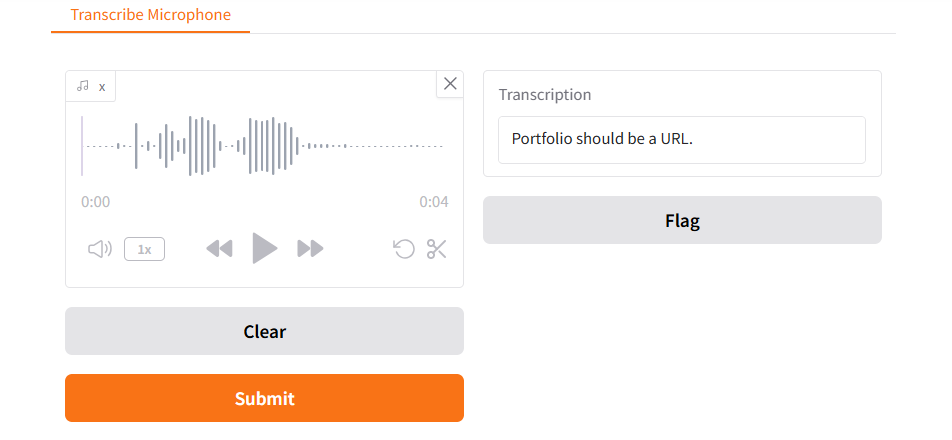
We can also get this done by integrating with voice. To change the feedback from text feedback to actual words spoken out loud. To do this we’ll use a different model from OpenAI called Whisper. LlamaIndex has a built-in way to transcribe audio files into text using Whisper.
def transcribe_speech(filepath):
    if filepath is None:
        gr.Warning("No audio found, please retry.")
    audio_file= open(filepath, "rb")
    reader = WhisperReader(
        model="whisper-1",
        api_key=openai_api_key,
    )
    documents = reader.load_data(filepath)
    return documents[0].text
But before we can use it, you need to capture some audio from your microphone. That involves some extra steps!
First, create a callback function that saves data to a global variable.
def store_transcription(output):
    global transcription_value
    transcription_value = output
    return output
Now use Gradio, which has special widgets that can render inside a notebook, to create an interface for capturing audio from a microphone. When the audio is captured, it calls transcribe_speech on the recorded data, and calls store_transcription on that.
mic_transcribe = gr.Interface(
    fn=lambda x: store_transcription(transcribe_speech(x)),
    inputs=gr.Audio(sources="microphone",
                    type="filepath"),
    outputs=gr.Textbox(label="Transcription"))
In Gradio, you further define a visual interface containing this microphone input and output, and then launch it:
test_interface = gr.Blocks()
with test_interface:
    gr.TabbedInterface(
        [mic_transcribe],
        ["Transcribe Microphone"]
    )

test_interface.launch(
    share=False,
    server_port=8000,
    prevent_thread_lock=True
)
Let us use Transcription Handler
# New! Transcription handler.
class TranscriptionHandler:

    # we create a queue to hold transcription values
    def __init__(self):
        self.transcription_queue = Queue()
        self.interface = None

    # every time we record something we put it in the queue
    def store_transcription(self, output):
        self.transcription_queue.put(output)
        return output

    # This is the same interface and transcription logic as before
    # except it stores the result in a queue instead of a global
    def create_interface(self):
        mic_transcribe = gr.Interface(
            fn=lambda x: self.store_transcription(transcribe_speech(x)),
            inputs=gr.Audio(sources="microphone", type="filepath"),
            outputs=gr.Textbox(label="Transcription")
        )
        self.interface = gr.Blocks()
        with self.interface:
            gr.TabbedInterface(
                [mic_transcribe],
                ["Transcribe Microphone"]
            )
        return self.interface

    # we launch the transcription interface
    async def get_transcription(self):
        self.interface = self.create_interface()
        self.interface.launch(
            share=False,
            server_port=8000,
            prevent_thread_lock=True
        )

        # we poll every 1.5 seconds waiting for something to end up in the queue
        while True:
            if not self.transcription_queue.empty():
                result = self.transcription_queue.get()
                if self.interface is not None:
                    self.interface.close()
                return result
            await asyncio.sleep(1.5)
We queue the text that is transcribed. The transcription interface is launched and we poll every 1.5 seconts waiting for something in queue
w = RAGWorkflow(timeout=600, verbose=False)

handler = w.run(
    resume_file="./data/fake_resume.pdf",
    application_form="./data/fake_application_form.pdf"
)

async for event in handler.stream_events():
  if isinstance(event, InputRequiredEvent):
      # Get transcription
      transcription_handler = TranscriptionHandler()
      response = await transcription_handler.get_transcription()

      handler.ctx.send_event(
          HumanResponseEvent(
              response=response
          )
      )

response = await handler
print("Agent complete! Here's your final result:")
print(str(response))
We have just run the workflow with voice integrated
References:
- https://learn.deeplearning.ai/courses/event-driven-agentic-document-workflows/lesson/wxpss/introduction
- https://docs.llamaindex.ai/en/stable/module_guides/workflow/